shadcn.io is an independent project built on shadcn/ui
The header says Card Title, then Card description goes here. The body is one sentence about the content area. The footer has Cancel and Submit.
Start here for a block that needs a title, a description, content and actions. An Item is the flatter row when you do not need a footer. In React, Base UI does not place Cancel and Submit.
Installation
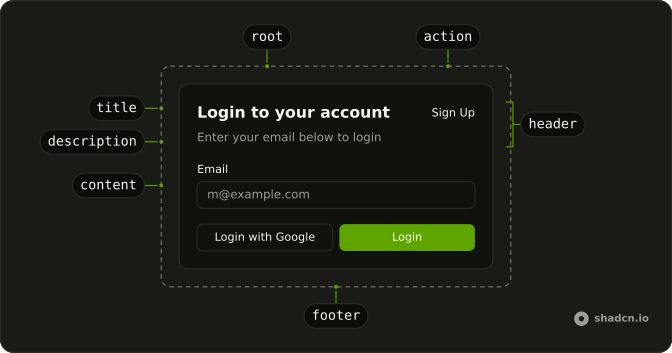
Anatomy
Usage
<Card className="w-full max-w-[350px]">
  <CardHeader>
    <CardTitle>Card Title</CardTitle>
    <CardDescription>Card description goes here</CardDescription>
  </CardHeader>
  <CardContent>
    <p>This is the card content area where you can place any content.</p>
  </CardContent>
  <CardFooter className="justify-between">
    <Button variant="outline">Cancel</Button>
    <Button>Submit</Button>
  </CardFooter>
</Card>
FAQ
Which card parts does this demo use?
Card, then CardHeader with CardTitle and CardDescription, then CardContent with a paragraph, then CardFooter with two buttons. Every part is optional: leave out the ones you don't need.
How wide is the card?
Up to 350px: w-full max-w-[350px] on Card, so it shrinks on narrow screens. The parts stack in a column, and the card sets the gaps between them.
Can the header take the title and description as props?
Yes. Pass title and description on CardHeader and it renders CardTitle and CardDescription for you. Use the parts, as here, when the title needs its own markup.
API Reference
Card
No extra props in this demo. The rest is on the Card page.
Button
Sets variant="outline". The rest is on the Button page.