shadcn.io is an independent project built on shadcn/ui
File opens three rows. New File has a file icon, Open has a folder icon and Save has a save icon, each before the words.
Add icons when the commands are ones people already know from desktop apps. A Command menu is easier once the list is long enough to search. Base UI in React does not pick the icons.
Installation
Sign in to get your install command
Free with an account. It carries your token, so the CLI installs everything in one go.
Use email insteadNo credit card
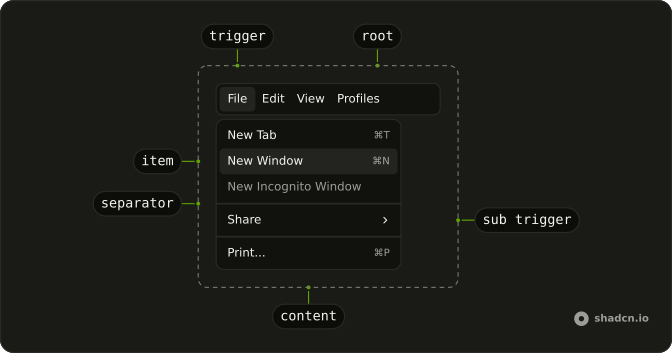
Anatomy
Usage
<Menubar>
  <MenubarMenu>
    <MenubarTrigger>File</MenubarTrigger>
    <MenubarContent>
      <MenubarItem>
        <FileIcon aria-hidden="true" />
        New File
      </MenubarItem>
      <MenubarItem>
        <FolderIcon aria-hidden="true" />
        Open
      </MenubarItem>
      <MenubarItem>
        <SaveIcon aria-hidden="true" />
        Save
      </MenubarItem>
    </MenubarContent>
  </MenubarMenu>
</Menubar>
FAQ
Where does each icon go?
First inside each MenubarItem, before the label. The item lays them out with a gap.
What size are these icons?
The item sizes them; the demo sets no size class. Add one, such as size-4, only to change it.
API Reference
Menubar
No extra props in this demo. The rest is on the Menubar page.