shadcn.io is an independent project built on shadcn/ui
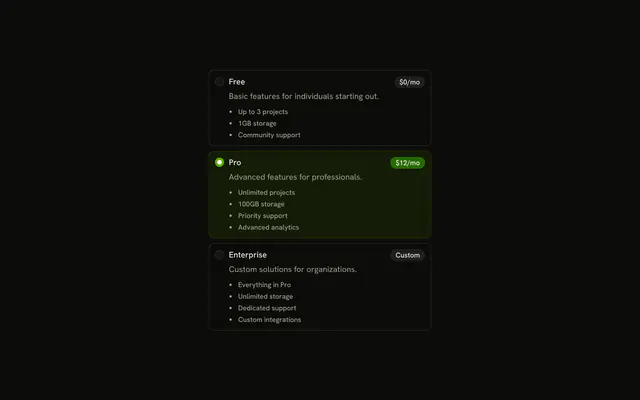
Three bordered rows, each with a radio, a title and a description. Starter Plan starts selected. The other titles are Professional Plan and Enterprise Plan.
Use a card row when the choice needs a sentence, such as a plan. A Toggle Group fits if the options are short words, not descriptions. Base UI in React does not highlight a plan on its own.
Installation
Anatomy
Usage
<RadioGroup className="max-w-sm gap-2" defaultValue="starter">
  {plans.map((plan) => (
    <FieldLabel htmlFor={`card-plan-${plan.value}`} key={plan.value}>
      <Field orientation="horizontal">
        <RadioGroupItem id={`card-plan-${plan.value}`} value={plan.value} />
        <FieldContent>
          <FieldTitle>{plan.title}</FieldTitle>
          <FieldDescription>{plan.description}</FieldDescription>
        </FieldContent>
      </Field>
    </FieldLabel>
  ))}
</RadioGroup>
FAQ
Which card starts selected?
defaultValue is starter, the Starter Plan. The values are starter, professional, and enterprise, from a list at the top of the file.
Where do the border and hover come from?
From FieldLabel. When it wraps a Field, it draws the rounded border, pads the field, and shows a hover background. No card classes are written in the demo.
Does clicking the description select the card?
Yes. FieldLabel wraps the whole Field, the item, the FieldTitle and the FieldDescription, so a click anywhere on the card checks the radio. The FieldLabel points at the item with htmlFor, and the item has the matching id.
How do I show which card is selected?
It is built in: FieldLabel changes its border and background when the item inside it is checked. Restyle that state in your own classes if you want a stronger highlight.
API Reference
Radio Group
Sets defaultValue="starter", id, card-plan-, plan, value and value={plan.value}. The rest is on the Radio Group page.
Field
Sets htmlFor, card-plan-, plan, value and orientation="horizontal". The rest is on the Field page.