shadcn.io is an independent project built on shadcn/ui
Option 1, Option 2 and Option 3 stack in a column, each with a radio and a label. Option 1 starts selected.
Use a vertical group for a single choice in a form or on a settings page. For any number of choices, use a Checkbox. On React, Base UI does not submit the choice.
Installation
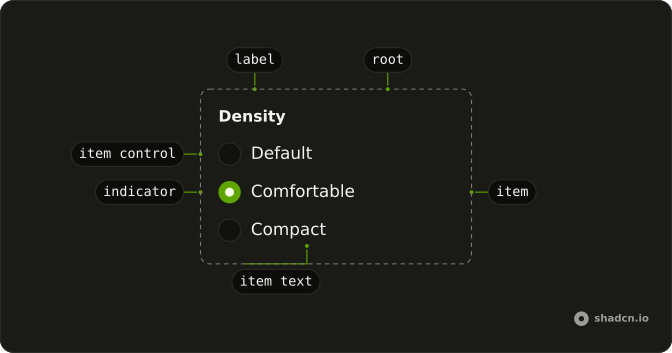
Anatomy
Usage
<RadioGroup className="w-fit" defaultValue="option-1">
  <Field orientation="horizontal">
    <RadioGroupItem id="basic-option-1" value="option-1" />
    <FieldLabel htmlFor="basic-option-1">Option 1</FieldLabel>
  </Field>
  <Field orientation="horizontal">
    <RadioGroupItem id="basic-option-2" value="option-2" />
    <FieldLabel htmlFor="basic-option-2">Option 2</FieldLabel>
  </Field>
  <Field orientation="horizontal">
    <RadioGroupItem id="basic-option-3" value="option-3" />
    <FieldLabel htmlFor="basic-option-3">Option 3</FieldLabel>
  </Field>
</RadioGroup>
FAQ
How does Option 1 start selected?
RadioGroup sets defaultValue to option-1, which matches the first item's value. Leave defaultValue off when nothing should start checked.
How do I control the selected value?
This demo uses defaultValue, so the group stores the choice. Pass value, and onValueChange receives the next string.
Why does clicking Option 2 check the radio?
The text is the item's label, so clicking it checks that item. Each RadioGroupItem has an id, and FieldLabel points at it with htmlFor.
How do I change the space between options?
RadioGroup lays the options out in a grid with a gap from the style. Pass a gap-* class on RadioGroup when you want more or less space.
API Reference
Radio Group
Sets defaultValue="option-1", id="basic-option-1", value="option-1", id="basic-option-2", value="option-2" and id="basic-option-3". The rest is on the Radio Group page.
Field
Sets orientation="horizontal", htmlFor="basic-option-1", htmlFor="basic-option-2" and htmlFor="basic-option-3". The rest is on the Field page.