Skip to content

shadcn.io is an independent project built on shadcn/ui

Scrollable Tags Scroll Area for React

A Technologies heading over one row of badges, from React and Next.js onward, in a panel that scrolls sideways.

Technologies heads a bordered panel. Inside, badges sit on one line, starting with React, Next.js, TypeScript and Tailwind CSS. The line scrolls sideways.

Keep tags on one scrolling line when wrapping would break a filter row. A Toggle Group fits if each tag is a control. In React, Base UI does not choose which badges appear.

Preview

Preview width

Installation

Sign in to get your install command
Free with an account. It carries your token, so the CLI installs everything in one go.
Use email insteadNo credit card

Anatomy
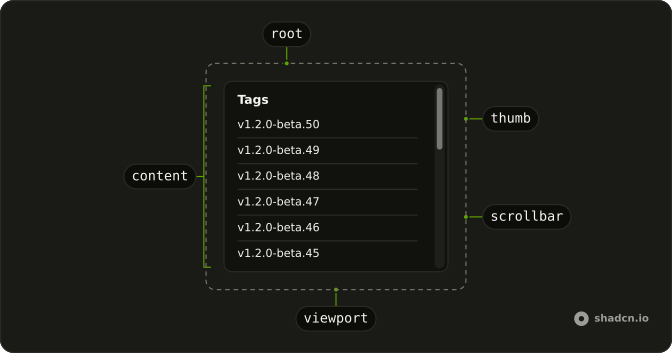
Scroll Area anatomy: root, viewport, content, scrollbar, thumb

Usage

<div className="flex w-full max-w-md flex-col gap-2">
  <h3 className="font-semibold text-sm">Technologies</h3>
  <ScrollArea className="w-full whitespace-nowrap rounded-md border bg-background">
    <div className="flex w-max gap-2 p-4">
      {tags.map((tag) => (
        <Badge key={tag} variant="secondary">
          {tag}
        </Badge>
      ))}
    </div>
    <ScrollBar orientation="horizontal" />
  </ScrollArea>
</div>

FAQ

Why do the badges stay on one line?

ScrollArea has whitespace-nowrap, and the inner row is flex w-max gap-2. w-max sizes the row to the badges, so the extra width scrolls. The frame is w-full, inside a max-w-md column.

What does each tag look like?

A Badge with variant secondary. There are twenty names, from React through CI/CD. p-4 on the row insets the first and last badge from the border.

Where is the sideways bar?

ScrollBar is rendered inside ScrollArea with orientation set to horizontal. The built-in bar is vertical, and this row is only one line tall.

Does the Technologies heading scroll?

No. The h3 is before ScrollArea, with font-semibold text-sm. Only the badge row is inside the area.

How do I change the space between badges?

gap-2 is on the flex row. Use gap-1 for a tighter row or gap-3 for a wider one. The badges stay variant secondary.

What draws the frame around the tags?

rounded-md border bg-background on ScrollArea. The column around the heading and the area is flex flex-col gap-2.

API Reference

Scroll Area

Sets orientation="horizontal". The rest is on the Scroll Area page.

Badge

Sets variant="secondary". The rest is on the Badge page.