shadcn.io is an independent project built on shadcn/ui
A ghost Toggle button with a chevron at the end. The chevron turns as one paragraph shows and hides below the button.
Start here, then swap in your own content. If the block needs a heading and a frame, wrap it in a Card. In React, Base UI only shows and hides this region.
Installation
Anatomy
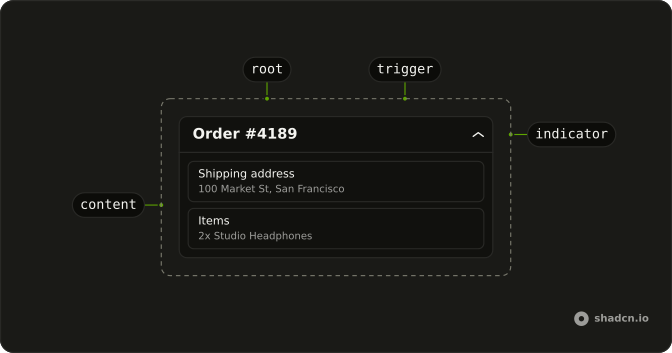
Usage
<Collapsible className="w-full max-w-lg">
  <CollapsibleTrigger render={<Button className="group" variant="ghost" />}>
    Toggle
    <ChevronDownIcon
      aria-hidden="true"
      className="transition-transform duration-200 group-aria-expanded:rotate-180"
      data-icon="inline-end"
    />
  </CollapsibleTrigger>
  <CollapsibleContent>
    <div className="mt-2 text-muted-foreground text-sm">
      This is the collapsible content. You can put any content here.
    </div>
  </CollapsibleContent>
</Collapsible>
FAQ
How do I use my own button as the trigger?
The trigger renders our Button with variant="ghost", so it keeps the button's look and the trigger's behavior.
Pass the button as the trigger's render prop.
What does variant ghost change on this button?
It's the transparent button with a hover fill, so the trigger stays quiet next to the content. Any other variant works the same way.
Does the chevron on Toggle rotate?
Yes. The button has the group class and the trigger sets aria-expanded on it while open, so group-aria-expanded:rotate-180 turns the chevron. data-icon="inline-end" spaces it after the label, and aria-hidden keeps the name Toggle.
API Reference
Collapsible
No extra props in this demo. The rest is on the Collapsible page.
Button
Sets variant="ghost". The rest is on the Button page.