shadcn.io is an independent project built on shadcn/ui
A Settings heading sits beside a muted expand control in brackets. It reveals Option 1, Option 2, and Option 3, each in a bordered row.
Use it on a dense settings page where a button would be too loud. If the control needs an icon, use a Button as the trigger. In React, Base UI does not remember that Settings was expanded.
Installation
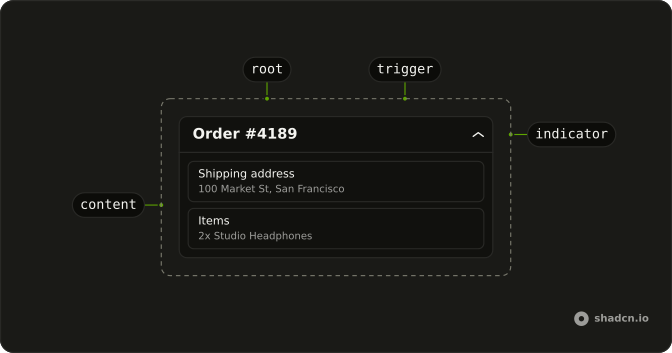
Anatomy
Usage
<Collapsible className="flex w-full max-w-lg flex-col gap-2">
  <div className="flex items-center gap-2">
    <h4 className="font-semibold text-sm">Settings</h4>
    <CollapsibleTrigger
      aria-label="Expand settings"
      className="text-muted-foreground text-sm underline-offset-4 hover:underline"
    >
      [expand]
    </CollapsibleTrigger>
  </div>
  <CollapsibleContent className="flex flex-col gap-2">
    {options.map((option) => (
      <div className="rounded-md border px-4 py-2 text-sm" key={option}>
        {option}
      </div>
    ))}
  </CollapsibleContent>
</Collapsible>
FAQ
Does the Settings heading toggle the list?
No. The h4 sits beside the trigger in a flex items-center gap-2 row, and only [expand] toggles the options.
How is the expand control styled?
text-muted-foreground text-sm, with hover:underline and underline-offset-4. It has aria-label="Expand settings", so screen readers hear what it expands rather than the brackets.
How are Option 1, Option 2, and Option 3 drawn?
Each is a div with rounded-md border px-4 py-2 text-sm, from the options list at the top of the file. CollapsibleContent is a flex flex-col gap-2 column.
API Reference
Collapsible
Sets aria-label="Expand settings". The rest is on the Collapsible page.