shadcn.io is an independent project built on shadcn/ui
A photo with square corners has a success-colored dot at the bottom corner. A hidden label on the dot says Online. The initials CN show only if the picture fails.
Use it for a workspace, a bot, or a service that is connected. The dot is not a live probe. Say the status in a Badge when the color alone is unclear. In Solid, Ark UI does not know if the service is up.
Installation
Anatomy
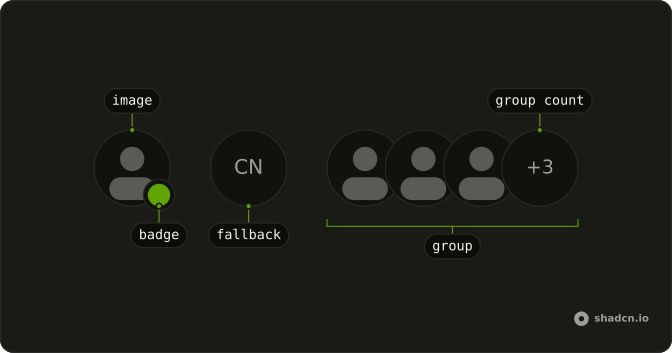
Usage
<Avatar class="rounded-lg after:rounded-lg">
    <AvatarImage alt="@shadcn" class="rounded-lg" height={32} src="https://github.com/shadcn.png" width={32} />
    <AvatarFallback class="rounded-lg">CN</AvatarFallback>
    <AvatarBadge class="bg-success">
      <span class="sr-only">Online</span>
    </AvatarBadge>
  </Avatar>
FAQ
How is this avatar squared off?
rounded-lg is on Avatar, AvatarImage, and AvatarFallback, and after:rounded-lg is on Avatar so the border follows. AvatarBadge is a circle of its own and doesn't take those classes.
How is the online dot made?
AvatarBadge uses bg-success. It sits on the bottom end corner with a ring in the background color, from the badge styles.
How is the dot labeled?
A visually hidden "Online" inside AvatarBadge is the accessible name. The green class is only the paint.
Does the dot follow the avatar size?
Yes. Leave size at the default, as this file does, or set sm or lg. The badge scales with that prop.
API Reference
Avatar
Sets alt="@shadcn", height={32}, src="https://github.com/shadcn.png" and width={32}. The rest is on the Avatar page.


