shadcn.io is an independent project built on shadcn/ui
The bar shows Solutions. The panel is two columns of category headings, six in all, and each heading has two links with descriptions.
Group links under headings when the panel would otherwise be one long list. Tabs fit better when each group is a different view of one page. In Solid, Ark UI closes the open panel when you press Escape.
Installation
Anatomy
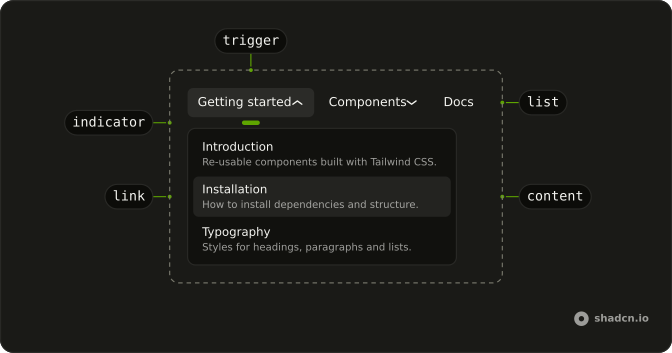
Usage
<div class="w-full max-w-md rounded-md border bg-background p-px">
    <NavigationMenu>
      <NavigationMenuList>
        <NavigationMenuItem>
          <NavigationMenuTrigger>Solutions</NavigationMenuTrigger>
          <NavigationMenuContent>
            <div class="grid w-[600px] max-w-full grid-flow-col grid-cols-2 grid-rows-3 gap-x-6 gap-y-3 p-2">
              {categories.map(category => <div class="flex flex-col">
                  <div class="mb-1 flex items-center gap-2 px-2">
                    <Dynamic component={category.icon} aria-hidden="true" class="size-5 text-primary" />
                    <h4 class="font-semibold text-sm">{category.title}</h4>
                  </div>
                  {category.items.map(item => <NavigationMenuLink asChild={props => <a {...props()} href={item.href}>
                        <span class="font-medium">{item.label}</span>
                        <span class="text-muted-foreground">
                          {item.description}
                        </span>
                      </a>} class="flex-col items-start gap-0.5" />)}
                </div>)}
            </div>
          </NavigationMenuContent>
        </NavigationMenuItem>
      </NavigationMenuList>
    </NavigationMenu>
  </div>
FAQ
How do the categories fill two columns?
The panel is a grid with grid-flow-col and three rows, so the first three categories fill the first column and the next three the second.
Are the category titles links?
No. They are h4 headings with an icon in the primary color; only the two entries under each are NavigationMenuLinks.
How do the links use my router?
Each link is your router's link rendered through NavigationMenuLink, so it keeps the menu's styles and focus handling.
NavigationMenuLink takes asChild, a function that renders your router's A with the props it gets.
API Reference
Navigation Menu
Sets asChild and props. The rest is on the Navigation Menu page.