shadcn.io is an independent project built on shadcn/ui
The bar shows Industries. The panel is headed SOLUTIONS BY INDUSTRY and lists Financial Services, E-commerce, Education, Healthcare, Professional Services, and Real Estate.
Use the grid when each industry needs one line of copy. A dedicated page of Card blocks fits when each industry is a long story. In Solid, Ark UI moves between the triggers with Tab.
Installation
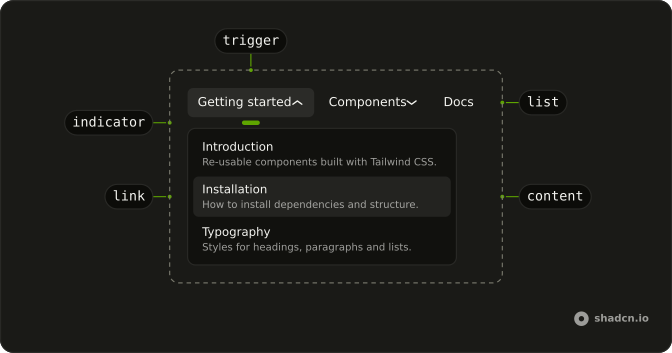
Anatomy
Usage
<div class="w-full max-w-md rounded-md border bg-background p-px">
    <NavigationMenu>
      <NavigationMenuList>
        <NavigationMenuItem>
          <NavigationMenuTrigger>Industries</NavigationMenuTrigger>
          <NavigationMenuContent>
            <div class="flex w-[700px] max-w-full flex-col gap-4 p-2">
              <div class="px-2">
                <h3 class="font-semibold text-muted-foreground text-sm">
                  SOLUTIONS BY INDUSTRY
                </h3>
                <p class="mt-1 text-muted-foreground text-sm">
                  Tailored solutions for your specific industry needs
                </p>
              </div>
              <div class="grid grid-cols-3 gap-4">
                {industries.map(industry => <NavigationMenuLink asChild={props => <a {...props()} href={industry.href}>
                      <div class="flex size-12 items-center justify-center rounded-lg bg-primary/10">
                        <Dynamic component={industry.icon} aria-hidden="true" class="size-6 text-primary" />
                      </div>
                      <div>
                        <div class="font-medium">{industry.name}</div>
                        <p class="text-muted-foreground text-sm">
                          {industry.description}
                        </p>
                      </div>
                    </a>} class="flex-col items-start gap-3" />)}
              </div>
            </div>
          </NavigationMenuContent>
        </NavigationMenuItem>
{/* The rest of the file is under Installation. */}
FAQ
How is the icon tile styled?
A size-12 rounded square with bg-primary/10 and the icon in text-primary, so it follows the theme's primary color.
How is each link laid out?
The link takes flex-col items-start gap-3: the tile on top, the name and description below.
How do the links use my router?
Each link is your router's link rendered through NavigationMenuLink, so it keeps the menu's styles and focus handling.
NavigationMenuLink takes asChild, a function that renders your router's A with the props it gets.
API Reference
Navigation Menu
Sets asChild and props. The rest is on the Navigation Menu page.