shadcn.io is an independent project built on shadcn/ui
The row is First, page 5, and Last. Page 5 is current. There is no Previous, Next, or page neighbor.
Use it when the ends matter more than the neighbors, such as newest and oldest. To step one page as well, add Previous and Next. A Select jumps to a page in the middle. In Solid, Ark UI follows each href, and these point at #.
Installation
Anatomy
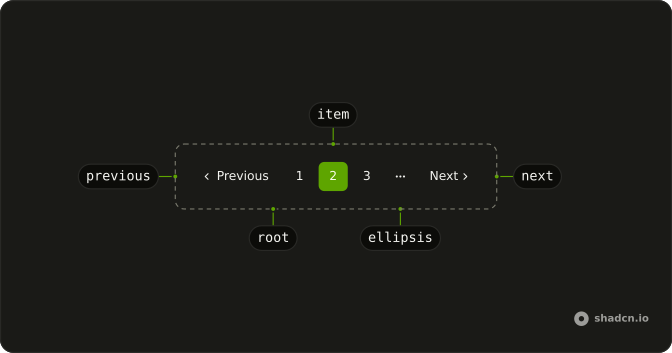
Usage
<Pagination>
    <PaginationContent>
      <PaginationItem>
        <PaginationLink href="#" size="md">
          First
        </PaginationLink>
      </PaginationItem>
      <PaginationItem>
        <PaginationLink href="#" isActive>
          5
        </PaginationLink>
      </PaginationItem>
      <PaginationItem>
        <PaginationLink href="#" size="md">
          Last
        </PaginationLink>
      </PaginationItem>
    </PaginationContent>
  </Pagination>
FAQ
What does the row render?
Three PaginationLinks: First, page 5 and Last. There is no PaginationPrevious or PaginationNext.
How do First and Last fit their words?
They take size="md", the size Previous and Next use, instead of the default square page size.
How is the current page marked?
isActive on page 5 gives it the outline style and aria-current="page". First and Last are ghost links named by their words.
What should First and Last do on the first and last page?
On page 1, First leads to the page you're on; disable it or leave it out, and the same for Last on the last page.
How do I add Previous and Next?
Put PaginationPrevious after First and PaginationNext before Last, each in its own PaginationItem, as the First and Last with Previous and Next example does.
API Reference
Pagination
Sets href="#", size="md" and isActive. The rest is on the Pagination page.