shadcn.io is an independent project built on shadcn/ui
Options opens two lines, Section 1 and Section 2, with a separator between them. The title Options is hidden and read by screen readers.
Use it when one panel holds two kinds of content that should not run together. A list of commands belongs in a Dropdown Menu. In Solid, Ark UI does not label the two sections.
Installation
Anatomy
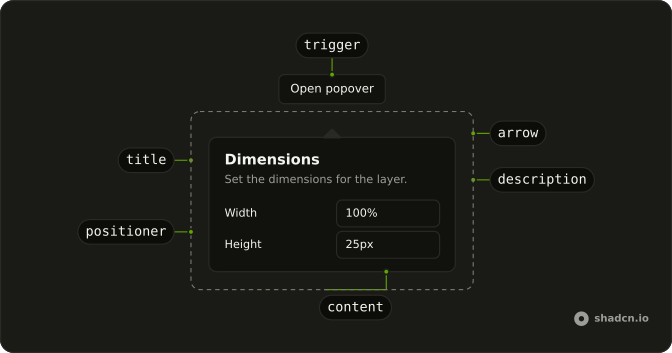
Usage
<Popover>
    <PopoverTrigger asChild={props => <Button {...props()} variant="outline">Options</Button>} />
    <PopoverContent class="gap-2">
      <PopoverTitle class="sr-only">Options</PopoverTitle>
      <p class="font-medium">Section 1</p>
      <Separator />
      <p class="font-medium">Section 2</p>
    </PopoverContent>
  </Popover>
FAQ
How does the separator split the panel?
PopoverContent sets gap-2. Section 1 and Section 2 are p elements with font-medium. A Separator sits between them. PopoverTitle reads Options and has className="sr-only".
How does the Options button become the trigger?
The trigger is a Button with variant="outline" and the label Options. Activating it opens the panel.
asChild is a function on PopoverTrigger that returns the button, and PopoverContent is the panel.
Where is the panel's name?
PopoverTitle is Options with className="sr-only", matching the button label. Section 1 and Section 2 are the visible text. They are paragraphs.
What controls the space around the separator?
gap-2 on PopoverContent spaces Section 1, the Separator, and Section 2. The two lines use font-medium. This file adds no width class.
API Reference
Popover
Sets asChild and props. The rest is on the Popover page.
Button
Sets props and variant="outline". The rest is on the Button page.
Separator
No extra props in this demo. The rest is on the Separator page.