shadcn.io is an independent project built on shadcn/ui
Start Tour opens Step 1 of 3 and the line Welcome to the tour. Let's get started! Previous is off. Next moves through three messages and turns off on the last step. The panel stays open.
Use it to introduce a feature where it lives. Next does not finish the tour for you. A tour that must block the page belongs in a Dialog. In Solid, Ark UI does not track the step.
Installation
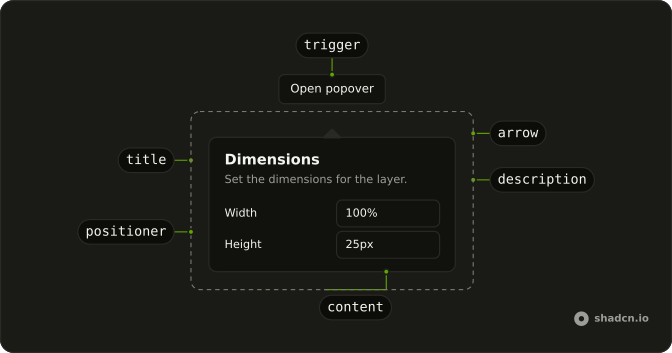
Anatomy
Usage
<Popover>
      <PopoverTrigger asChild={props => <Button {...props()} variant="outline">Start Tour</Button>} />
      <PopoverContent>
        <PopoverHeader>
          <PopoverTitle>
            Step {step() + 1} of {steps.length}
          </PopoverTitle>
          <PopoverDescription>{steps[step()]}</PopoverDescription>
        </PopoverHeader>
        <div class="flex justify-between gap-2">
          <Button disabled={step() === 0} onClick={handlePrevious} size="sm" variant="outline">
            Previous
          </Button>
          <Button disabled={step() === steps.length - 1} onClick={handleNext} size="sm">
            Next
          </Button>
        </div>
      </PopoverContent>
    </Popover>
FAQ
How does the step text change?
steps holds three strings, and the current step is a piece of state that starts at 0. PopoverTitle reads Step, the step number, then of 3, and PopoverDescription shows the current string. Both sit in PopoverHeader.
What happens on the last step?
Previous and Next only change the step; the open state isn't controlled. On the last step Next is disabled, and the panel stays up until Escape or a click outside.
How does Start Tour become the trigger?
The trigger is a Button with variant="outline" and the label Start Tour. Activating it opens the panel. Moving between steps leaves that open state alone.
asChild is a function on PopoverTrigger that returns the button, and PopoverContent is the panel.
API Reference
Popover
Sets asChild and props. The rest is on the Popover page.
Button
Sets props, variant="outline", disabled={step() === 0}, onClick={handlePrevious}, size="sm" and disabled={step() === steps.length - 1}. The rest is on the Button page.