shadcn.io is an independent project built on shadcn/ui
An outlined row shows a spinner, the title Downloading..., the line 129 MB / 1000 MB, a Cancel button, and a progress bar at 75. Cancel is hidden on the narrowest width. No file is transferring.
Use the row when a transfer should show motion and how far along it is. Cancel does not stop anything until you wire it. If the numbers are unknown, hold the row with a Skeleton. In Solid, Ark UI labels the spinner Loading.
Installation
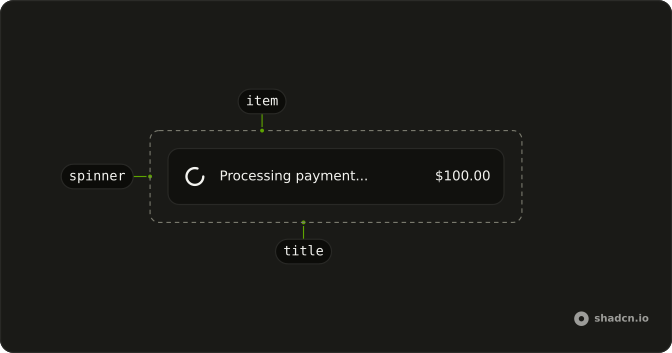
Anatomy
Usage
<div class="flex w-full max-w-md flex-col gap-4 [--radius:1rem]">
    <Item class="bg-background" variant="outline">
      <ItemMedia variant="icon">
        <Spinner />
      </ItemMedia>
      <ItemContent>
        <ItemTitle>Downloading...</ItemTitle>
        <ItemDescription>129 MB / 1000 MB</ItemDescription>
      </ItemContent>
      <ItemActions class="hidden sm:flex">
        <Button size="sm" variant="outline">
          Cancel
        </Button>
      </ItemActions>
      <ItemFooter>
        <Progress aria-label="Download progress" class="w-full" value={75} />
      </ItemFooter>
    </Item>
  </div>
FAQ
Where is the spinner in the download row?
In ItemMedia with variant set to icon. The Item uses variant outline. The spinner is the default size, with role="status" and an aria-label of Loading.
What do the title and description say?
ItemTitle is "Downloading...". ItemDescription is "129 MB / 1000 MB". Both sit in ItemContent, next to the media.
How is the progress bar set?
Progress is in ItemFooter, with value 75, className w-full, and aria-label "Download progress". The bar shows that value. The spinner is separate, in the media slot.
When does the Cancel button show?
ItemActions has className hidden sm:flex, so the button is hidden on the smallest width and shown from the sm breakpoint. The Button is size sm and variant outline, labeled Cancel.
API Reference
Item
Sets variant="outline" and variant="icon". The rest is on the Item page.
Spinner
No extra props in this demo. The rest is on the Spinner page.
Button
Sets size="sm" and variant="outline". The rest is on the Button page.
Progress
Sets aria-label="Download progress" and value={75}. The rest is on the Progress page.