shadcn.io is an independent project built on shadcn/ui
One button shows a bold icon and the word Bold. It is not pressed. The visible word names the button.
Add the word when an icon alone is ambiguous. An icon-only Toggle fits once the mark is familiar. In Solid, Ark UI does not apply the bold.
Installation
Anatomy
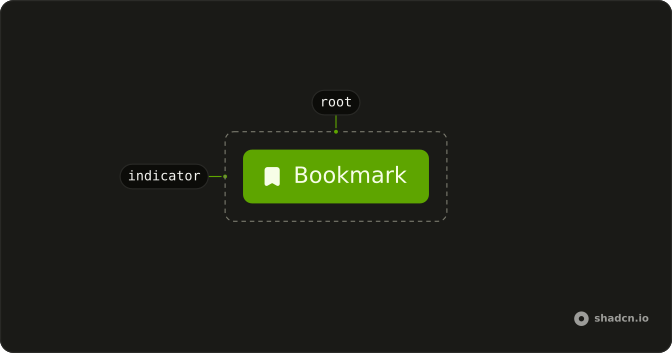
Usage
<Toggle>
    <BoldIcon aria-hidden="true" />
    Bold
  </Toggle>
FAQ
Do I still need aria-label with visible text?
No. The text inside the Toggle becomes its accessible name, and screen readers announce "Bold, toggle button" with its pressed state. An aria-label would replace the visible text for screen readers, so if you add one, make it start with the visible words, such as "Bold text", so voice control users can say what they see.
Can I put the text before the icon instead of after?
Yes. Put the text first and the icon second inside the Toggle; it's a flex row with a gap, so the spacing stays the same either way. The order follows the reading direction, so in a right-to-left layout the first child sits on the right.
When should I use text labels instead of icon-only toggles?
Use a label when the icon isn't obvious, when the action is used rarely, or when the people using it are new to the tool. Icon-only toggles fit dense toolbars of familiar actions like bold and italic, as long as each has an aria-label.
How do I adjust the icon and text sizes?
The Toggle sizes an icon for its text (size-4 in most styles) unless the icon has its own size-* class. Give the icon size-5 for a larger icon, or add text-base to the Toggle for larger text, and keep the two in proportion. To change the whole control, set size to sm or lg.
Can I toggle between showing text and icon-only?
Yes. Wrap the text in a span with sr-only md:not-sr-only: on small screens only the icon shows, but the text is still there for screen readers, so the Toggle keeps its name without an aria-label. From the md breakpoint up, the label appears next to the icon.
What happens if the text label is very long?
The Toggle doesn't wrap its content, so a long label makes the button wider and can push the toolbar out of its container. Keep labels to a word or two. If the text comes from data, set a maximum width on the Toggle and put the text in a span with truncate.
API Reference
Toggle
No extra props in this demo. The rest is on the Toggle page.