shadcn.io is an independent project built on shadcn/ui
The button shows a calendar icon and today's date. The popover puts a month beside Quick Select: Today, Tomorrow, In 3 days, In a week, In 2 weeks and In a month.
Offer shortcuts for dates people mean by a phrase, such as tomorrow. A Date Input fits if they should type the date instead. In Svelte, Ark UI does not turn a phrase into a date.
Installation
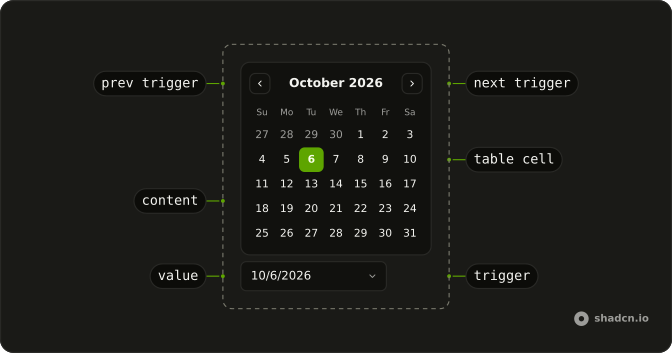
Anatomy
Usage
<DatePicker closeOnSelect={false} onValueChange={handleValueChange} positioning={positioning} value={value}><DatePickerTrigger>{#snippet asChild(props)}<Button {...props({ class: "w-70 justify-start font-normal" })} variant="outline"><CalendarIcon aria-hidden="true" data-icon="inline-start" /><span>{#if date}{formatDate(date)}{:else}{"Pick a date"}{/if}</span></Button>{/snippet}</DatePickerTrigger><DatePickerContent class="flex divide-x overflow-hidden p-0"><div class="p-3"><CalendarViewControl><CalendarPrevTrigger /><CalendarViewDate /><CalendarNextTrigger /></CalendarViewControl><CalendarTable><CalendarWeekDays /><CalendarTableDays /></CalendarTable></div><div class="relative w-62 overflow-hidden"><div class="absolute inset-0 flex flex-col gap-4"><p class="px-4 pt-4 text-center font-medium text-sm">Quick Select</p><ScrollArea class="min-h-0 flex-1"><div class="flex flex-col gap-2 px-4 pb-4">{#each shortcuts as shortcut (shortcut.label)}<DatePickerPresetTrigger value={[shortcut.date]}>{#snippet asChild(props)}<Button {...props()} size="sm" variant="outline">{shortcut.label}</Button>{/snippet}</DatePickerPresetTrigger>{/each}</div></ScrollArea></div></div></DatePickerContent></DatePicker>FAQ
How do the shortcuts set the date?
Each is a button inside a DatePickerPresetTrigger whose value is a one-date list. The preset selects it as if you had clicked the day.
How are the shortcut dates computed?
From today, once when the module loads, by adding days, weeks or a month. A page left open past midnight keeps the old dates until it reloads.
Does the picker close after a shortcut?
No. closeOnSelect is false, so the result stays visible next to the shortcuts. Escape, a click outside or the button close it.
How are the calendar and the shortcuts laid out?
DatePickerContent is a row split by divide-x: the calendar, then a column with the Quick Select heading and a Scroll Area of outline buttons.
API Reference
Date Picker
Sets closeOnSelect={false}, onValueChange={handleValueChange}, positioning={positioning}, value={value} and value={[shortcut.date]}. The rest is on the Date Picker page.
Button
Sets props, w-70, justify-start, font-normal, variant="outline" and size="sm". The rest is on the Button page.
Calendar
No extra props in this demo. The rest is on the Calendar page.
Scroll Area
No extra props in this demo. The rest is on the Scroll Area page.