shadcn.io is an independent project built on shadcn/ui
An empty track. The bar is at 0 percent, so nothing is filled in, and there is no visible label beside it.
Use an empty bar before the work starts, so the track is there when the first update arrives. A Skeleton fits when you are waiting on content, not on a known task. In Svelte, Ark UI does not move the bar on its own.
Installation
Anatomy
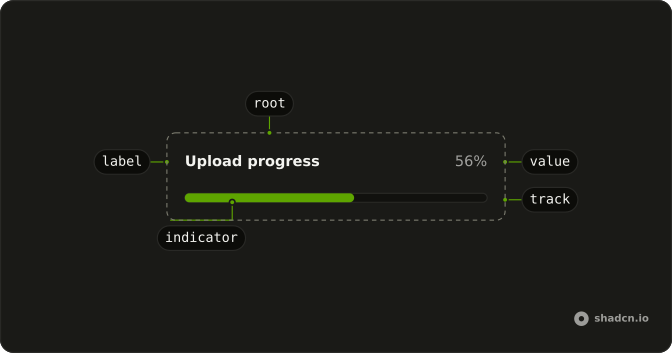
Usage
<Progress aria-label="Upload progress" class="w-full max-w-md" value={0} />FAQ
What does the bar show?
value is 0, so the track is empty. The track is still drawn, so the bar keeps its place in the layout.
Is 0 the same as an indeterminate bar?
No. 0 is a measured amount: the work hasn't started yet.
Pass null as value when you can't measure the work; the bar then reports an indeterminate state.
For a wait with nothing to measure, a Spinner is usually clearer.
What is the accessible name?
Ark UI puts the progressbar role on the track and names it with the value text, here 0%. The aria-label, Upload progress, sits on the root element, so put what the bar measures in visible text nearby when it matters.
How do I start filling it?
Change value as the work advances. This demo passes a fixed 0.
Always pass value: without one, Ark UI starts the bar at 50.
API Reference
Progress
Sets aria-label="Upload progress" and value={0}. The rest is on the Progress page.