shadcn.io is an independent project built on shadcn/ui
A book icon, the title Get started with our guide, and a line about setting up a project. The action reads Read the documentation, with an external-link icon.
Use it when the next step is reading, not creating. If they can start immediately, use a Button that creates the project. In Svelte, Ark UI does not open the guide.
Installation
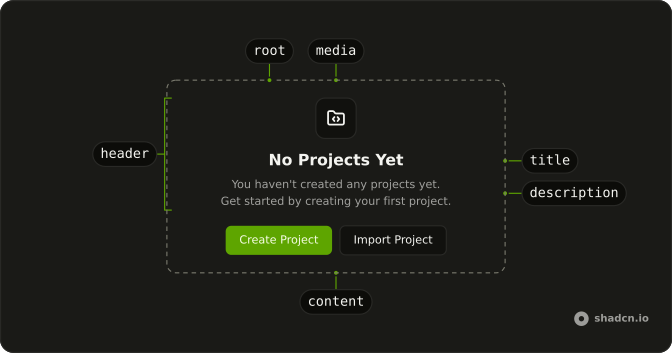
Anatomy
Usage
<Empty><EmptyHeader><EmptyMedia variant="icon"><BookOpenIcon aria-hidden="true" /></EmptyMedia><EmptyTitle>Get started with our guide</EmptyTitle><EmptyDescription>Learn how to set up your first project and start building.</EmptyDescription></EmptyHeader><EmptyContent><Button variant="link">{#snippet asChild(props)}<a {...props(/* <a> attributes; Ark types these as <button>'s */ { href: "#" } as never)}>Read the documentation<ExternalLinkIcon aria-hidden="true" data-icon="inline-end" /></a>{/snippet}</Button></EmptyContent></Empty>FAQ
Where does the external icon sit?
After the label, with data-icon="inline-end". The button's own gap separates the words and the icon, and sizes the icon for you.
What is in the header?
BookOpenIcon in EmptyMedia with variant="icon", the title "Get started with our guide", and a description about setting up the first project.
Where does the link sit?
In EmptyContent, after EmptyHeader. The content is a centered column, so the link sits under the description.
API Reference
Empty
Sets variant="icon". The rest is on the Empty page.
Button
Sets variant="link". The rest is on the Button page.