shadcn.io is an independent project built on shadcn/ui
Each slide lays a headline, a short line and a button over a dark gradient. The first reads Build faster with ready-made components, with Get Started. Previous and next sit inside the frame.
Use a hero carousel when a few campaigns share the top of a page. A single Card is clearer if there is only one message. In Svelte, Ark UI does not play the slides on its own.
Installation
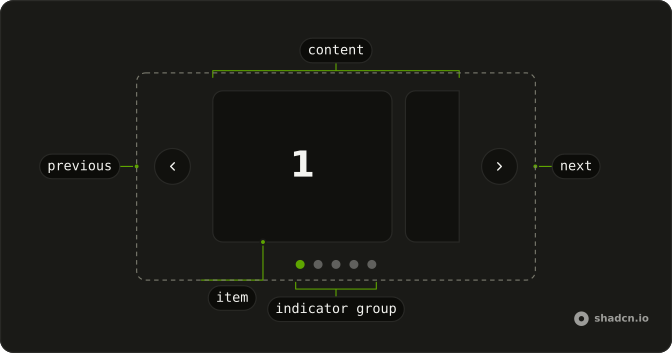
Anatomy
Usage
<div class="mx-auto w-full max-w-2xl"><Carousel slideCount={slides.length}><CarouselContent>{#each slides as slide, index (slide.title)}<CarouselItem index={index}><div class="relative aspect-video overflow-hidden rounded-lg bg-muted"><div class="absolute inset-0 bg-linear-to-t from-foreground/60 to-transparent"></div><div class="absolute inset-0 flex flex-col items-center justify-center p-8 text-center text-background"><h2 class="mb-2 font-bold text-3xl">{slide.title}</h2><p class="mb-6 max-w-md text-sm opacity-90">{slide.description}</p><Button variant="secondary">{slide.cta}</Button></div></div></CarouselItem>{/each}</CarouselContent><CarouselControl><CarouselPrevious class="data-[orientation=horizontal]:inset-s-4" /><CarouselNext class="data-[orientation=horizontal]:inset-e-4" /></CarouselControl></Carousel></div>FAQ
When should I use a hero carousel instead of a single hero?
When you have two to four messages of equal weight, such as a launch, a sale and a new feature. People rarely wait for later slides, so put the most important message first. With one clear goal, a single static hero works better.
How do I add a background image?
Put an img with absolute inset-0 size-full object-cover first in the slide's box, before the gradient layer. The demo has no image: the fill is bg-muted under the gradient.
What is the gradient for?
It keeps the text readable on any background. The layer is bg-linear-to-t from-foreground/60 to-transparent, darkest at the bottom, and the text is text-background, so both swap in dark mode. Change the direction (bg-linear-to-b) or the strength (from-foreground/80) to suit your images.
API Reference
Carousel
Sets slideCount={slides.length} and index={index}. The rest is on the Carousel page.
Button
Sets variant="secondary". The rest is on the Button page.