shadcn.io is an independent project built on shadcn/ui
One wide frame shows a single number, from 1 through 5, one slide at a time. Previous and next sit beside the frame.
Start here for images or quotes that share one slot. A Scroll Area fits if people should skim them in a strip. Ark UI in Svelte does not advance the slides on a timer.
Installation
Anatomy
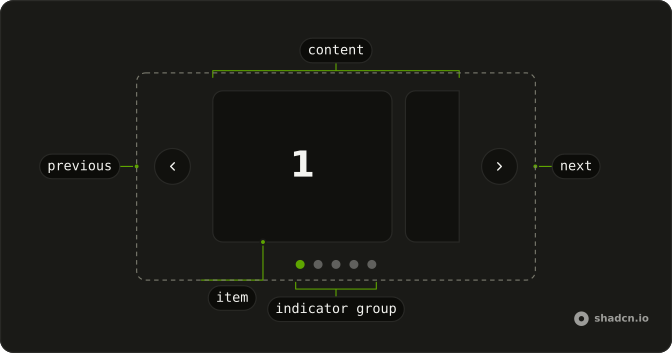
Usage
<div class="mx-auto w-full max-w-xl"><Carousel slideCount={slides.length}><CarouselContent>{#each slides as slide, index (slide)}<CarouselItem index={index}><div class="flex aspect-video w-full items-center justify-center rounded-md border bg-background"><span class="font-semibold text-4xl">{slide}</span></div></CarouselItem>{/each}</CarouselContent><CarouselControl><CarouselPrevious /><CarouselNext /></CarouselControl></Carousel></div>FAQ
What is on each slide?
Five slides, one CarouselItem each. Each holds a div with aspect-video, w-full, rounded-md border and bg-background, and the slide number in font-semibold text-4xl. The wrapper is mx-auto w-full max-w-xl.
Why does one slide fill the frame?
One slide per page is the default. slidesPerPage defaults to 1, and spacing on Carousel defaults to 16px.
How do I show more than one slide?
Set slidesPerPage, such as 3. spacing sets the gap between slides.
API Reference
Carousel
Sets slideCount={slides.length} and index={index}. The rest is on the Carousel page.