shadcn.io is an independent project built on shadcn/ui
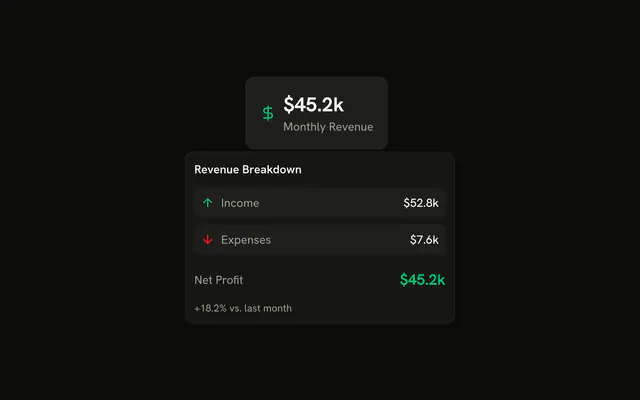
The link is the product name. The card shows a package icon, $299 beside a struck-through $349, a short description, 4.8 from 2,431 reviews, and In Stock.
Reach for it in a cart or a recommendation list when leaving the page is too much. A Popover is the tap-friendly version. In Svelte, Ark UI does not look up the product. The copy is in the demo.
Installation
Anatomy
Usage
<HoverCard><HoverCardTrigger>{#snippet asChild(props)}<a {...props(/* <a> attributes; Ark types these as <button>'s */ { class: "font-medium text-sm underline underline-offset-4", href: "#" } as never)}>Wireless Headphones Pro</a>{/snippet}</HoverCardTrigger><HoverCardContent class="w-80"><div class="flex flex-col gap-3"><div class="flex gap-3"><div class="flex size-16 shrink-0 items-center justify-center rounded-md bg-muted"><PackageIcon aria-hidden="true" class="size-8 text-muted-foreground" /></div><div class="flex flex-1 flex-col gap-1"><h4 class="font-semibold text-sm">Wireless Headphones Pro</h4><div class="flex items-center gap-2"><span class="font-bold text-lg">$299</span><span class="text-muted-foreground text-sm line-through">$349</span></div></div></div><p class="text-muted-foreground text-sm">Premium wireless headphones with active noise cancellation, 30-hour battery life, and studio-quality sound.</p><div class="flex items-center justify-between text-muted-foreground text-xs"><span class="flex items-center gap-1"><StarIcon aria-hidden="true" class="size-3 fill-current text-warning" />4.8 (2,431 reviews)</span><span class="text-success">In Stock</span></div></div></HoverCardContent></HoverCard>FAQ
What is in the card?
A package icon in a muted square, the name, $299 beside $349 struck through, the description, a star with 4.8 (2,431 reviews) and In Stock.
How is the product link made the trigger?
HoverCardTrigger renders the product link through its asChild snippet.
How are the rating and the stock colored?
The star is filled with the warning token and In Stock uses text-success, so both follow the theme.
How do I change how fast the card opens and closes?
The card opens a moment after the pointer rests on the trigger and stays up long enough for the pointer to move into it. Both delays are in milliseconds.
Set openDelay and closeDelay on HoverCard; they default to 10 and 100. positioning picks another side than the bottom.
Does the card open from the keyboard and on touch screens?
Focusing the link opens the card, moving focus away or pressing Escape closes it. Touch screens have no hover, so keep what matters reachable elsewhere, or use a Popover when the card has to open on a tap.
API Reference
Hover Card
No extra props in this demo. The rest is on the Hover Card page.