shadcn.io is an independent project built on shadcn/ui
The bar shows Platform. The panel is a wide grid of feature, resource, and company links, a Getting Started card with Watch Tutorial, and a help card with Contact Sales.
Use the full panel when the header is the main way around a large site. A Sidebar fits an app that should keep that map on screen. In Svelte, Ark UI moves between the triggers with Tab.
Installation
Anatomy
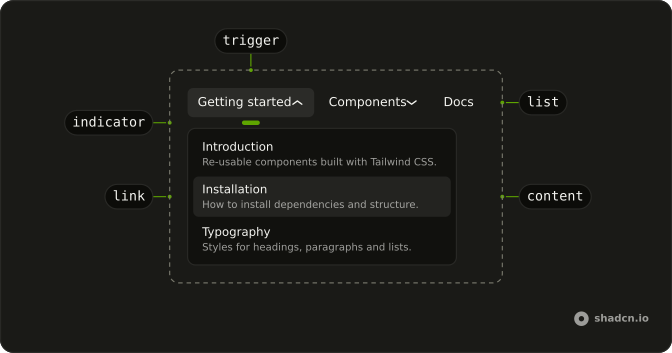
Usage
<div class="w-full max-w-md rounded-md border bg-background p-px"><NavigationMenu><NavigationMenuList><NavigationMenuItem><NavigationMenuTrigger>Platform</NavigationMenuTrigger><NavigationMenuContent><div class="grid w-[900px] max-w-full grid-cols-[2fr_1fr_1fr] gap-6 p-4"><div class="flex flex-col gap-4">{#each featureGroups as group (group.title)}<div class="flex flex-col gap-1"><h4 class="mb-2 px-2 font-semibold text-muted-foreground text-sm">{group.title}</h4>{#each group.items as feature (feature.label)}<NavigationMenuLink class="items-start gap-2">{#snippet asChild(props)}<a {...props({ href: feature.href })}><feature.icon aria-hidden="true" class="size-5" /><div class="flex flex-col gap-0.5"><span class="font-medium">{feature.label}</span><span class="text-muted-foreground">{feature.description}</span></div></a>{/snippet}</NavigationMenuLink>{/each}</div>{/each}</div><div class="flex flex-col gap-4">{#each linkGroups as group (group.title)}<div class="flex flex-col gap-1"><h4 class="mb-2 px-2 font-semibold text-muted-foreground text-sm">{group.title}</h4>{#each group.items as item (item.label)}<NavigationMenuLink class="font-medium">{#snippet asChild(props)}<a {...props({ href: item.href })}>{#if item.icon}<item.icon aria-hidden="true" class="size-4" />{:else}{/if}{item.label}</a>{/snippet}</NavigationMenuLink>{/each}</div>{/each}</div><div class="flex flex-col gap-4"><div class="flex flex-col gap-3 rounded-lg bg-muted p-4"><div class="aspect-video rounded bg-background"></div><h4 class="font-semibold">Getting Started</h4><p class="text-muted-foreground text-sm">Learn the basics in just 5 minutes</p><Button class="w-full" size="sm">Watch Tutorial<ArrowRightIcon aria-hidden="true" class="rtl:rotate-180" data-icon="inline-end" /></Button></div><div class="flex flex-col gap-1 rounded-lg bg-primary/5 p-4"><h4 class="font-semibold">Need Help?</h4><p class="text-muted-foreground text-sm">Talk to our sales team</p><Button class="mt-2 w-full" size="sm" variant="outline">Contact Sales</Button></div></div></div></NavigationMenuContent></NavigationMenuItem></NavigationMenuList></NavigationMenu></div>FAQ
How are the columns laid out?
A three-column grid, grid-cols-[2fr_1fr_1fr]: the feature groups take the widest column, the resource and company links the middle, and the two panels the last.
How are the groups built?
From lists at the top of the file: two feature groups with descriptions and two link groups, each with a title. Resource links have icons; company links don't.
How do the links use my router?
Each link is your router's link rendered through NavigationMenuLink, so it keeps the menu's styles and focus handling.
The demo puts an anchor inside NavigationMenuLink. SvelteKit routes plain links, so that is enough.
API Reference
Navigation Menu
No extra props in this demo. The rest is on the Navigation Menu page.
Button
Sets size="sm" and variant="outline". The rest is on the Button page.