shadcn.io is an independent project built on shadcn/ui
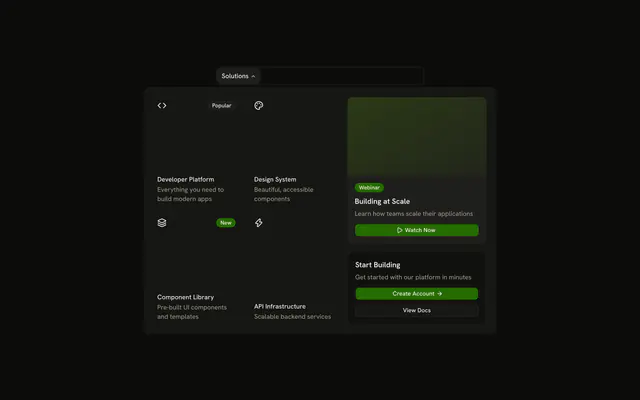
The bar shows Products. The panel has two columns, Development and Infrastructure. Each lists subcategories such as Frontend and Hosting, with more links indented under them.
Keep the third level indented in the same panel so you do not need flyout menus. A Tree View fits when that nesting is the page, not a header. In Svelte, Ark UI moves between the triggers with Tab.
Installation
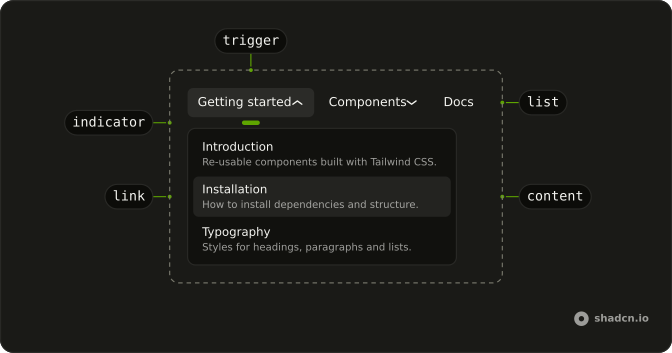
Anatomy
Usage
<div class="w-full max-w-md rounded-md border bg-background p-px"><NavigationMenu><NavigationMenuList><NavigationMenuItem><NavigationMenuTrigger>Products</NavigationMenuTrigger><NavigationMenuContent><div class="grid w-[600px] max-w-full grid-cols-2 gap-4 p-2">{#each categories as category (category.title)}<div class="flex flex-col gap-1"><h4 class="mb-2 px-2 font-semibold text-sm">{category.title}</h4>{#each category.subcategories as subcategory (subcategory.title)}<div class="flex flex-col gap-1"><NavigationMenuLink class="justify-between font-medium">{#snippet asChild(props)}<a {...props({ href: "#" })}>{subcategory.title}<ChevronRightIcon aria-hidden="true" class="size-4 rtl:rotate-180" /></a>{/snippet}</NavigationMenuLink><div class="ms-4 flex flex-col gap-1 border-s ps-4">{#each subcategory.items as item (item)}<NavigationMenuLink>{#snippet asChild(props)}<a {...props({ href: "#" })}>{item}</a>{/snippet}</NavigationMenuLink>{/each}</div></div>{/each}</div>{/each}</div></NavigationMenuContent></NavigationMenuItem></NavigationMenuList></NavigationMenu></div>FAQ
How are the levels shown?
Categories are headings, subcategories are links with a chevron, and their items sit below in a column with ms-4, ps-4 and a start border, so the nesting reads in both directions.
How do the links use my router?
Each link is your router's link rendered through NavigationMenuLink, so it keeps the menu's styles and focus handling.
The demo puts an anchor inside NavigationMenuLink. SvelteKit routes plain links, so that is enough.
API Reference
Navigation Menu
No extra props in this demo. The rest is on the Navigation Menu page.