shadcn.io is an independent project built on shadcn/ui
The row is Previous, the muted words Page 2 of 10, and Next. The counter is text, not a link. Both buttons point at #.
People see where they are without a row of numbers, which suits a narrow screen or step-by-step reading. If there is room, show the numbers, or jump with a Select. In Svelte, Ark UI does not write the counter. It is a span you fill in.
Installation
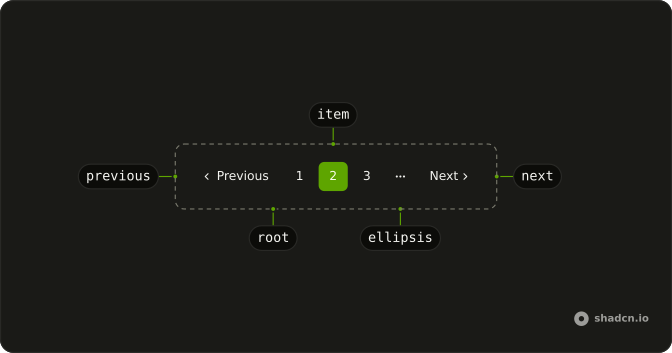
Anatomy
Usage
<Pagination><PaginationContent><PaginationItem><PaginationPrevious href="#" /></PaginationItem><PaginationItem><span class="text-muted-foreground text-sm">Page 2 of 10</span></PaginationItem><PaginationItem><PaginationNext href="#" /></PaginationItem></PaginationContent></Pagination>FAQ
What sits between Previous and Next?
A span with the literal text "Page 2 of 10" and className="text-muted-foreground text-sm", inside a PaginationItem. It is not a PaginationLink.
Does the counter follow the current page?
No. The string is written in the file. Change the text of that span when the page changes. Nothing in this demo reads a page prop.
What do Previous and Next do here?
They are links with href="#". Default text is "Previous" and "Next", and the accessible names are "Go to previous page" and "Go to next page". The nav is labeled "pagination".
How do I point Previous and Next at real pages?
Replace each href="#" with that page's URL. The counter span has no href.
API Reference
Pagination
Sets href="#". The rest is on the Pagination page.