shadcn.io is an independent project built on shadcn/ui
The row is First, Previous, page 5, Next, and Last. Page 5 is current. There are no neighboring page numbers.
Use it for a long list where a run of page numbers would take too much room. People can step one page or jump to either end. A Select covers a jump to the middle. In Svelte, Ark UI follows each href, and these point at #.
Installation
Anatomy
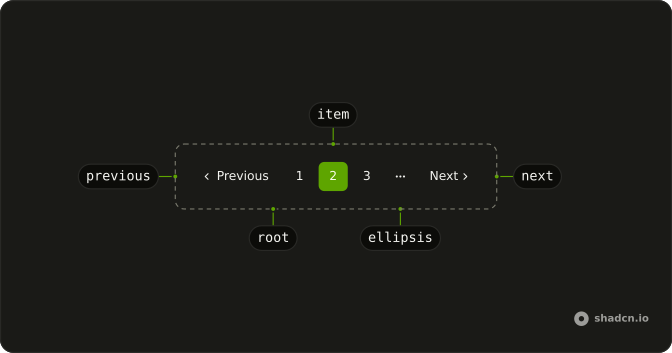
Usage
<Pagination><PaginationContent><PaginationItem><PaginationLink href="#" size="md">First</PaginationLink></PaginationItem><PaginationItem><PaginationPrevious href="#" /></PaginationItem><PaginationItem><PaginationLink href="#" isActive>5</PaginationLink></PaginationItem><PaginationItem><PaginationNext href="#" /></PaginationItem><PaginationItem><PaginationLink href="#" size="md">Last</PaginationLink></PaginationItem></PaginationContent></Pagination>FAQ
What order are the controls in?
First, PaginationPrevious, page 5, PaginationNext, Last, each in its own PaginationItem.
How do First and Last fit their words?
They are PaginationLinks with size="md", the size Previous and Next use, instead of the default square page size.
How is the current page marked?
isActive on page 5 gives it the outline style and aria-current="page". The other controls are ghost links.
How do I change the Previous and Next words?
Pass text. The defaults are Previous and Next, and the accessible names are Go to previous page and Go to next page. The word is hidden below the sm breakpoint, where only the chevron shows.
API Reference
Pagination
Sets href="#", size="md" and isActive. The rest is on the Pagination page.