shadcn.io is an independent project built on shadcn/ui
Three rows, each with a radio, a title, a price badge, a description and a feature list. Pro starts selected at $12/mo. Free is $0/mo and Enterprise is Custom.
Use a rich row when people compare plans, not single words. A Card grid fits if the plans should sit side by side. On Svelte, Ark UI does not price the plans.
Installation
Anatomy
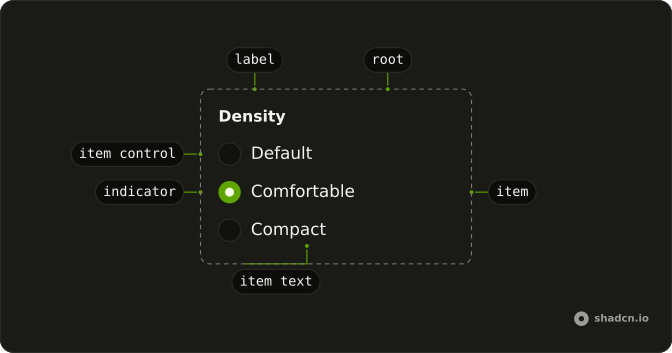
Usage
<RadioGroup class="max-w-sm" defaultValue="pro">{#each plans as plan (plan.value)}<FieldLabel><Field orientation="horizontal"><RadioGroupItem value={plan.value} /><FieldContent class="gap-2"><div class="flex items-center justify-between gap-2"><FieldTitle>{plan.title}</FieldTitle><Badge variant={plan.badge}>{plan.price}</Badge></div><FieldDescription>{plan.description}</FieldDescription><ul class="flex list-disc flex-col gap-1 ps-4 text-muted-foreground text-xs">{#each plan.features as feature (feature)}<li>{feature}</li>{/each}</ul></FieldContent></Field></FieldLabel>{/each}</RadioGroup>FAQ
Which plan starts selected?
defaultValue is pro. The values are free, pro, and enterprise, and every card is built from a list of plans at the top of the file.
How is the price placed?
The FieldTitle and the Badge share a row with justify-between. Free shows $0/mo and Enterprise shows Custom with variant secondary. Pro shows $12/mo with the default variant, so the recommended plan stands out.
Where does the feature list come from?
Each plan has a features array, rendered as a ul with list-disc, text-xs and text-muted-foreground. Pro and Enterprise list four features, Free lists three. Nothing hides a line based on the selection.
Why does the radio sit at the top of the card?
Field is horizontal, and when it holds a FieldContent it aligns its items to the start, so the radio lines up with the plan name, not the middle of the list.
API Reference
Radio Group
Sets defaultValue="pro" and value={plan.value}. The rest is on the Radio Group page.
Field
Sets orientation="horizontal". The rest is on the Field page.
Badge
Sets variant={plan.badge}. The rest is on the Badge page.