shadcn.io is an independent project built on shadcn/ui
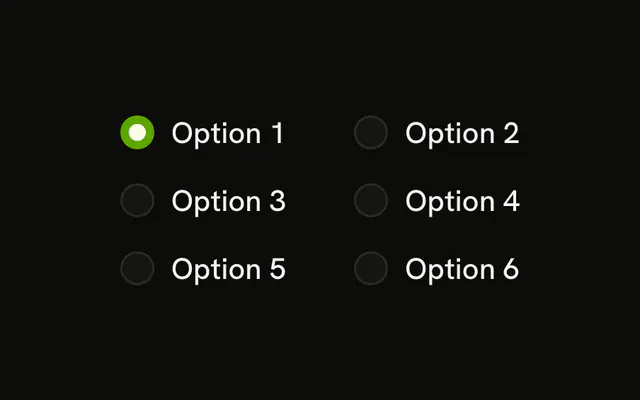
Option 1, Option 2 and Option 3 sit on one line, each with a radio and a label. Option 1 starts selected.
Use a row for a short choice that should not take vertical space. Stack the options, or use a Select, when the labels get long. In Svelte, Ark UI does not wrap the row.
Installation
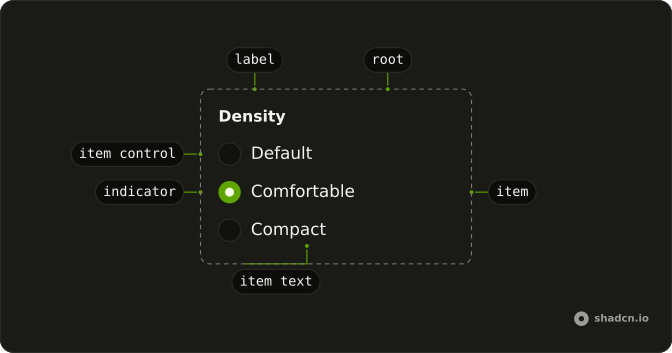
Anatomy
Usage
<RadioGroup class="flex w-fit flex-row flex-wrap gap-4" defaultValue="option-1" orientation="horizontal"><RadioGroupItem value="option-1">Option 1</RadioGroupItem><RadioGroupItem value="option-2">Option 2</RadioGroupItem><RadioGroupItem value="option-3">Option 3</RadioGroupItem></RadioGroup>FAQ
How are the options placed in a row?
RadioGroup takes flex flex-row flex-wrap gap-4, which replaces its default grid. defaultValue is option-1.
How do I start on a different option?
Change defaultValue to option-2 or option-3, matching that item's value.
Why does the label text select the radio?
The text is the item's label, so clicking it checks that item. The text is the child of RadioGroupItem, which renders it as the item's label.
What if the labels get too long for one row?
flex-wrap moves the options that do not fit onto the next line. For more than four options, or long labels, a vertical group reads faster.
API Reference
Radio Group
Sets defaultValue="option-1", orientation="horizontal", value="option-1", value="option-2" and value="option-3". The rest is on the Radio Group page.