shadcn.io is an independent project built on shadcn/ui
UI library: Ark UI
A bordered table of products with no line between the rows. The columns are Product, Category, Price and Stock. Laptop is first, in Electronics, at $999.00, with 24 in stock.
Drop the row lines for a short, quiet list. A Card per product is clearer when each row needs more than four cells. In Svelte, Ark UI does not remove the dividers.
Installation
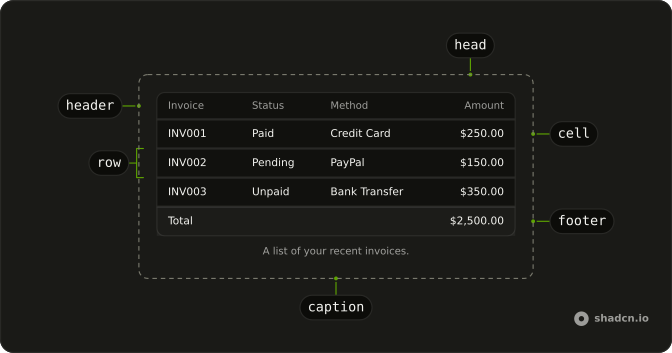
Anatomy
Usage
<div class="w-full max-w-4xl rounded-md border bg-background"><Table><TableHeader><TableRow class="border-b-0 hover:bg-transparent"><TableHead>Product</TableHead><TableHead>Category</TableHead><TableHead class="text-end">Price</TableHead><TableHead class="text-end">Stock</TableHead></TableRow></TableHeader><TableBody>{#each products as product (product.name)}<TableRow class="border-b-0"><TableCell class="font-medium">{product.name}</TableCell><TableCell>{product.category}</TableCell><TableCell class="text-end">{product.price}</TableCell><TableCell class="text-end">{product.stock}</TableCell></TableRow>{/each}</TableBody></Table></div>FAQ
How are the row lines removed?
Every body TableRow sets border-b-0, which clears the bottom border that TableRow draws. The header TableRow sets it too.
Does the header row highlight on hover?
The header
TableRow sets hover:bg-transparent, so hovering the labels does not fill the row.Body rows still use hover:bg-muted/50.How are price and stock aligned?
Both headers and both cells use text-end. The product name cell is font-medium. Category is plain text.
API Reference
Table
No extra props in this demo. The rest is on the Table page.