Table Examples
8 styled tables for lists, logs, comparisons and detail views. For sorting, filtering and pagination, see the Data Table examples. Each on React, Vue, Svelte and Solid, with Base UI, React Aria, Ark UI or Radix UI on React.
Every table example
8 examples.
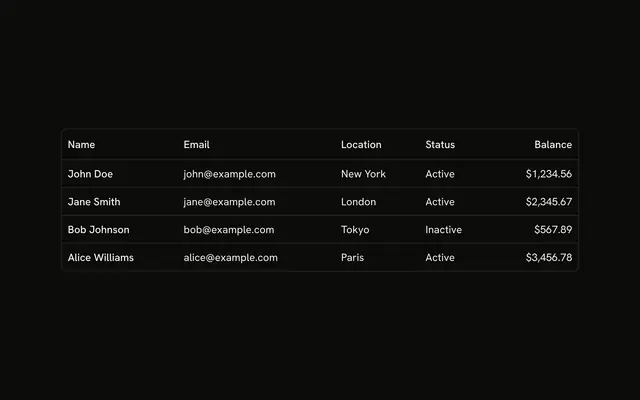
- Basic TableStandardA bordered table of people with Name, Email, Location, Status and Balance. John Doe is the first row, in New York.
- Compatibility TableAdvancedA support table of CSS features against Chrome, Firefox, Safari, Edge, Chrome Android and Safari iOS, with a check or a cross in each cell.

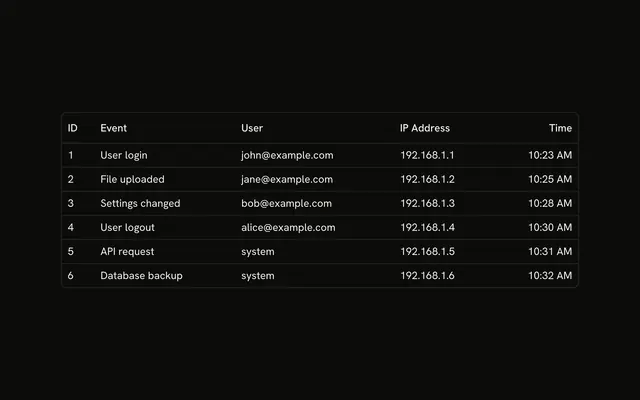
- Dense TableAdvancedA compact activity log with short rows. Columns are ID, Event, User, IP Address and Time, starting with User login at 10:23 AM.
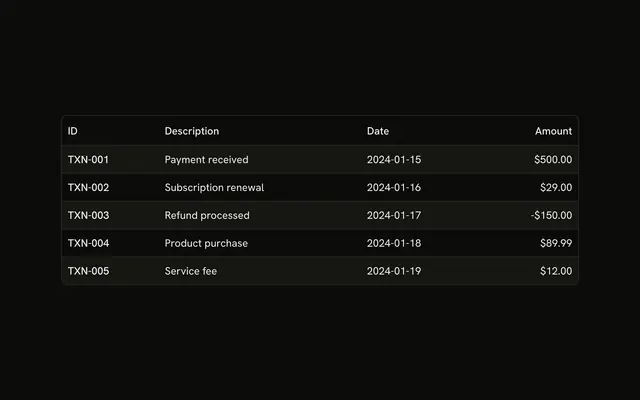
- Striped TableStandardA transaction table with ID, Description, Date and Amount. Every other row is shaded, and the first row is TXN-001, Payment received.
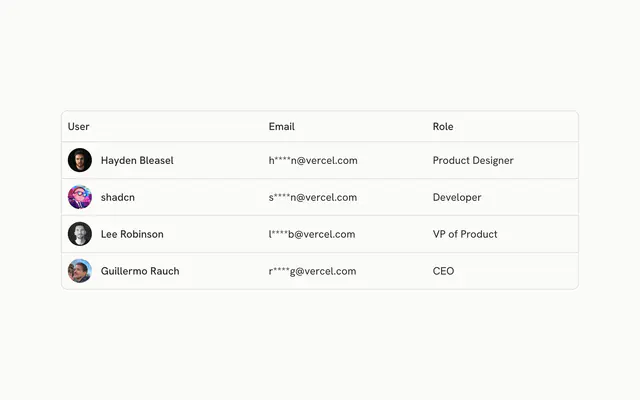
- Table with AvatarStandardA team table with User, Email and Role. Each name has an avatar, starting with Hayden Bleasel, Product Designer.
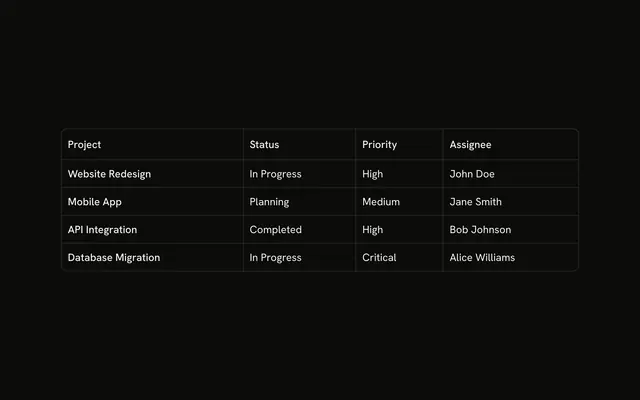
- Table with Vertical LinesAdvancedA project table with vertical lines between Project, Status, Priority and Assignee. Website Redesign is first, In Progress, High.
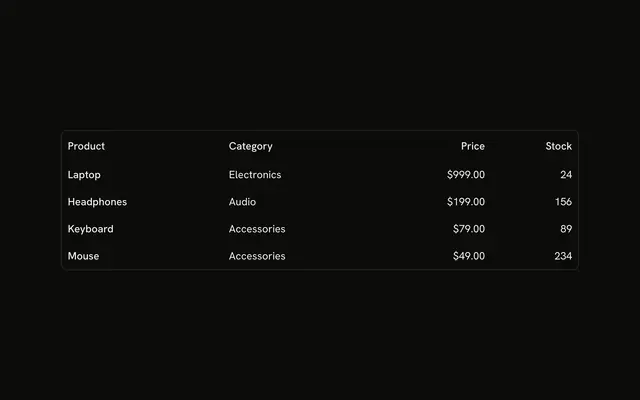
- Table Without DividersStandardA product table with no lines between the rows. Columns are Product, Category, Price and Stock, and Laptop is first at $999.00.
- Vertical TableAdvancedA two-column profile table, Field and Value. Rows run from Full Name John Doe through Role Administrator.


Or describe it. With Pro, your AI agent installs the table example you describe, on your framework and UI library.
Get ProGalleries
More component examples
8 related galleries, free: open one for its live examples and their code.













Pricing
Table examples MCP, with Pro
Your AI agent installs any of the 1364 examples, and every component, block and icon, with every Pro plan.
4.9/5 out of 5 · 150+ reviewsfrom 150+ founders and developers.
- Secure checkout via Stripe
- Code lives in your repo
- Keep what you've shipped if you cancel
- License terms
FAQ
Frequently asked questions
A styled `<table>` for data people read: user lists, transactions, logs, comparisons and detail views. shadcn.io's Table is a set of parts, `Table`, `TableHeader`, `TableBody`, `TableFooter`, `TableRow`, `TableHead`, `TableCell` and `TableCaption`, that keep the native table elements and add spacing, dividers, a hover state and theme colors.
Yes. Every example is free to use in personal and commercial projects, with no attribution. Seeing the code and installing it takes a free shadcn.io account.
Table when the rows are only read: lists, statements, reports, comparisons. Data Table when people sort, filter, page through or select rows; those examples add TanStack Table on React. If the table needs no interaction beyond reading, Table is all you need.
A plain `<table>` has no padding, dividers, hover or dark mode. Table adds them with your theme's tokens, keeps the native header and cell semantics for screen readers, and wraps the table in a container that scrolls sideways when the columns don't fit.
Render `TableFooter` after `TableBody` with one `TableRow` holding the total. Give the label cell a `colSpan` so the total sits under the column it sums.
Table already scrolls sideways inside its container, and cells stay on one line. To show less on small screens, hide lower-priority columns with `hidden md:table-cell` on their head and cells, or show the same records as a list of cards below a breakpoint.
Put `TableCaption` inside `Table`. Screen readers read it before the rows, so it names the data for people who navigate by table. Add one when no heading nearby already says what the table holds.
Sign in with a free account and run the install command on the example's page. It adds the example's file and the Table component, and any other component it uses, such as Avatar, to your project.
Shade every other `TableRow`, either from the row's index as the Striped Table example does or with `even:bg-muted/30` on the row. Banding helps the eye follow a row across a wide table.
Give the table a scrolling parent with a fixed height, such as `max-h-96 overflow-y-auto`, and add `sticky top-0 bg-background` to the `TableHead` cells. The header stays in place while the body scrolls.
shadcn.io's Table and, in some examples, Avatar, styled with Tailwind CSS and icons from Lucide. They run on React with Base UI, React Aria, Ark UI or Radix UI, and on Vue, Svelte and Solid with Ark UI. Table itself needs no state.
Yes. They render native `table`, `thead`, `tbody`, `tr`, `th` and `td` elements, so screen readers announce rows, columns and their headers. Add a `TableCaption` to name the table, and a label on any icon that carries meaning, as the Compatibility Table does.
No. Every table here is static markup from data, so it renders on the server in any of the frameworks. Add client code only when the table becomes interactive, which is where the Data Table examples start.
4.9 out of 5 from 150+ developers


Every table example. One prompt away.
Every table example is free with an account. With Pro, your AI agent installs them from a prompt.
Get Pro