shadcn.io is an independent project built on shadcn/ui
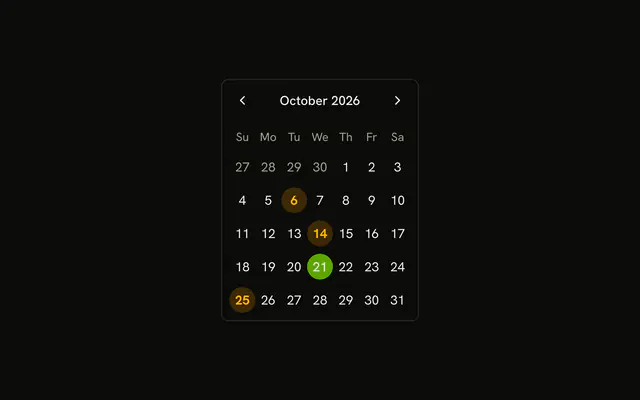
Select Date opens a dialog with the same title. The days are circles. The 6th, the 14th, and the 25th are bold and tinted, and they can still be picked.
Use it when the calendar is a step, not a fixture on the page. Leave the grid visible if people compare dates often. A Date Picker is the field version. In Vue, Ark UI does not mark days booked on its own.
Installation
Anatomy
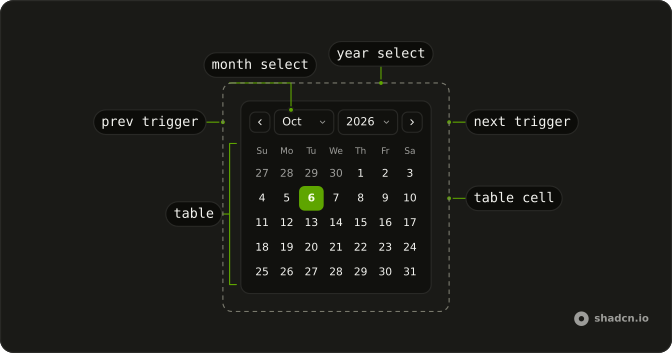
Usage
<Dialog>
  <DialogTrigger :asChild="true">
    <Button variant="outline">Select Date</Button>
  </DialogTrigger>
  <DialogContent class="sm:max-w-fit">
    <DialogHeader><DialogTitle>Select Date</DialogTitle></DialogHeader>
    <Calendar class="rounded-md border" @value-change="handleValueChange" :value="value">
      <CalendarViewControl>
        <CalendarPrevTrigger />
        <CalendarViewDate />
        <CalendarNextTrigger />
      </CalendarViewControl>
      <CalendarTable>
        <CalendarWeekDays />
        <CalendarContext v-slot="calendar">
          <CalendarTableBody>
            <CalendarTableRow
              v-for="week in calendar.weeks"
              :key='week.map((day) => day.toString()).join("-")'
            >
              <CalendarTableCell
                v-for="day in week"
                :class='cn(
                  "rounded-full",
                  isBooked(day) &&
                    "bg-warning/20 font-bold text-warning-foreground"
                )'
                :key="day.toString()"
                :value="day"
              >
                {{ day.day }}
<!-- The rest of the file is under Installation. -->
FAQ
Which days are highlighted as booked?
The 6th, the 14th and the 25th of the current month are the booked days. isBooked adds bg-warning/20, font-bold and text-warning-foreground on that CalendarTableCell.
How do the days become circles?
Each CalendarTableCell has rounded-full. The cells come from calendar.weeks inside CalendarContext, one CalendarTableRow per week, and the cell value is that day.
Can someone still pick a booked day?
Yes. The booked styling is a class on the day. The calendar still selects a single date, including the 6th, the 14th or the 25th.
How do I read the selected day?
value is a list holding the selected date, and onValueChange receives { value }. This demo starts the list from parseDate(new Date()).
API Reference
Dialog
Sets asChild. The rest is on the Dialog page.
Button
Sets variant="outline". The rest is on the Button page.
Calendar
Sets value-change="handleValueChange", value="value", v-slot="calendar", v-for="week in calendar.weeks", key and week. The rest is on the Calendar page.