shadcn.io is an independent project built on shadcn/ui
A large bar chart icon, the title No data available, and a note that data will show once it is available. There is no button.
Use it when a report finished loading and has nothing to plot. While the request is still running, show a Skeleton. In Vue, Ark UI does not know the chart is empty.
Installation
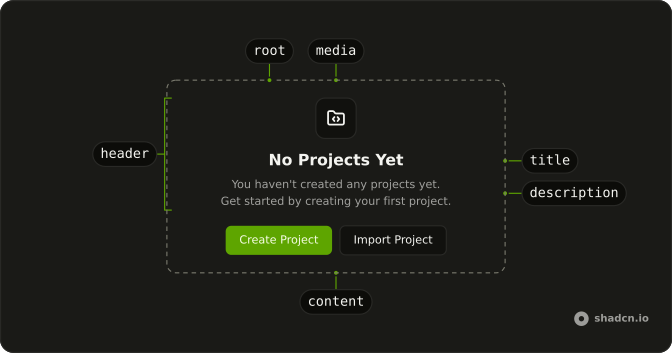
Anatomy
Usage
<Empty>
  <EmptyHeader>
    <EmptyMedia>
      <ChartColumnIcon aria-hidden="true" class="size-16 text-muted-foreground" />
    </EmptyMedia>
    <EmptyTitle>No data available</EmptyTitle>
    <EmptyDescription>
      There's no data to display in this chart yet. Data will appear here once it's available.
    </EmptyDescription>
  </EmptyHeader>
</Empty>
FAQ
Why is the chart icon so large?
EmptyMedia has no variant, so it stays the plain slot, and ChartColumnIcon sets size-16 and text-muted-foreground. variant="icon" would draw the small icon tile and size an unsized glyph for you. This demo sets the size on the icon.
What does the empty chart say?
EmptyTitle is "No data available". EmptyDescription says there is nothing to display yet and that data will appear once it is available. Change those two strings to name the chart.
Where would a button go?
This file has no EmptyContent. The message is EmptyTitle and EmptyDescription inside EmptyHeader. Add EmptyContent after the header when the chart needs a button.
How do I use a different chart icon?
Swap ChartColumnIcon for another icon and keep className="size-16 text-muted-foreground". Leave variant off EmptyMedia so that size class is what draws.
API Reference
Empty
No extra props in this demo. The rest is on the Empty page.