shadcn.io is an independent project built on shadcn/ui
A mail icon, the title Subscribe to our newsletter, and a line about updates. An email field, placeholder Enter your email, and a Subscribe button sit under the text.
Use it for a newsletter or a waitlist where a list would be blank. If you only need the field, an Input on the page is enough. In Vue, Ark UI does not send the email.
Installation
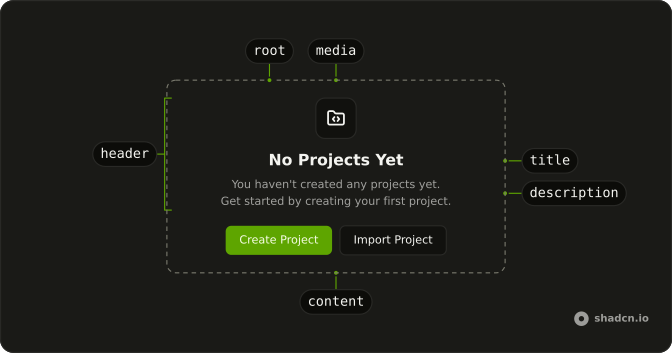
Anatomy
Usage
<Empty>
  <EmptyHeader>
    <EmptyMedia variant="icon"><MailIcon aria-hidden="true" /></EmptyMedia>
    <EmptyTitle>Subscribe to our newsletter</EmptyTitle>
    <EmptyDescription>
      Get the latest updates and news delivered to your inbox.
    </EmptyDescription>
  </EmptyHeader>
  <EmptyContent>
    <div class="flex w-full gap-2">
      <Input aria-label="Email" placeholder="Enter your email" type="email" />
      <Button>Subscribe</Button>
    </div>
  </EmptyContent>
</Empty>
FAQ
What kind of input is in the empty state?
An Input with type="email", placeholder="Enter your email" and aria-label="Email", since there is no visible label. It sits beside a Subscribe Button in a div with flex w-full gap-2, inside EmptyContent.
What do the title and description say?
EmptyTitle is "Subscribe to our newsletter". EmptyDescription says the latest updates and news are delivered to the inbox.
Where is the mail icon?
MailIcon is in EmptyMedia with variant="icon", above the title. The input row does not repeat it.
Why is the row full width?
EmptyContent is a centered column with a max width. w-full on the flex row fills that width. Input is w-full and min-w-0, so the field uses the leftover space beside Subscribe.
API Reference
Empty
Sets variant="icon". The rest is on the Empty page.
Input
Sets aria-label="Email", placeholder="Enter your email" and type="email". The rest is on the Input page.
Button
No extra props in this demo. The rest is on the Button page.