shadcn.io is an independent project built on shadcn/ui
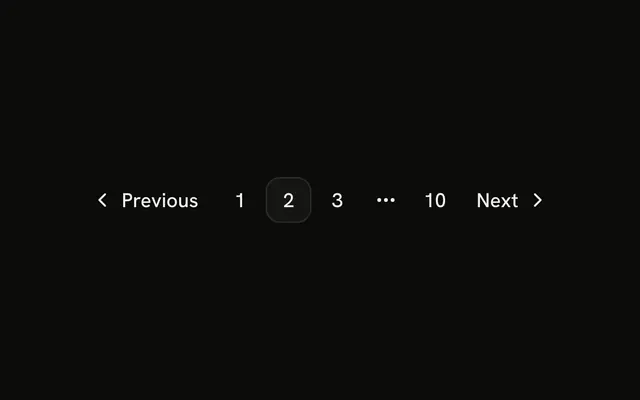
The row is pages 1, 2, and 3, an ellipsis, and page 10. Page 2 is current. There is no Previous or Next. The ellipsis is not a link.
It shows how far the list goes without listing every page, and it stays compact. Add Previous and Next when people need to step. A Select jumps further. In Vue, Ark UI does not insert the ellipsis. You do.
Installation
Anatomy
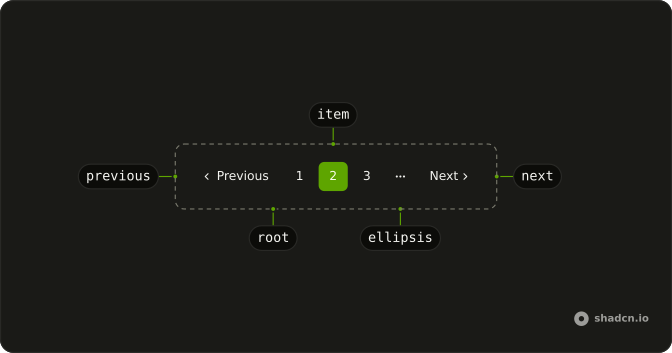
Usage
<Pagination>
  <PaginationContent>
    <PaginationItem><PaginationLink href="#">1</PaginationLink></PaginationItem>
    <PaginationItem>
      <PaginationLink href="#" :isActive="true">2</PaginationLink>
    </PaginationItem>
    <PaginationItem><PaginationLink href="#">3</PaginationLink></PaginationItem>
    <PaginationItem><PaginationEllipsis /></PaginationItem>
    <PaginationItem><PaginationLink href="#">10</PaginationLink></PaginationItem>
  </PaginationContent>
</Pagination>
FAQ
What does this row render?
PaginationLinks for pages 1, 2 and 3, a PaginationEllipsis, and a link for page 10. Page 2 has isActive. There is no Previous or Next.
Is the ellipsis something people can press?
No. PaginationEllipsis is a span with aria-hidden and a more-horizontal icon. Pages 4 to 9 are left out of the row.
How do I mark a different page as current?
Move isActive to that PaginationLink. It sets the outline variant and aria-current="page". This file hardcodes 1, 2, 3 and 10, so edit those numbers too.
How do I link the numbered pages?
Each PaginationLink has href="#". Set it to that page's URL. The ellipsis has no href. The nav is labeled "pagination".
API Reference
Pagination
Sets href="#" and isActive. The rest is on the Pagination page.