shadcn.io is an independent project built on shadcn/ui
A bordered list has two rows. Marketing emails is off, with Receive emails about new products. Security emails is on, with Receive emails about account security.
Use a divided list for related settings without a card around each one. One featured setting can stand alone in a card. Choices that wait for Save fit a Checkbox. In Vue, Ark UI keeps each switch's own state.
Installation
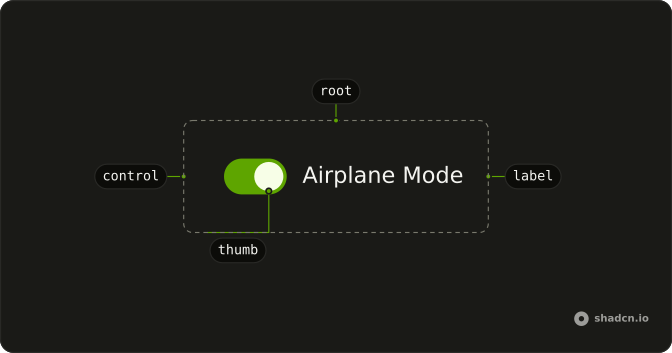
Anatomy
Usage
<div class="flex flex-col divide-y rounded-lg border bg-background">
  <Field class="p-4" orientation="horizontal">
    <FieldContent>
      <FieldLabel class="font-medium">Marketing emails</FieldLabel>
      <FieldDescription>Receive emails about new products</FieldDescription>
    </FieldContent>
    <Switch />
  </Field>
  <Field class="p-4" orientation="horizontal">
    <FieldContent>
      <FieldLabel class="font-medium">Security emails</FieldLabel>
      <FieldDescription>Receive emails about account security</FieldDescription>
    </FieldContent>
    <Switch :defaultChecked="true" />
  </Field>
</div>
FAQ
How are the two settings stacked?
The wrapper is flex flex-col divide-y rounded-lg border bg-background. Each row is a horizontal Field with p-4, holding a FieldContent and a Switch.
Which switch starts on?
Marketing emails starts off. Security emails starts on through its default prop.
The prop is defaultChecked.
How is each label tied to its switch?
Each row is its own Field, so each label belongs to its own switch.
The Field links the label to the switch, so this file sets no ids.
How do I control this switch in Vue?
Each switch keeps its own state here. To control them, keep each switch's on or off state in your own state, such as one object with a key per setting, and pass it back.
Bind it with v-model:checked, or listen to @checked-change, which receives details.checked.
API Reference
Field
Sets orientation="horizontal". The rest is on the Field page.
Switch
Sets defaultChecked. The rest is on the Switch page.