shadcn.io is an independent project built on shadcn/ui
Account, Billing, Notifications and Settings each show an icon before the word. Account is selected. Its panel repeats the icon in a tinted circle beside the heading and a short paragraph.
Add icons when people see the same sections often enough to recognize them. A Navigation Menu fits if each section is its own page. On Vue, Ark UI does not choose the icons.
Installation
Anatomy
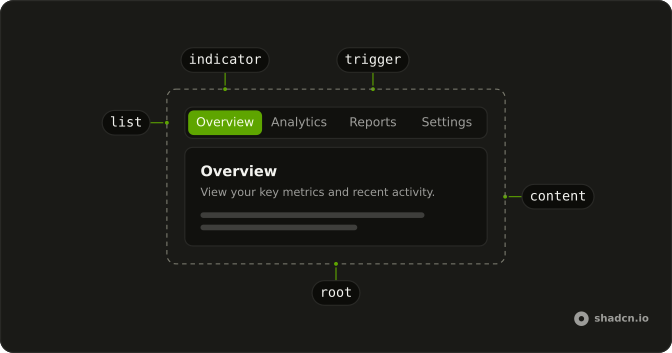
Usage
<Tabs class="w-full max-w-md" defaultValue="account">
  <TabsList>
    <TabsTrigger v-for="section in sections" :key="section.value" :value="section.value">
      <component :is="section.icon" aria-hidden="true" />{{ section.label }}
    </TabsTrigger>
  </TabsList>
  <TabsContent v-for="section in sections" :key="section.value" :value="section.value">
    <div class="rounded-lg border bg-card p-6 text-card-foreground shadow-sm">
      <div class="mb-4 flex items-center gap-3">
        <div class="flex size-10 items-center justify-center rounded-full bg-primary/10">
          <component :is="section.icon" aria-hidden="true" class="size-5 text-primary" />
        </div>
        <div>
          <h3 class="font-semibold text-lg">{{ section.label }}</h3>
          <p class="text-muted-foreground text-sm">{{ section.subtitle }}</p>
        </div>
      </div>
      <p class="text-muted-foreground text-sm">{{ section.description }}</p>
    </div>
  </TabsContent>
</Tabs>
FAQ
Where do the icons sit in the triggers?
Before the word. The trigger draws an unsized icon at size-4 and spaces it from the label with its own gap.
What are the four tabs?
Account, Billing, Notifications and Settings, built from a sections array. Account is the default, and the group is w-full max-w-md.
Why is the icon repeated in the panel?
It ties the panel to its tab. The panel draws the same icon at size-5 in text-primary, inside a size-10 circle with bg-primary/10.
What names the trigger for a screen reader?
The visible word. The icons have aria-hidden="true", so the trigger is announced only by its label.
API Reference
Tabs
Sets defaultValue="account", v-for="section in sections", key="section.value" and value="section.value". The rest is on the Tabs page.