shadcn.io is an independent project built on shadcn/ui
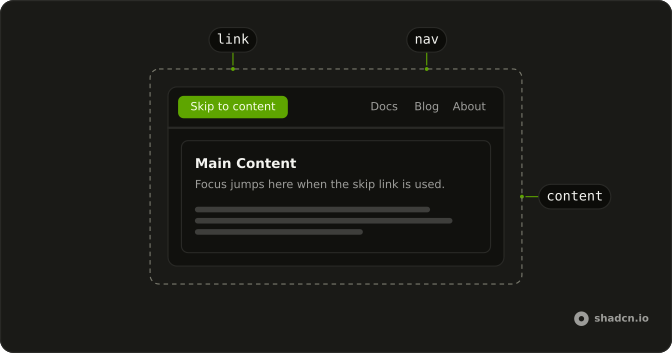
Skip Nav is the "Skip to content" link that keyboard users reach on their first Tab. It stays hidden until it has focus, then shows in the top corner, and Enter takes focus past the header to the main content, so nobody has to tab through the whole menu again on each new page.
It jumps to one fixed place. For links to every section of a long article, add a Table of Contents beside it.
Installation
Anatomy
Usage
import { SkipNavContent, SkipNavLink } from "@/components/ui/skip-nav";Put the link before everything else on the page and wrap the main content in SkipNavContent. Both default to the id skip-nav-content, so one pair needs no props.
<>
  <SkipNavLink />
  <header className="flex gap-4 border-b p-4">
    <a href="/">Home</a>
    <a href="/docs">Docs</a>
    <a href="/pricing">Pricing</a>
  </header>
  <SkipNavContent>
    <main className="p-4">
      <h1 className="font-semibold text-2xl">Getting started</h1>
    </main>
  </SkipNavContent>
</>
Accessibility
SkipNavLink is an ordinary <a> whose href points at #skip-nav-content. Its sr-only class hides it from sight but not from a screen reader, and while it has focus it shows at the top start corner of the window, above the rest of the page. SkipNavContent is a div with tabIndex set to -1: Tab never stops on it, but the browser can focus it, so following the link puts focus there. What's left to you is the order: nothing focusable should come before the link, and its text should name where it goes.
- Tab
- From the top of the page, moves focus to the skip link and shows it.
- Enter
- On the skip link, moves focus to the main content and scrolls it into view. The next Tab continues inside it.
FAQ
How does a skip to content link work?
It's an in-page link. SkipNavLink renders an <a> whose href is #skip-nav-content, kept out of sight with sr-only until it takes focus, and SkipNavContent renders the div with that id. Enter follows the link like any other, so the browser scrolls to the div and moves focus onto it.
Nothing in the component listens for keys or holds state. The jump is the browser's own navigation to a fragment, which is why it needs no script once the page has rendered.
Where should the skip link go in my layout?
First in the page, ahead of the logo, the header and the navigation, so it is the first thing Tab reaches. In an app with a shared layout, render SkipNavLink once in that layout instead of on every page, and wrap the region where each page's own content starts in SkipNavContent.
Anything focusable earlier in the markup, such as a cookie banner or an announcement bar with a link in it, takes the first Tab instead. Render the skip link before it in the markup, wherever the banner sits on screen.
How do I point Skip Nav at my own main element?
Give both parts the same id. On SkipNavLink that prop only builds the href and never becomes the link's own id attribute. Both parts default to skip-nav-content, so a single pair works without one.
To skip to an element you already have, such as your <main>, leave out SkipNavContent. Give that element an id and set its tabIndex to -1, then pass the same id to SkipNavLink. Without that attribute, the browser scrolls to the element but focus can't land on it.
Can a page have more than one skip link?
It can. Render one SkipNavLink per destination, one after another at the top, and give each pair its own id, such as a "Skip to search" link next to the default "Skip to content". A link can also point straight at a search field's id, since a field takes focus on its own.
Every extra link is another Tab before the header, so keep the list to the two or three places people go most.
How do I change the Skip to content text?
Put your own text inside SkipNavLink. With nothing inside, it reads "Skip to content".
Name the destination in a few words, such as "Skip to main content" or "Skip to results". The link shows as a small button in the corner, and a screen reader reads it as the first link on the page, so a long sentence crowds both. On a translated site, pass the translated string the same way.
How do I change where the skip link appears or how it looks?
Add classes to SkipNavLink. Everything visible about it sits behind the focus: variant, because the link is hidden until it takes focus, so write yours the same way: focus:top-2 to move it up, focus:bg-background for a quieter button. Your classes merge after the component's and win where they conflict.
The link is fixed to the top start corner of the window, which is the top right on a right-to-left page. To show it inside a box instead, add focus:absolute, as the demo at the top of this page does, and give that box relative.
Where does keyboard focus go after using a skip link?
Onto SkipNavContent, the element the link points at. Its tabIndex of -1 lets the browser focus it when the link is followed, though Tab never stops there on its own. The next Tab goes to the first link, button or field inside the main content, and Shift + Tab goes back to the last focusable element before it, usually the end of the header.
The content's outline-none class keeps a focus ring from wrapping the whole region. Add a ring class to SkipNavContent if you want to show where focus landed.
Do I need a skip link if my page already uses landmarks?
Keep it, for people who use a keyboard without a screen reader. A screen reader can jump between landmarks such as <main> and <nav> with its own shortcuts, but a browser gives the keyboard alone no such key, so without a skip link those people tab through the whole header on every page.
WCAG's Bypass Blocks criterion (2.4.1) asks for a way past content that repeats across pages. Use both: put the content in a <main> landmark and point the skip link at it.
API Reference
SkipNavLink
<a> data-slot="skip-nav-link"
id?string
The id of the element to skip to.
- Default
"skip-nav-content"
asChild?boolean
Use the provided child element as the default rendered element, combining their props and behavior.
className?string
Merged with the part's classes.
SkipNavContent
<div> data-slot="skip-nav-content"
id?string
The id that SkipNavLink links to.
- Default
"skip-nav-content"
className?string
Merged with the part's classes.