shadcn.io is an independent project built on shadcn/ui
3D Marquee lays a grid of images back at an angle and keeps its columns scrolling without end, every other one the other way. It's a backdrop that says there's a lot here, behind a hero heading or at the top of a template gallery, with what the section says set over it in real text.
For a row of logos or quotes that people should read, use a Marquee instead.
Installation
Anatomy
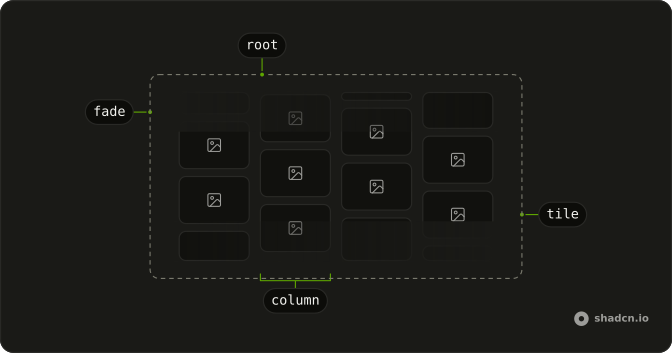
Usage
import { Marquee3D } from "@/components/ui/marquee-3d";The marquee fills its box and takes no size from its tiles, so give it a height. Pass at least as many images as it has columns, four by default.
const screenshots = [
  "/shots/1.jpg",
  "/shots/2.jpg",
  "/shots/3.jpg",
  "/shots/4.jpg",
  "/shots/5.jpg",
  "/shots/6.jpg",
  "/shots/7.jpg",
  "/shots/8.jpg",
];

export const TemplatesBackdrop = () => (
  <Marquee3D className="h-96" images={screenshots} />
);
Accessibility
Everything in the grid is decoration. Each image has an empty alt, the tiles repeated to close the loop are hidden from assistive tech, and nothing in it takes focus, so a screen reader passes over it. Put what the section says in real text over it or beside it. Under reduced motion the columns hold still and the tiles don't lift. Otherwise the columns never stop on their own, and hovering pauses them only with pauseOnHover and a mouse, so a backdrop that stays on screen needs a pause button that sets paused, like the one in the Hero demo.
Demos
Colors
Sixteen tiles painted with colors instead of images, using theme tokens such as var(--chart-1), var(--primary) and var(--muted), so the grid changes with the theme and in dark mode. Any CSS color works. Reach for it before the screenshots exist, or where photos would compete with the content beside it. When both are given, colors wins over images.
Reverse
Eight photos in three columns, with reverse turning the grid to lean the other way. The tiles are dealt out in order, three, three and two, and each column repeats its own until a set holds at least four. Use it to mirror a second marquee on the same page, or when the default lean runs against the layout around it.
Hero
A travel gallery's hero, with the marquee placed absolutely behind a heading, a line of copy and a Start a gallery button, at 60% opacity. A radial wash keeps the words readable, and a duration of 40 seconds doesn't pull the eye from the heading. The pause button in the corner sets paused, so anyone can stop the backdrop from the keyboard or on a phone.
Pause on hover
Eight images at a fast duration of 12 seconds, with pauseOnHover set, so every column stops while the pointer is over the grid and a tile can be looked at. The tile under the pointer still slides up its column and grows a little. A pause helps most at a speed like this one, and it needs a mouse or trackpad, since touch screens don't hover.
FAQ
How many images does a 3D Marquee need?
Between 8 and 16 fill the grid well. They're dealt into the columns in order, like cards around a table, and each column repeats its own until a set holds at least four, then runs that set three times over, so a short list still covers the box. Past 16, each column runs longer than the box can show, so more of them are off screen at any moment.
Pass at least as many images as columns, which is 4 by default. With fewer, the last columns get nothing and the grid shows empty lanes.
How do I slow down or speed up a 3D Marquee?
Set duration, the seconds a column takes to scroll by one set of its tiles, 20 by default. Every other column takes a quarter longer and runs the other way, so the grid never moves in step.
Behind a heading, 30 to 40 seconds keeps it calm, as the Hero demo shows at 40. A fast value such as 12 suits a grid people look at for itself, where Pause on hover lets them stop it.
Can I use solid colors instead of images in a 3D Marquee?
Yes. Pass colors, an array of CSS colors, in place of images, as the Colors demo does with sixteen. Each one paints a whole tile.
Theme tokens such as var(--chart-1) or var(--primary) follow the theme and switch with dark mode, so the grid matches the rest of the page. When both props are given, colors wins, even as an empty array, which leaves the grid bare.
Why is my 3D Marquee empty or tiny?
Because its box has no height. The marquee fills its parent and is a size container, so it takes none of its size from the tiles: give it a class such as h-96, or absolute inset-0 inside a section that has a height.
The grid is 160% of the box's longer side, and with four columns each tile is about 38% of that side wide. Tiles grow with a wide hero and shrink in a small card. In a tall, narrow box the longer side is the height, so the tiles come out wide for the space and fewer fit across.
How do I let people pause a 3D Marquee?
Set paused to true and every column stops where it stands, and set it back to false to let them carry on from there. Drive it from a button of your own, as the Hero demo does from a pause button in its corner. WCAG asks for a way to stop motion that starts on its own and runs longer than five seconds beside other content.
pauseOnHover also stops the columns while the pointer is over the grid, but only with a mouse or trackpad. Touch screens and keyboards can't hover, so it doesn't replace the button.
Do the images in a 3D Marquee need alt text?
No, and the component leaves it out on purpose. Every img has an empty alt, which tells a screen reader to skip it, and images takes URLs only, because the grid is decoration and nothing in it takes focus.
If the pictures carry meaning, such as templates someone can open, show them again in a real gallery with proper alt text and keep the marquee as the backdrop. Put the section's message in text over it, as the Hero demo does.
Which way does the 3D Marquee lean on a right-to-left page?
The opposite way from a left-to-right page. The grid is turned 45 degrees, and under dir="rtl" the turn flips, so the backdrop mirrors along with the rest of the layout.
reverse flips the lean again in either direction, as the Reverse demo does on a left-to-right page. The columns scroll up and down, so their motion is the same both ways.
Does the 3D Marquee slow the page down?
The motion is cheap. Each column moves with a CSS transform animation that the browser runs without layout, and no script runs after the first render.
The weight is in the images. Every column holds three copies of its set, so 16 images become 48 img elements, though the browser downloads each URL once. Serve them near the size a tile shows, about 460 pixels wide in a 1200-pixel hero, as the demos do with 480-pixel images.
API Reference
Marquee3D
<div> data-slot="marquee-3d"
colors?string[]
Tiles painted in a colour each instead of images: any CSS colour, such
as a theme token (var(--chart-1)). Used when given.
columns?number
How many columns the tiles are dealt into, in order: the first tile to the first column, the second to the second, and so on.
- Default
4
duration?number
The time one column takes to scroll by its own length, in seconds; every other column takes a quarter longer, the other way.
- Default
20
images?string[]
The images' URLs, one tile each. 8 to 16 fill the grid well.
paused?boolean
Whether the columns hold still where they are: for a pause button of yours, since motion that starts on its own needs a way to stop it without a mouse.
- Default
false
pauseOnHover?boolean
Whether the columns stop while the pointer is over the grid.
- Default
false
reverse?boolean
Whether the grid leans the other way: to the start instead of the end.
- Default
false
className?string
Merged with the part's classes.
data-pause-on-hover?string
Present when pauseOnHover is true.
data-paused?string
Present when paused is true.
data-reverse?string
Present when reverse is true.
--marquee-3d-durationstring--marquee-3d-turnstring


