shadcn.io is an independent project built on shadcn/ui
One customer quote at a time: the speaker's photo stands at the front of a tilted stack, and their words come in one by one beside it.
Use it on a landing or pricing page for three to six quotes that each deserve a moment. For a wall of short reviews, lay out Cards in a grid; for quotes or logos that keep scrolling past, use a Marquee. In React, the photos and the words move with CSS transitions and keyframes, so nothing else is installed.
Installation
Anatomy
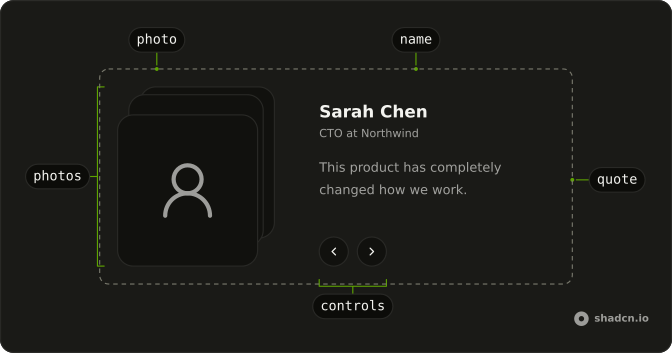
AnimatedTestimonials
├── photos
│   └── photo (one per testimonial)
├── content
│   └── item
│       ├── name
│       ├── designation
│       └── quote
└── controls
    ├── previous
    ├── next
    └── pause (with autoplay)
Usage
import {
  AnimatedTestimonials,
} from "@/components/ui/animated-testimonials";<AnimatedTestimonials
autoplay
testimonials={[
{
quote: "The best investment we made this year.",
name: "Emily Watson",
designation: "CEO at Harbor Labs",
src: "/photos/emily.jpg",
},
]}
/>Accessibility
The root is a region named Testimonials. The quote, the name and the role sit in a polite live region, so a screen reader reads the new testimonial when it changes. While autoplay is running the region goes quiet and speaks again once it pauses. The photo at the front carries the speaker's name as its alternative text, and the photos behind it are hidden from assistive tech.
Autoplay pauses while the pointer is over the component or focus is in it, a pause button stops it for good, and it stays off when the reader asked for reduced motion. The photos then change in place and the words appear at once.
- Tab
- Move between the previous, next and pause buttons.
- Enter
- Press the focused button.
- Space
- Press the focused button.
- Arrow Right
- With a button focused, show the next testimonial (the previous one in right-to-left text).
- Arrow Left
- With a button focused, show the previous testimonial (the next one in right-to-left text).
Demos
Manual
Three quotes with no autoplay: the testimonial changes only when the reader presses previous or next, or an arrow key while a button has focus. Use this when the quotes are long enough that a timer would cut someone off mid-sentence. The last one wraps round to the first, so neither button is ever disabled.
Controlled
The place is held outside with value and onValueChange, and a line under the component reads it back as Showing 2 of 3. Hold it yourself when something else on the page follows the quote, such as a company logo or a case study link. value counts from 0, and the buttons, the arrow keys and autoplay all report through onValueChange.
Stacked
The same component in a narrow column: below 36rem of its own width, the photos sit above the words. It follows its container, not the screen, so it stacks in a sidebar on a wide monitor too. Keep the quotes short here, since a long one pushes the buttons far down.
FAQ
What does each testimonial need?
An object with quote, name, designation and src: the words, who said them, their role, and the URL of their photo. Pass them in order as testimonials. The name is also the front photo's alternative text, so use the person's real name rather than a handle. Each photo is cropped to fill its frame, so a square one with the face near the middle works best.
How does autoplay work, and how do readers stop it?
Set autoplay and the component moves on every interval milliseconds, 5000 by default. It pauses while the pointer is over it or focus is inside it, and a pause button beside next stops it until pressed again. It never starts when the reader asked for reduced motion, and the pause button is not shown then.
How does the word-by-word reveal work?
The quote is split at its spaces and each word runs the same CSS keyframes, in from a blur and a little below, delayed by its place in the quote. The full quote is also in the page as plain text for screen readers, so they never hear it a word at a time. A new testimonial plays the reveal again from its first word.
Is Animated Testimonials accessible with Base UI?
Yes. The buttons are this library's Button with labels, the quote is announced politely when it changes, and the arrow keys move it while a button has focus. Autoplay pauses on hover and focus, can be stopped, and stays off under reduced motion, where the photos and words also change without moving.
How do I control which testimonial shows in React?
Pass value and update it from onValueChange, as the Controlled demo on this page does. value is the testimonial's place in the list, counting from 0. Use defaultValue instead when you only want to choose the first one shown and let the component keep its own place.
Why do the photos sit above the quote on small screens?
The layout is a container query on the component itself: from 36rem of its own width the photos and the words sit side by side, below that they stack. The Stacked demo on this page shows the narrow layout. Give the component a wider column, or change the @xl breakpoint in its file, to move the switch.
How do I install Animated Testimonials in React?
Run the command in the Installation section on this page. It adds the component, the Button it uses, and the keyframes for the photo lift and the word reveal to your stylesheet. Import AnimatedTestimonials from your ui folder and pass it your testimonials. The command uses the shadcn CLI.
API Reference
AnimatedTestimonials
<section> data-slot="animated-testimonials"
value?number
The testimonial shown, by its place in testimonials, when you hold it yourself.
defaultValue?number
The testimonial shown first, by its place in testimonials, when you
don't pass value.
- Default
0
onValueChange?(value: number) → void
Called with the new place after the previous or next button, an arrow key or autoplay moves.
- Parameters
value– number- Returns
void
testimonialsTestimonial[]
The testimonials, in order: each with a quote, a name, a role and a photo.
autoplay?boolean
Whether it moves on to the next testimonial by itself. It pauses while the pointer is over it or focus is in it, a button stops it, and it stays off when the reader asked for reduced motion.
- Default
false
interval?number
How long each testimonial stays with autoplay, in milliseconds. @default 5000.
- Default
5000
className?string
Merged with the part's classes.
data-state?string--animated-testimonials-depthstring--animated-testimonials-dirstring--animated-testimonials-tiltstring