shadcn.io is an independent project built on shadcn/ui
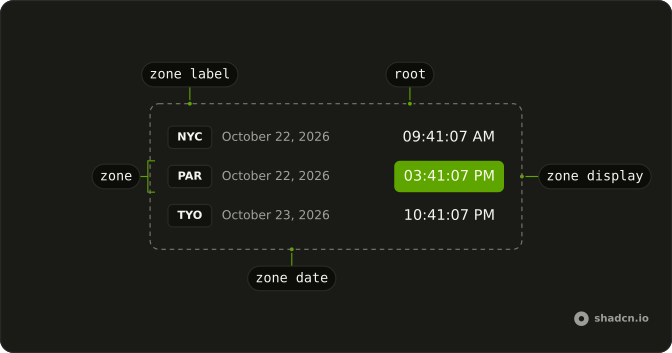
Relative Time is a world clock: one row per time zone, each with a label, the date there and the time there, all reading one timer so they turn over on the same second. Put it on a team page, a status page or beside a meeting, or give it a fixed moment to show when a meeting falls in every office.
For a single moment written as 5 minutes ago or in 3 days, use Relative Time Text.
Installation
Anatomy
Usage
import {
  RelativeTime, RelativeTimeZone, RelativeTimeZoneDate,
  RelativeTimeZoneDisplay, RelativeTimeZoneLabel,
} from "@/components/ui/relative-time";
zone takes an IANA time zone name, and the label, date and time inside a RelativeTimeZone all read that zone from it.
<RelativeTime>
  <RelativeTimeZone zone="Europe/Paris">
    <RelativeTimeZoneLabel>PAR</RelativeTimeZoneLabel>
    <RelativeTimeZoneDate />
    <RelativeTimeZoneDisplay />
  </RelativeTimeZone>
</RelativeTime>
Accessibility
Each time is a <time> element whose datetime attribute holds the instant it shows, and the clock isn't a live region, so a screen reader reads the time when it reaches it instead of announcing every second. A short code such as PAR is read out as written and doesn't name the city, so spell out the city in the label, as the Fixed demo does, or add the full name as visually hidden text. Nothing here takes focus.
Demos
Fixed
A design review at 15:00 UTC on Thursday, November 12, 2026, shown in four offices from San Francisco to Bangalore. value holds that one moment, so the clock stops ticking and every row converts it. The formats are shorter than the defaults, a weekday with the date and hours without seconds. Use a fixed value for anything scheduled.
Formats
A card in en-GB with day-first dates and a 24-hour time, set through dateFormatOptions, timeFormatOptions and locale, and under it a second clock showing only the times, each with the zone's short name. Any Intl.DateTimeFormat option works, so a format is a prop rather than an edit to the component. The zone always comes from each row's zone.
FAQ
How do I add time zones to Relative Time?
Put a RelativeTimeZone inside RelativeTime for each zone, with zone set to its IANA name, such as America/New_York or Asia/Kolkata. The label, date and time inside it read that zone, and every row shares the one timer, however many you add.
A name the browser doesn't know, such as a typo or a stale value from user settings, shows a dash for that row's date and time, and the console warns once with the name Intl.DateTimeFormat rejected. The other rows show their times as usual, on the server too. Check zones that come from user input before you save them, by creating a formatter with that zone inside a try block.
Does Relative Time show times like 5 minutes ago?
No. Relative Time shows the same moment as a clock in several time zones, such as 3:00 PM in Paris and 9:00 AM in New York.
For a past or future moment written relative to now, such as 5 minutes ago or in 3 days, use Relative Time Text, which updates its wording as time passes.
How do I change the Relative Time date and time format in React?
Pass dateFormatOptions and timeFormatOptions, which take any Intl.DateTimeFormat options, and a locale, as the Formats demo does. Setting hourCycle to h23 gives a 24-hour clock, and timeZoneName set to short adds the zone's short name.
That short name depends on the locale: in winter en-US writes Europe/Madrid as GMT+1, where en-GB writes CET. The locale is fixed to en-US by default, so the server and the browser write the same text.
How do I show a specific time instead of now in Relative Time?
Pass the moment as value, a Date, and the clock stops ticking while every row shows that instant in its own zone, as the Fixed demo does for a meeting. Leave value out and the clock is live again.
Build the moment from UTC parts, as that demo does with Date.UTC, so it means the same instant on the server and in every visitor's browser.
How often does the Relative Time clock update?
Once a second, on the second, from one timer in RelativeTime that every row reads, and onValueChange is called with each new time. A clock with no seconds in its format still renders every second.
Before the page runs in the browser, each date and time shows a dash, since the server can't know the visitor's current time. That keeps the server's HTML and the first render in the browser the same.
How do I add the visitor's own time zone to Relative Time?
Read it in the browser with Intl.DateTimeFormat().resolvedOptions().timeZone, which gives an IANA name such as Europe/Berlin, and render one more RelativeTimeZone with it. Do that once the page has loaded in the browser, since the server doesn't know the visitor's zone and would otherwise render its own.
Label that row as local time, so people don't mistake it for an office.
How do I style the Relative Time rows?
Pass classes to each part: the label is a small pill in a monospace font, and the date and time are plain text, the time with tabular numbers. RelativeTimeZone is a flex row with its parts pushed to either end, so wrap the label and the date in a span to keep them together on the left, as the demo at the top of the page does.
API Reference
RelativeTime
value?Date
A fixed moment to show in every zone. Without it, the clock is live and ticks each second.
onValueChange?(value: Date) → void
Called with the new time on every tick of the live clock.
- Parameters
value– Date- Returns
void
dateFormatOptions?Intl.DateTimeFormatOptions
Options for each zone's date (Intl.DateTimeFormat). @default { dateStyle: "long" }.
locale?string
The locale dates and times are written in. Fixed by default, so the server and the browser write them the same way.
- Default
"en-US"
timeFormatOptions?Intl.DateTimeFormatOptions
Options for each zone's time (Intl.DateTimeFormat). @default { hour: "2-digit", minute: "2-digit", second: "2-digit" }.
className?string
Merged with the part's classes.
RelativeTimeZone
zonestring
The IANA time zone this row shows, such as Europe/Paris.
className?string
Merged with the part's classes.
RelativeTimeZoneLabel
<span> data-slot="relative-time-zone-label"
className?string
Merged with the part's classes.
RelativeTimeZoneDate
<span> data-slot="relative-time-zone-date"
className?string
Merged with the part's classes.
RelativeTimeZoneDisplay
<time> data-slot="relative-time-zone-display"
className?string
Merged with the part's classes.