shadcn.io is an independent project built on shadcn/ui
A world clock: a row per time zone, each with a label, its date and its time, ticking every second.
Use it on a team page, a status page, or beside a meeting to show what time it is for everyone. Every row reads one shared clock, so they turn over on the same second. For a single moment written as "5 minutes ago", use Relative Time Text. In Vue, each time is a time element with the instant it shows, and the zones come from Intl, so there's no time zone data to ship.
Installation
Anatomy
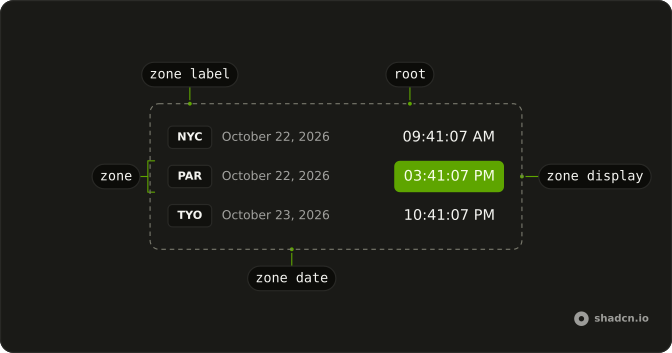
RelativeTime
└── RelativeTimeZone
    ├── RelativeTimeZoneLabel
    ├── RelativeTimeZoneDate
    └── RelativeTimeZoneDisplay
Usage
<script setup lang="ts">
import {
  RelativeTime, RelativeTimeZone, RelativeTimeZoneDate,
  RelativeTimeZoneDisplay, RelativeTimeZoneLabel,
} from "@/components/ui/relative-time";
</script>
<template>
  <RelativeTime>
    <RelativeTimeZone zone="Europe/Paris">
      <RelativeTimeZoneLabel>PAR</RelativeTimeZoneLabel>
      <RelativeTimeZoneDate />
      <RelativeTimeZoneDisplay />
    </RelativeTimeZone>
  </RelativeTime>
</template>
Demos
Fixed
A design review at 15:00 UTC, shown in four offices from San Francisco to Bangalore. value holds that one moment, so the clock stops ticking and every row converts it. The date and time options are shorter here: a weekday and a day, and hours without seconds. Use a fixed value for anything scheduled, and leave it out for the time right now.
Formats
A day-first date and a 24-hour time in en-GB, through dateFormatOptions, timeFormatOptions and locale, in a card. Below it, the same three zones as a row of times with the zone's short name. Any Intl.DateTimeFormat option works, so the format is a prop, not a fork of the component. The zone itself always comes from the row's zone.
FAQ
How do I add time zones to Relative Time?
Put a RelativeTimeZone in RelativeTime for each zone, with zone set to its IANA name, such as America/New_York or Asia/Kolkata. Its label, date and time parts read that zone. Add as many rows as you need: they all share one timer.
Is this the same as the '5 minutes ago' Relative Time?
No. This one is a world clock: the same moment in several zones. For a past or future moment written as "5 minutes ago" or "in 3 days", use Relative Time Text, a text effect.
How do I change the date and time format in Vue?
Pass dateFormatOptions and timeFormatOptions, any Intl.DateTimeFormat options, and a locale. hourCycle: "h23" gives a 24-hour clock, and timeZoneName: "short" adds the zone's abbreviation. The Formats demo on this page shows both.
How do I show a specific time instead of now?
Pass the moment as value. The clock stops ticking and every row shows that instant in its own zone, which is what a meeting time needs. Leave value out and the clock is live again.
How often does the clock update?
Once a second, on the second, from one timer in RelativeTime that every row reads. onValueChange is called with each new time. Before the page runs, the rows show a dash, since the server can't know the visitor's time.
API Reference
RelativeTime
value?Date
A fixed moment to show in every zone. Without it, the clock is live and ticks each second.
dateFormatOptions?Intl.DateTimeFormatOptions
Options for each zone's date (Intl.DateTimeFormat). @default { dateStyle: "long" }.
locale?string
The locale dates and times are written in. Fixed by default, so the server and the browser write them the same way.
- Default
"en-US"
timeFormatOptions?Intl.DateTimeFormatOptions
Options for each zone's time (Intl.DateTimeFormat). @default { hour: "2-digit", minute: "2-digit", second: "2-digit" }.
class?string
Merged with the part's classes.
@value-change(value: Date) → void
Called with the new time on every tick of the live clock.
- Parameters
value– Date- Returns
void
RelativeTimeZone
zonestring
The IANA time zone this row shows, such as Europe/Paris.
class?string
Merged with the part's classes.
RelativeTimeZoneLabel
<span> data-slot="relative-time-zone-label"
class?string
Merged with the part's classes.
RelativeTimeZoneDate
<span> data-slot="relative-time-zone-date"
class?string
Merged with the part's classes.
RelativeTimeZoneDisplay
<time> data-slot="relative-time-zone-display"
class?string
Merged with the part's classes.