shadcn.io is an independent project built on shadcn/ui
A symbol, its logo, its price and its change, in one line. A rise is green with an up arrow, a fall is red with a down arrow.
Use it for a watchlist row, a portfolio line, or a quote in the middle of a sentence. Prices come from your feed; the ticker only writes them, in the currency and locale you give it. For a number that counts or rolls as it changes, use Counting Number or Sliding Number. In Solid, the change carries its sign as text, so the color and the arrow are never the only clue.
Installation
Anatomy
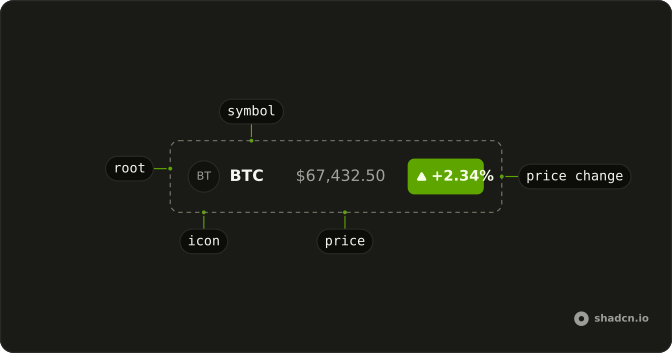
Ticker
├── TickerIcon
├── TickerSymbol
├── TickerPrice
└── TickerPriceChange
Usage
import {
  Ticker, TickerIcon, TickerPrice, TickerPriceChange, TickerSymbol,
} from "@/components/ui/ticker";<Ticker>
<TickerIcon src="https://github.com/bitcoin.png" symbol="BTC" />
<TickerSymbol symbol="BTC" />
<TickerPrice price={67432.5} />
<TickerPriceChange change={2.34} isPercent />
</Ticker>Demos
Currencies
Four markets, each Ticker with its own currency and locale: dollars in en-US, euros in de-DE, pounds in en-GB and rupees in en-IN. The change here is money, not a percent, so it's written in the same currency with its sign. Intl.NumberFormat places the symbol, the separators and the Indian lakh grouping. An unknown currency code falls back to US dollars instead of throwing.
Inline
Two tickers inside a sentence about chip makers, each a logo, a symbol and a percent change. The root is an inline span, so it sits on the line like a word and wraps with the text. Keep inline tickers short, a symbol and a change, and leave the full price to a table or a list.
Live
Three stocks whose prices move every two seconds, from a stand-in feed in the demo. Each new price slides in where the old one was, and the change turns from green to red as it crosses the open. Under reduced motion the new price only fades. Feed it real quotes the same way: pass the new price and change, and the ticker redraws.
FAQ
How do I change the Ticker's currency format?
Pass currency and locale to Ticker, such as EUR and de-DE. Every price and money change inside is written by Intl.NumberFormat with two decimals. An unknown currency code falls back to US dollars. The locale is fixed to en-US by default, so the server and the browser write the same text.
How does TickerPriceChange pick its color?
A positive change is up, in the success color with an up arrow; a negative one is down, in the destructive color with the arrow turned. Zero is flat and muted, with no arrow. The sign is part of the text, so the direction is read out too. Set isPercent when the number is a percent.
What does TickerIcon show when the logo doesn't load?
It's an Avatar: the image when src loads, and otherwise the symbol's first two letters. Without a src the letters show from the start. The image has an empty alt, because TickerSymbol beside it already names the stock.
How do I make a Ticker a link or a button in Solid?
Render the ticker as that element: the Default demo on this page renders each row as a button. Use a link when the row opens a quote page and a button when it opens a panel. A plain Ticker is a span with no role, for a quote you only read.
Does the Ticker fetch prices?
No. It writes the numbers you pass it. Keep the feed in your app, a socket or a poll, and pass each new price and change. A new price slides in when its text changes, and only fades under reduced motion.
API Reference
Ticker
<span>
currency?string
The ISO 4217 code prices and money changes are written in. An unknown
code falls back to USD.
- Default
"USD"
locale?string
The locale numbers are written in. Fixed by default, so the server and the browser write them the same way.
- Default
"en-US"
asChild?(props: ParentProps) => JSX.Element
Render your own element: a function that gets the part's props to spread on it.
- Type
(props: ParentProps) => JSX.Element
class?string
Merged with the part's classes.
TickerIcon
data-slot="ticker-icon"
symbolstring
The symbol whose letters stand in for the logo.
dir?"ltr" | "rtl"
The document's text/writing direction.
- Type
"ltr" | "rtl"- Default
"ltr"
id?string
The unique identifier of the machine.
ids?object
The ids of the elements in the avatar. Useful for composition.
- Type
{ root?: string; image?: string; fallback?: string }
onStatusChange?(details: StatusChangeDetails) → void
Functional called when the image loading status changes.
- Type
(details: StatusChangeDetails) → void- Parameters
details– { status: LoadStatus }- Returns
void
size?"default" | "sm" | "lg"
The size.
- Type
"default" | "sm" | "lg"
src?string
The logo's address. Without one, or while it fails, the symbol's first two letters show.
asChild?(props: ParentProps) => JSX.Element
Render your own element: a function that gets the part's props to spread on it.
- Type
(props: ParentProps) => JSX.Element
class?string
Merged with the part's classes.
TickerSymbol
<span> data-slot="ticker-symbol"
symbolstring
The symbol, written in capitals: btc shows as BTC.
class?string
Merged with the part's classes.
TickerPrice
<span> data-slot="ticker-price"
pricenumber
The price, written in the ticker's currency and locale.
class?string
Merged with the part's classes.
TickerPriceChange
<span> data-slot="ticker-price-change"
changenumber
The change: positive is up, negative is down.
isPercent?boolean
Whether change is a percent (2.5 is 2.5%) rather than money.
- Default
false
class?string
Merged with the part's classes.
data-direction?string
Mirrors direction.