shadcn.io is an independent project built on shadcn/ui
A row of days, each with its month and number, between two arrows that page through them. Today is marked, and the selected day is filled.
Use it when the day is near and a whole month would be too much: a booking, a delivery slot, a day in a schedule. When the day could be months away, use a Calendar, or a Date Picker in a form. In Svelte, the days are one stop in the tab order: the arrow keys move between them, and Enter selects.
Installation
Anatomy
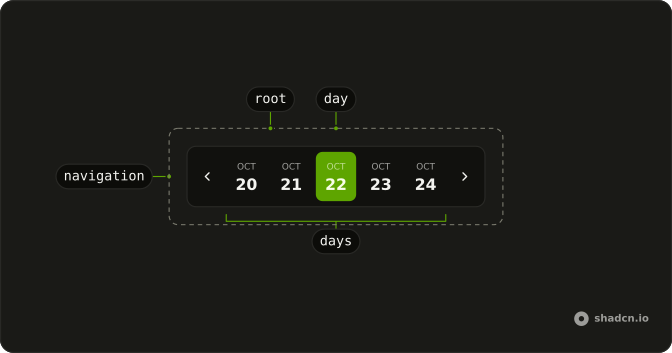
MiniCalendar
├── MiniCalendarNavigation
├── MiniCalendarDays
│   └── MiniCalendarDay
└── MiniCalendarNavigation
Usage
<script lang="ts">
import {
  MiniCalendar, MiniCalendarDays, MiniCalendarNavigation,
} from "@/components/ui/mini-calendar";
</script>
<MiniCalendar days={7}>
  <MiniCalendarNavigation direction="prev" />
  <MiniCalendarDays />
  <MiniCalendarNavigation direction="next" />
</MiniCalendar>
Accessibility
- Tab
- Moves focus into the days, to the selected day, today or the first day, and on to the next arrow.
- Arrow Left
- Moves focus to the previous day, paging the strip back at its start. Mirrored in a right-to-left page.
- Arrow Right
- Moves focus to the next day, paging the strip on at its end. Mirrored in a right-to-left page.
- Home
- Moves focus to the first day in view.
- End
- Moves focus to the last day in view.
- Page Up
- Pages the strip back and moves focus by as many days as it shows.
- Page Down
- Pages the strip on and moves focus by as many days as it shows.
- Enter
- Selects the focused day.
- Space
- Selects the focused day.
Demos
Controlled
Five days, with value and startDate held by the demo, the full selected date written below, and a Today button that sets both. Hold startDate when something outside the strip needs to move it, like that button or a jump to a booking. Hold value when the day feeds the rest of the form. Without them, defaultValue and defaultStartDate set where it starts.
Days
Two strips, one of three days and one of five, set by days. The arrows page by the same count, so three days move three at a time. Pick the count from the space you have and how far ahead people usually book: seven reads as a week, five as working days in view.
Weekends
A week whose Saturday and Sunday are dimmed, by one MiniCalendarDay inside MiniCalendarDays with classes on data-weekend. MiniCalendarDays renders its children once per day, and a day without a date takes the one it's rendered for. Each day also carries data-today and data-selected, so a style can target any of them without new props.
FAQ
How do I control the selected day of the Mini Calendar?
Pass value and onValueChange to MiniCalendar, as the Controlled demo does. For a strip that keeps its own state, use defaultValue. The value is a Date at local midnight. startDate and onStartDateChange control which days are in view the same way.
How do I change how many days show?
Set days: five by default. The arrows page by that count, so days={7} moves a week at a time. The Days demo on this page shows three and five.
How is today marked?
Today's button has a tinted background, unless it's also the selected day, which is filled. It carries aria-current="date" and data-today. Today is read once the page runs, in the visitor's own time zone, so the server never guesses it.
How do I style weekends or other days in Svelte?
Put one MiniCalendarDay inside MiniCalendarDays with your classes: it's rendered for every day in view. Target data-weekend, data-today or data-selected, as the Weekends demo does. Pass children to MiniCalendarDay to change what each button shows.
How does the keyboard move through the days?
The days are one stop in the tab order. The arrow keys move one day, Home and End go to the ends, and Page Up and Page Down move a whole strip. Moving past an end pages the strip so the day stays in view. Enter or Space selects, and each day's name is its full date.
API Reference
MiniCalendar
startDate?Date
The first day in view (controlled).
defaultStartDate?Date
The first day in view when uncontrolled. @default today.
onStartDateChange?(date: Date) → void
Called with the first day in view when the strip pages.
- Parameters
date– Date- Returns
void
value?Date | null
The selected day (controlled).
- Type
Date | null
defaultValue?Date | null
The day selected at first when uncontrolled.
- Type
Date | null- Default
null
onValueChange?(value: Date) → void
Called with the day a person selects.
- Parameters
value– Date- Returns
void
days?number
How many days the strip shows; the arrows page by as many.
- Default
5
locale?string
The locale month names and the days' labels are written in. Fixed by default, so the server and the browser write them the same way.
- Default
"en-US"
class?string
Merged with the part's classes.
MiniCalendarNavigation
data-slot="mini-calendar-navigation"
directionMiniCalendarDirection
Which way the strip pages, by as many days as it shows.
clickEffect?boolean
Apply a click effect to the button.
- Default
true
isLoading?boolean
Show a loading indicator.
- Default
false
pill?boolean
Fully rounded corners.
- Default
false
size?"default" | "icon" | "icon-lg" | "icon-md" | "icon-sm" | "icon-xl" | "icon-xs" | "lg" | "md" | "sm" | "xl" | "xs"
The size.
- Type
"default" | "icon" | "icon-lg" | "icon-md" | "icon-sm" | "icon-xl" | "icon-xs" | "lg" | "md" | "sm" | "xl" | "xs"- Default
"md"
variant?"default" | "destructive" | "ghost" | "link" | "outline" | "secondary"
The visual style.
- Type
"default" | "destructive" | "ghost" | "link" | "outline" | "secondary"- Default
"default"
asChild?Snippet<[PropsFn]>
Render your own element: a snippet that gets the part's props to spread on it.
- Type
Snippet<[PropsFn]>
class?string
Merged with the part's classes.
data-direction?string
Mirrors direction.
MiniCalendarDays
<div>
children?Snippet
What each day in view renders, once per day: a MiniCalendarDay
without a date takes that day's.
- Default
<MiniCalendarDay />
class?string
Merged with the part's classes.
MiniCalendarDay
data-slot="mini-calendar-day"
clickEffect?boolean
Apply a click effect to the button.
- Default
true
date?Date
The day this button selects. Inside MiniCalendarDays, the day it's rendered for.
isLoading?boolean
Show a loading indicator.
- Default
false
pill?boolean
Fully rounded corners.
- Default
false
size?"default" | "icon" | "icon-lg" | "icon-md" | "icon-sm" | "icon-xl" | "icon-xs" | "lg" | "md" | "sm" | "xl" | "xs"
The size.
- Type
"default" | "icon" | "icon-lg" | "icon-md" | "icon-sm" | "icon-xl" | "icon-xs" | "lg" | "md" | "sm" | "xl" | "xs"- Default
"md"
variant?"default" | "destructive" | "ghost" | "link" | "outline" | "secondary"
The visual style.
- Type
"default" | "destructive" | "ghost" | "link" | "outline" | "secondary"- Default
"default"
asChild?Snippet<[PropsFn]>
Render your own element: a snippet that gets the part's props to spread on it.
- Type
Snippet<[PropsFn]>
class?string
Merged with the part's classes.
data-date?string
Mirrors key.
data-selected?string
Present when isSelected is true.
data-today?string
Present when isToday is true.
data-weekend?string