shadcn.io is an independent project built on shadcn/ui
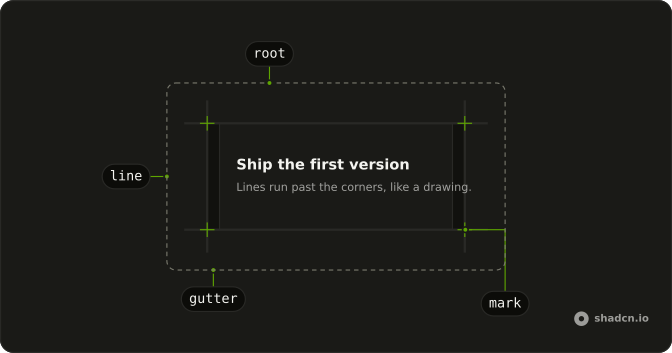
Guides draws thin lines in the border color along the edges of a box, the way a technical drawing marks out a plan. The lines can run past the corners or out to the page's edges, fade in from nothing, add an inner pair with a hatched or dotted gutter, and carry a plus, a dot or a square where they cross.
It frames the sections of a landing page without cards. For one line between two blocks, use a Separator, and for a surface that groups content, a Card.
Installation
Anatomy
Usage
<script setup lang="ts">
import { Guides } from "@/components/ui/guides";
</script>
Guides fills the nearest positioned ancestor, so give the box it outlines relative, and put it first inside the box. Content after it that has a position and a background paints over its lines.
<template>
  <div class="relative p-8">
    <Guides extend="md" marks="corners" />
    <h3>Ship the first version</h3>
  </div>
</template>
Stacking sections
A landing page is a stack of sections, so its lines come in two layers.
The spine is the same in every section. Each section puts its content in one shared page column and draws only the rule along its top:
<template>
  <section class="relative overflow-x-clip px-4 sm:px-6">
    <div class="relative mx-auto w-full max-w-6xl py-16 md:py-24">
      <Guides bleed marks="top" rules="top" />

    </div>
  </section>
</template>
The side lines of every section then sit in the same place and join into one pair from the top of the page to the bottom, and each boundary is drawn once, by the section below it. Leave extend off the spine, because its lines would run into the next section, and fade too, because a fading side line breaks the pair. A hero that opens the page is the exception and can fade its spine in from the top.
The interior is what changes from section to section: bands that cut through inner lines, hatched gutters, cells, a framed figure. That variety keeps a page of sections from looking like one section repeated.
Demos
Spine
Two stacked sections, titled One column for the page and One rule per boundary, share a column. Their side lines join into one pair, and each section draws only the rule above it, with a plus on both ends, so the boundary between them is a single line. Start a landing page from this.
Bands
A block of questions with dashed inner lines set in by inset="lg", and two lists crossing it as bands. Each list has relative, a background and border-y, so it paints over the inner lines and its borders run from one side line to the other. Use it for an FAQ, a changelog or any long list in a framed section.
Gutter
A call to action, Start building today, with solid inner lines and gutter set to hatch, which fills the band between each side and its inner line with diagonal hatching. The hatched edges set the block apart as the one to act on, without a colored background.
Cells
Three feature cells, Dashboards, Instant API and Role-based access, each with its own Guides set to extend="md" and marks="start". The lines run 1rem past every corner, the same as the grid's gap-4, so they meet across the gaps and the row reads as one drawing. Use it for features, stats or testimonials instead of three cards.
Mark shapes
Three boxes, one per markShape: a plus, a dot and a small square, on all four corners. The square is filled with the page's background, so it sits on top of the crossing lines instead of showing them through it. The dot is the smallest of the three, for a page where the marks should stay quiet.
Framed figure
A small bar chart of weekly sessions in a dashed frame with square marks on its corners, nested in a solid frame whose lines run 1rem past its own corners, with a caption below. Two layers of Guides, one inside the other, set an illustration apart from the text around it.
RTL
The opening box in Arabic, with dir set to rtl, dashed inner lines and marks="start". The lines are placed with logical sides, so the start mark moves to the top-right corner, and each mark carries a right-to-left offset that keeps it centered on its crossing.
FAQ
Why don't my guides line up with the box?
Guides is an absolute layer that fills its nearest positioned ancestor, so the box you want outlined needs relative, with Guides inside it. If the nearest relative is an ancestor further up, the lines trace that one instead.
The side lines and rules sit one pixel outside the box's padding edge, so they never cover the padding or the content in it.
How do I stack sections without doubling the lines?
Give every section the same column and draw only its top rule. Put px-4 sm:px-6 on the section, mx-auto w-full max-w-6xl and the vertical padding on the column inside it, and in that column a Guides with bleed set to true, marks="top" and rules="top", as the Spine demo does.
The side lines then sit in the same place in every section and join, and each boundary is drawn once, by the section below it. Leave extend off these lines, or they cross into the neighbors.
How do I make the rules run to the edges of the page?
Set bleed to true. The top and bottom rules then reach far past the sides, until the nearest ancestor that clips stops them.
Give the section overflow-x-clip, so the rules end at its edges and the page never scrolls sideways. Unlike overflow-hidden, it doesn't make the section a scroll container, so sticky children inside keep working.
How do I make a band cut through the inner lines?
Draw the inner lines with inner set to solid or dashed, then give the band relative and a background such as bg-background. Guides comes first in the box, so a positioned band after it paints over its lines.
Add border-y to the band and its borders run from one side line to the other, as the lists in the Bands demo do.
How do I fade the guide lines in at the top of a hero?
Set fade to top. The side lines, the inner lines and the gutters then start transparent and reach full strength 40% of the way down, so the drawing seems to begin inside the hero rather than at the browser's edge.
Use bottom for the reverse, or both to fade in over the first 30% and out over the last 30%. The rules aren't faded, so pair a fading spine with rules set to bottom or none.
How do I draw guides around a grid of cards?
Give each cell its own Guides and set extend to match the grid's gap. With gap-4 and extend="md", both 1rem, each cell's lines run across the gap and meet its neighbor's, so the gaps read as crossings in one drawing.
Put marks="start" on each for a single mark per cell, as the Cells demo does. Drop the cards' own borders and backgrounds, or the two sets of edges compete.
What color are the lines, and how do I change it?
The lines and gutters take the theme's border color and the marks take muted-foreground, so they follow the theme in light and dark mode.
To change one Guides, pass a class that targets its parts, such as *:data-[slot=guides-line]:border-primary/40 for the lines or *:data-[slot=guides-mark]:text-primary for the marks. To change every Guides, edit the file in components/ui.
Do screen readers announce Guides?
No. The layer is aria-hidden and pointer-events-none, so assistive technology skips it and it never takes a click or a hover from what lies under it.
It carries no meaning, so the structure it draws has to exist in the markup too. Headings, lists and landmarks such as section tell a screen reader what the lines tell a sighted reader.
API Reference
Guides
<div> data-slot="guides"
bleed?boolean
Lets the rules run past the sides to the edges of the nearest ancestor
that clips (give the section overflow-x-clip).
- Default
false
extend?"none" | "sm" | "md" | "lg"
How far the lines run past the corners: none, 0.5rem, 1rem or 3.5rem.
- Type
"none" | "sm" | "md" | "lg"- Default
"none"
fade?"none" | "top" | "bottom" | "both"
Fades the side lines (and the inner lines and gutters) in from nothing at their top, their bottom or both ends.
- Type
"none" | "top" | "bottom" | "both"- Default
"none"
gutter?"none" | "hatch" | "dots"
Fills the band between the sides and the inner lines: diagonal hatching or a dot grid.
- Type
"none" | "hatch" | "dots"- Default
"none"
inner?"none" | "solid" | "dashed"
A second pair of side lines, inset from the sides by inset.
- Type
"none" | "solid" | "dashed"- Default
"none"
inset?"sm" | "md" | "lg"
How far the inner lines (and the gutters) sit from the sides: 0.75rem,
1rem then 2rem from sm, or 1.5rem then 3rem from sm.
- Type
"sm" | "md" | "lg"- Default
"md"
marks?"none" | "start" | "top" | "bottom" | "corners"
Marks on the corners: none, the top-start corner, the two top corners, the two bottom corners, or all four.
- Type
"none" | "start" | "top" | "bottom" | "corners"- Default
"none"
markShape?"plus" | "dot" | "square"
The marks' shape: a plus, a dot, or a small square.
- Type
"plus" | "dot" | "square"- Default
"plus"
rules?"both" | "top" | "bottom" | "none"
Which horizontal edges get a line. A section in a stack of sections
draws only its top rule, so two sections never double a line.
- Type
"both" | "top" | "bottom" | "none"- Default
"both"
sides?boolean
Draws the two side lines.
- Default
true
variant?"solid" | "dashed"
The outer lines' style.
- Type
"solid" | "dashed"- Default
"solid"
class?string
Merged with the part's classes.
--guides-insetstring