Atlassian Design System
Atlassian's live --ds tokens: Atlassian Blue #1868db pills and links, navy brand fills, Charlie Display and Charlie Text. For React, Next.js and AI tools.
- Primary color
- #1868db
- Typeface
- Charlie Text
- Shape
- Mixed
- Base radius
- 10px
- Colors
- 24
- Type tokens
- 13
- Components
- 22
- Spacing values
- 10
About Atlassian DESIGN.md
Curated by Dov Azencot, updated May 13, 2026. Source atlassian.com (opens in a new tab).
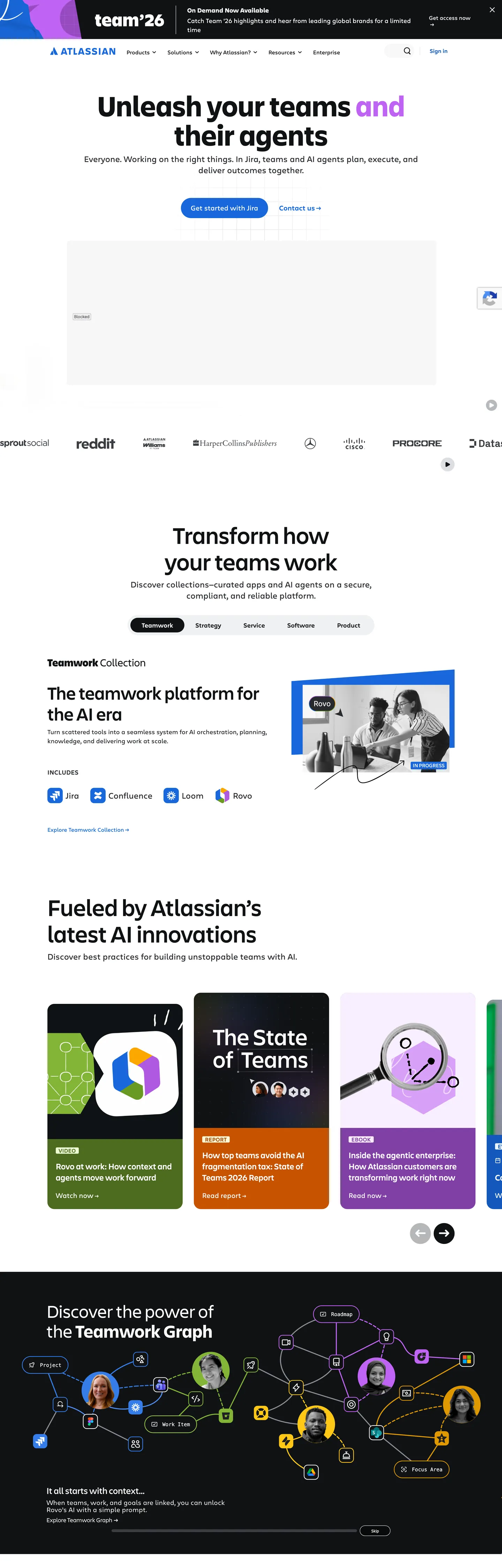
Atlassian's marketing surface is the rare enterprise homepage that ships its design tokens to the browser as `--ds-*` custom properties — 468 of them on `:root`, each carrying a hex value the DOM resolves at paint time. The canvas is pure white (`#ffffff`) and ink sits in a near-black (`#101214`); the only true chromatic event is Atlassian Blue (`#1868db`), bound to the `--ds-link` and `--ds-background-brand-bold` roles and reserved for the hero CTA pill ("Get started with Jira"). Display type is Charlie Display at 84px weight 600 across "Unleash your teams and their agents"; body and nav drop to Charlie Text at 16–20px weight 400. Where most enterprise homepages drown the action in three competing buttons and a gradient hero, Atlassian gates the entire above-the-fold composition through one blue pill. The DESIGN.md file packages 24 colors tokens, 11 typography styles, 8 corner radii, 10 spacing values, and 22 components. Colors split into ink (`#101214`, `#292a2e`, `#505258`, `#63666b`), surface (`#ffffff`, `#dddee1`, `#e9f2fe`), brand voltage (`#1868db` link / `#1c2b42` boldest navy / `#1558bc` pressed), and a semantic chart family (`#22a06b` green, `#357de8` blue, `#af59e1` purple, `#ae2e24` red) inherited from the open Atlassian Design System. The format is the Google Labs DESIGN.md spec — token references like `{colors.brand-bold}` and `{typography.display-xl}` that designers and AI agents can both parse without translation. Feed the file to Claude, Cursor, or GitHub Copilot and the agent reproduces Atlassian's specific gate: a white canvas, navy headlines, Charlie at weight 500 for display and 400 for body, and Atlassian Blue scoped to a single 10000px pill per viewport. Reference the tokens directly inside Tailwind config, CSS variables, or paste the component block into a brand audit. The discipline worth studying is the refusal of the enterprise CTA stack — Atlassian commits to one primary action per fold, lets the navy boldest fill `#1c2b42` carry the dark sections, and trusts product mockups in white cards to do the persuasion work decorative gradients do elsewhere.
What makes it distinct
5 highlights
- Live design tokens on `:root`468 `--ds-*` custom properties render every brand and structural color
- Single Atlassian Blue voltage`#1868db` fills the Jira CTA pill and link role; navy `#1c2b42` carries deep brand fills
- Two-typeface pairingCharlie Display at 84px weight 600 for hero, Charlie Text at 16–20px for body and nav
- Pill geometry on the primary CTA`10000px` radius button against 3px and 20px card corners elsewhere
- Semantic-token chromeNames like `--ds-background-brand-bold` (`#1868db`) and `--ds-background-brand-boldest` (`#1c2b42`) ship straight to the page
Live at atlassian.com
Atlassian in production, as captured. Scroll the window to see the whole page.
24 colors
Atlassian's system runs on #1868db as its primary voltage, used in 2 of 22 components. Type is set in Charlie Text across 13 tokens from 12px to 84px, weights 400–600. Shape language is mixed across 22 components, blending pills, soft rounds, and squarer corners.
Brand & Accent
Sparing, CTA-only voltage · 3
Surface
Page and card backgrounds · 3
Text
Headlines, body, captions · 8
Borders & Hairlines
Dividers, outlines, rules · 2
Other
Specialty colors · 8
13 type tokens
Set in Charlie Text across 13 tokens, from 12px to 84px, weights 400–600. Shown in its own stack: where the font isn't installed, the fallback the file names stands in.
- display-xl84px · weight 600 · lh 1The quick brown fox jumps over the lazy dog
- display-lg68px · weight 500 · lh 1.12The quick brown fox jumps over the lazy dog
- display-md52px · weight 500 · lh 1.15The quick brown fox jumps over the lazy dog
- display-sm32px · weight 500 · lh 1.1The quick brown fox jumps over the lazy dog
- display-xs28px · weight 400 · lh 1.43The quick brown fox jumps over the lazy dog
- subhead24px · weight 500 · lh 1.33 · tracking 0.3pxThe quick brown fox jumps over the lazy dog
- body-lg24px · weight 400 · lh 1.33The quick brown fox jumps over the lazy dog
- body-md18px · weight 400 · lh 1.44The quick brown fox jumps over the lazy dog
- body-md-strong18px · weight 500 · lh 1.44The quick brown fox jumps over the lazy dog
- body-sm16px · weight 400 · lh 1.5The quick brown fox jumps over the lazy dog
- caption12px · weight 400 · lh 1.3The quick brown fox jumps over the lazy dog
- eyebrow16px · weight 500 · lh 1.13 · tracking 0.3pxThe quick brown fox jumps over the lazy dog
- button-md20px · weight 400 · lh 1.3The quick brown fox jumps over the lazy dog
Radii and spacing
8 corner radii and 10 spacing values. Shape language: mixed, on a 10px base radius.
Radii8
- none0px
- xs3px
- sm4px
- md10px
- lg20px
- xl40px
- full10000px
- circle100%
Spacing10
- xxs4px
- xs6px
- sm8px
- md16px
- base20px
- lg24px
- xl32px
- xxl40px
- section64px
- gutter136px
22 components
Each rendered from its tokens (color, type, radius, padding) on Atlassian's own canvas.
- Button PrimaryButton Primarybutton-primary
- Button Primary HoverButton Primary Hoverbutton-primary-hover
- Button Primary PressedButton Primary Pressedbutton-primary-pressed
- Button SecondaryButton Secondarybutton-secondary
- Button On DarkButton On Darkbutton-on-dark
- Top NavTop Navtop-nav
- Nav LinkNav Linknav-link
- Hero HeadingHero Headinghero-heading
- Product CardProduct Cardproduct-card
- Product Card DarkProduct Card Darkproduct-card-dark
- Featured Card BrandFeatured Card Brandfeatured-card-brand
- Tab DefaultTab Defaulttab-default
- Tab SelectedTab Selectedtab-selected
- Eyebrow LabelEyebrow Labeleyebrow-label
- Link TextLink Textlink-text
- Badge NewsBadge Newsbadge-news
- Chart Tile GreenChart Tile Greenchart-tile-green
- Chart Tile PurpleChart Tile Purplechart-tile-purple
- Chart Tile OrangeChart Tile Orangechart-tile-orange
- Section DarkSection Darksection-dark
- DividerDividerdivider
- FooterFooterfooter
The system, in use
Atlassian's tokens on the kind of product it builds.
Plan, build and ship in one place
Bring your team's work together, from the first idea to the final release.
Atlassian design system FAQ
Atlassian's tokens, its components and how to use this DESIGN.md in your project.
Related reading
Specs, directories and component libraries that pair with this design system.
- Browse all design systemsThe full directory of DESIGN.md files on shadcn.io, with live mockups for each.shadcn.io
- Atlassian Design SystemThe open design system Atlassian ships — token names, components, and accessibility guidance.atlassian.design (opens in a new tab)
- The DESIGN.md specificationGoogle Labs' open spec for machine-readable design system files — the format this page is built on.github.com (opens in a new tab)
Use Atlassian in your project
One machine-readable file. Drop it into Claude Code, Cursor, VS Code or any AI tool that reads DESIGN.md.
Download the DESIGN.md
One machine-readable file: every color, type, radius, spacing, and component token of Atlassian.
Feed it to your AI tool
Drop it into Claude, Cursor, or GitHub Copilot. The agent writes React components and Tailwind classes that match Atlassian's visual language.
Reference the tokens directly
Or paste the values into your Tailwind config, CSS variables, or component library: every color, size and radius is a quoted, ready-to-copy value.
Read the full DESIGN.md overview, rationale, do’s and don’ts
Overview
Atlassian's homepage is the rare enterprise marketing surface that ships its design system tokens to the browser as live --ds-* CSS custom properties — 468 of them on :root, each carrying a hex value the DOM resolves at paint time. The canvas commits to white (#ffffff); ink runs near-black (#101214); the single chromatic event above the fold is Atlassian Blue (#1868db), bound to the --ds-link and --ds-background-brand-bold roles and reserved for the hero CTA pill at 10000px corner radius.
Token transparency: the marketing site does not transcode design tokens into one-off marketing CSS — it loads the same --ds-background-brand-bold, --ds-text, and --ds-border vocabulary that styles Jira and Confluence inside the product, then resolves them on :root. The hex behind the Jira CTA pill (#1868db) is the same value an Atlaskit button renders in the app. Where most enterprise homepages route brand color through Webflow custom fields and bespoke marketing variables, Atlassian routes it through the same token graph the engineering team ships to product.
Display type is Charlie Display at weight 500–600, hitting 84px on the hero h1 ("Unleash your teams and their agents") with line-height equal to font-size (a tight 1.0 ratio). Body and nav drop to Charlie Text at 16–20px weight 400 with line-height 1.3–1.5. The hierarchy is engineered: there are no decorative weights between display and body — the brand earns presence through size jumps (84 → 52 → 32 → 24 → 18), not through bolds. Atlassian also runs a semantic chart family — green #22a06b, blue #357de8, purple #af59e1, red #ae2e24, teal #2898bd — pulled from the product's analytics surfaces and dropped into homepage product-tile illustrations.
Key Characteristics:
- Single action gate: every fold contains exactly one Atlassian Blue pill (
#1868db); secondary actions are white pills with hairline borders. - White canvas (
#ffffff) all the way down except for one anchored dark band (#000000) at the Teamwork Graph showcase. - Charlie Display for hero and section heads, Charlie Text for nav and body — two families, no third.
- Pill geometry (
10000px) only on buttons and chips; cards stay at20px, form fields at3px. - Navy boldest (
#1c2b42) carries dark product-card fills —--ds-background-brand-boldestresolved straight to the page. - The chart family (
#22a06b,#357de8,#af59e1,#ae2e24) appears only inside product-tile illustrations, never as section backgrounds.
Colors
- Atlassian Blue (
#1868db) — frequency 39. Used as text (18), border (18), background (3). Bound to--ds-link,--ds-background-brand-bold,--ds-icon-brand,--ds-border-selected,--ds-text-brand. The page's single chromatic voltage — the Jira CTA pill, every link, every focus indicator. - Atlassian Blue pressed (
#1558bc) — frequency 10. Used as text (3), background (4), border (3). The--ds-link-pressedand--ds-background-brand-bold-hoveredvalue — never appears at rest, only on active and hover states of the primary. - Brand boldest navy (
#1c2b42) — frequency 158. Used as text (79), border (79). Bound to--ds-background-brand-boldest. The dark fill for product cards that need brand atmosphere — appears across the "Featured apps" tiles and the Teamwork Platform header strip. - Ink primary (
#101214) — frequency 274. Used as text (133), bg (8), border (133). The page's load-bearing text color, bound to--ds-borderand--ds-skeleton-subtle. Reserved for headlines, body type, and the selected tab fill. - Ink neutral-bold (
#292a2e) — frequency 81. Used as text (41), border (40). The--ds-textand--ds-iconvalue — secondary type and default icon stroke. - Ink subtle (
#505258) — frequency 54. Used as text (27), border (27). Bound to--ds-text-subtleand--ds-icon-subtle— the workhorse for supporting paragraphs and inactive tabs. - Ink subtlest (
#63666b) — frequency 4. Used as text (2), border (2). The--ds-text-subtlestquietest grade — captions and legal type. - Canvas white (
#ffffff) — frequency 240. Used as text (113), bg (11), border (111), shadow (5). The default surface and--ds-surface. Also serves as inverse ink against the navy dark band. - Inverse canvas (
#000000) — frequency 1049. Used as text (524), border (524), bg (1). Resolves through--ds-UNSAFE-transparent(the alpha-overlay token) and the dark--ds-background-inverse-subtleband — most occurrences are transparent borders rather than fills. - Surface pressed (
#dddee1) — frequency 2. Used as bg (1), border (1). The--ds-surface-pressedhairline color — depressed-state fills on overlay cards. - Selected surface (
#e9f2fe) — frequency 4. Used as bg (4). Bound to--ds-background-selectedand--ds-background-brand-subtlest— the pale blue tint behind selected chips and badges. - Hairline strong (
#b7b9be) — frequency 1. Used as border (1). The--ds-border-inputvalue — applied to text-input outlines that lack a specific brand border. - Chart green (
#22a06b) — frequency 0. Bound to--ds-border-accent-greenand--ds-chart-green-bold. Reserved for product-tile illustration accents, never as a section background. - Chart blue (
#357de8) — frequency 0. Bound to--ds-chart-brandand--ds-chart-categorical-1— the analytics-categorical-1 hex inside dashboard mockups. - Chart purple (
#af59e1) — frequency 0. Bound to--ds-icon-discoveryand--ds-chart-purple-bolder— the "Discovery" semantic in product UI screenshots. - Chart red (
#ae2e24) — frequency 0. Bound to--ds-text-danger— danger semantic, no marketing exposure on the homepage above the fold. - Chart orange (
#c75300) — frequency 0. Bound to--ds-chart-warning-bold— warning semantic inside dashboard mockups.
Typography
Two proprietary families, no third. Charlie Display carries the hero h1 at 84px weight 600 with line-height 84px — a tight 1.0 ratio that pulls "Unleash your teams and their agents" into a dense two-line block. Section heads step down 68 → 52 → 32 px at weight 500 with line-height 1.10–1.15. The 28px tier (display-xs) drops to weight 400 — Atlassian uses size, not bold, to mark hierarchy from there down.
Charlie Text covers body, nav, and labels at 16–24px weight 400. The two flavors live at 16px line-height 1.5 (long-form paragraphs) and 18–20px line-height 1.44–1.30 (subheads inside cards). Eyebrow labels use weight 500 with letter-spacing 0.3px — the only place positive tracking appears.
The fallback chain is a long native stack: -apple-system, system-ui, Segoe UI, Roboto, Oxygen, Ubuntu, Fira Sans, Droid Sans, Helvetica Neue, sans-serif. If Charlie isn't licensed, Inter at weight 500 for display and 400 for body is the closest open substitute; Geist Sans also works. Avoid native Helvetica fallback — its heavier x-height clashes with Charlie's narrower letterforms.
Layout
The grid is centered with a maximum content width near 1168px and side gutters that step to 136px on wide viewports (the 0px 136px padding pattern appears 11 times in the extracted spacing histogram). Sections stack vertically with 64px of vertical rhythm between major bands. Inside sections, content blocks use 32px between heading and supporting copy, 24px between sibling cards, and 8px for micro-spacing inside list items.
The hero uses centered alignment with the heading at 968px width — type spans nearly the whole content frame, leaving only the side gutters as breathing room. Below the fold, three-tile card grids replace center alignment; tiles run at equal width with 24px gutters and 32px internal padding. The Teamwork Platform tabs sit inside a centered pill row, then unfold into a single full-width product-mockup card.
Elevation & Depth
Atlassian leans on hairline + surface contrast rather than drop shadows for elevation. The canvas is #ffffff; cards on the canvas use a 1px hairline border in #dddee1 (--ds-border) to lift off without a shadow. The only documented shadow surfaces live behind the white floating cards inside the Teamwork Graph dark band, where elevation reverses — cards float off #000000 with a soft --ds-shadow-overflow glow.
The Atlassian Design System ships --ds-elevation-surface-current, --ds-elevation-surface-raised, --ds-elevation-surface-overlay tokens that resolve to #ffffff on light mode — the elevation differentiator is z-index and shadow alpha, not surface color. The marketing homepage uses two elevation tiers (current for body content, raised for floating mockup cards) and skips the overlay tier entirely.
Shapes
Three-tier radius language by component role: 10000px (pill) on the primary CTA and chip badges, 20px (rounded-lg) on feature cards and product tiles, 3px (rounded-xs) on form fields and inputs. The 40px value appears on a handful of large illustration containers — never on type-bearing components.
A 100% (circle) radius is reserved for brand-logo avatars and the Atlassian logo lockup. The pill is gated to interactive surfaces; cards are gated to content surfaces; the near-square 3px is gated to engineered-control surfaces. Atlassian deliberately avoids the mid-range 8–12px register — the gap between 3px and 20px signals to the reader which components are containers and which are inputs.
Components
button-primary— Atlassian Blue (#1868db) fill, white text, Charlie Text 20px weight 400,10000pxradius, padding14px 26px, height58px. The Jira CTA — one per fold.button-primary-hover— same geometry, fill shifts to#1558bc(the--ds-background-brand-bold-hoveredvalue).button-secondary— white fill, ink text, 1px#b7b9beborder, same10000pxradius — pairs alongside primary as the muted alternative.button-on-dark— white pill with ink text, used on the navy and black bands.top-nav— white canvas, ink text, Charlie Text 16px, 72px height with10px 16pxpadding per link.nav-link— flat 44px height, no border, ink at default and#1868dbon hover.hero-heading— Charlie Display 84px weight 600 line-height84px, no padding, no border, sits centered at968pxwidth.product-card— white canvas, 1px#dddee1hairline,20pxradius,32pxpadding — the workhorse content tile.product-card-dark— navy boldest fill (#1c2b42), white text — appears in the "Featured apps" trio for emphasis.featured-card-brand— Atlassian Blue (#1868db) fill, white text — the singular branded tile in the product-tile grid.tab-default/tab-selected— pill chips at10000pxradius, padding8px 32px. Default is white-on-ink-subtle; selected flips to ink fill with white text.eyebrow-label— Charlie Text 16px weight 500, letter-spacing0.3pxuppercase — the only place positive tracking appears.link-text— inherits body-md sizing with#1868dbink — used inline inside paragraphs.badge-news— pale blue (#e9f2fe) fill, blue text, pill radius — the "On Demand Now Available" announcement chip.chart-tile-{green,purple,orange}— saturated chart-family fills, white text,20pxradius — the colored product-tile trio at "Fueled by Atlassian's latest AI innovations".section-dark—#000000fill, white text,64px 136pxpadding — the Teamwork Graph anchored band.divider— 1px hairline at#dddee1— section breaks above the footer.footer— white canvas, ink-subtle text, Charlie Text 12px caption sizing,64px 136pxpadding.
Do's and Don'ts
Do use #1868db ({colors.brand-bold}) exclusively for the primary CTA, inline links, and focus indicators. The hex shows up as a text color 18 times in the page, as a border 18 times, as a background 3 times — almost every appearance is for an interactive role.
Do stack hierarchy through size, not weight. Display drops 84 → 68 → 52 → 32 → 28 with weight 500–600 at the top and weight 400 by 28px. Add a bold at 28px and the page reads as a marketing one-pager, not the Atlassian product surface.
Don't apply 10000px pill radius to anything except buttons, chips, and pill badges. Use it on a 200px-tall card and the card reads as a giant button. Cards belong at {rounded.lg} (20px); form fields belong at {rounded.xs} (3px).
Don't use #1c2b42 for body text. The navy boldest is a background fill bound to --ds-background-brand-boldest — its contrast against #ffffff is fine for type at display sizes but fails the WCAG ratio against pale tints. For text on white, use #101214 ink instead.
Don't combine the chart family (#22a06b, #357de8, #af59e1, #ae2e24) with the brand voltage #1868db in the same component. The chart hexes are categorical tokens for analytics surfaces; pulling them into marketing chrome breaks the semantic gate Atlassian maintains between product UI and homepage.
Don't swap Charlie Display for Charlie Text on the hero. Charlie Display is the only family designed for tight lineHeight: 84px at fontSize: 84px — Charlie Text at the same size opens the tracking and breaks the engineered density of "Unleash your teams and their agents".
Known Gaps
- Form-input styling — the homepage does not expose a text-input component (the extractor returned
input: null). The--ds-background-inputtoken (#ffffff) and the implied#b7b9beborder outline an input recipe but Atlassian's full form chrome lives on signup pages, not the marketing hero. - Dark-mode product UI — Atlassian Design System ships a full dark theme for Jira and Confluence; the homepage stays light except for the single Teamwork Graph band. This DESIGN.md captures the marketing track only.
- Motion and animation timings — Atlassian uses entrance animations on tile reveals and tab transitions; durations and easings are not exposed via
--ds-*properties on:root. - Charlie Display and Charlie Text are proprietary — Inter at weight 500/400 is the closest open substitute.
- The 468
--ds-*variables include token roles not surfaced on this homepage (warning, danger, success, discovery semantics) — they ship to:rootbecause the page imports the full design-token stylesheet, but most don't paint pixels above the fold.
More systems like this
Asana, ClickUp, Linear and 5 more in Project Management: each brand's colors, type and components in one file your AI agent builds from.
Build it with Pro
The DESIGN.md files are free. Pro adds 6,000+ blocks, premium templates and the MCP server, so your AI editor builds in your system for you.
4.9/5 out of 5 · 150+ reviewsfrom 150+ founders and developers.
Billing
Billed once a year in USD. Cancel anytime.
- How many people can use the license.
- Client work, SaaS products and anything you charge for.
- Page sections in 56 categories, from heroes and pricing tables to dashboards and settings, on every framework and UI library, in your theme.
- Complete Next.js sites for startups, SaaS, agencies and portfolios, every page designed, ready to ship.
- Your AI agent searches, previews and installs any component, block, icon or DESIGN.md from a prompt: 22 tools in Claude Code, Cursor, VS Code and 35 more clients.
- Buttons with motion and states of their own, from an arrow that slides in to a burst of confetti.
- Typewriters, scrambles, counters and more, for headlines, labels and numbers.
- Animated backgrounds for heroes, sections and cards, from a soft aurora to a flock that flees the cursor. Most are pure CSS.
- WebGPU shaders, from a slow aurora to a black hole, each drawing only while it's on screen.
- One design and one theme on all four: the components, blocks and effects are built for each framework.
- React on Base UI, Radix UI, React Aria or Ark UI: install the version for the library your project already uses. Vue, Svelte and Solid run on Ark UI.
- From a button to a date picker, a color picker or a guided tour: accessible, typed in TypeScript, each with live demos.
- Real-world patterns built from the components, in 53 galleries: forms, tables, menus, dialogs and more.
- Area, bar, line, pie, radar and radial charts on TanStack Charts, on every framework. React also gets the Recharts originals.
- Debounce, local storage, media queries and more: each hook is one typed file you own.
- From 222 libraries, Lucide, Heroicons, Tabler and Material Symbols among them, as SVG or a React component in one command.
- Stripe, Linear, Apple and 497 more: a brand's colors, typography and components in one file your AI agent builds from.
- Restyle every component and block at once: 8 styles, 8 grays, 18 colors and 5 radii, shared as a shadcn preset code.
- Priority requests are answered first.
Individual
For personal projects & open source
$32instead of $49/mo
$389 billed yearly
- Seats: 1 seat
- Commercial use: Personal & open source only
- Blocks: All 6,181 blocks
- Templates: All 14 templates
- MCP server: 38 AI clients
- Animated buttons: All 35 buttons
- Text effects: All 97 effects
- Backgrounds: All 100 backgrounds
- Shaders: All 100 shaders
- Frameworks: React, Vue, Svelte, Solid
- UI libraries: Base UI, Radix, Aria, Ark
- Components: All 174 components
- Examples: All 1,103 examples
- Charts: All 70 charts
- React hooks: All 35 hooks
- Icons: 294k+ icons
- DESIGN.md files: All 500 brands
- Theme builder: 8 styles × 18 colors
- Support: Standard
Team
Most popularFor freelancers, agencies & startups
$66instead of $99/mo
$789 billed yearly · ≈ $13/dev/mo
- Seats: Up to 5 seats
- Commercial use: Included
- Blocks: All 6,181 blocks
- Templates: All 14 templates
- MCP server: 38 AI clients
- Animated buttons: All 35 buttons
- Text effects: All 97 effects
- Backgrounds: All 100 backgrounds
- Shaders: All 100 shaders
- Frameworks: React, Vue, Svelte, Solid
- UI libraries: Base UI, Radix, Aria, Ark
- Components: All 174 components
- Examples: All 1,103 examples
- Charts: All 70 charts
- React hooks: All 35 hooks
- Icons: 294k+ icons
- DESIGN.md files: All 500 brands
- Theme builder: 8 styles × 18 colors
- Support: Priority
Organization
For companies with larger teams
$132instead of $199/mo
$1,589 billed yearly
- Seats: Unlimited seats
- Commercial use: Included
- Blocks: All 6,181 blocks
- Templates: All 14 templates
- MCP server: 38 AI clients
- Animated buttons: All 35 buttons
- Text effects: All 97 effects
- Backgrounds: All 100 backgrounds
- Shaders: All 100 shaders
- Frameworks: React, Vue, Svelte, Solid
- UI libraries: Base UI, Radix, Aria, Ark
- Components: All 174 components
- Examples: All 1,103 examples
- Charts: All 70 charts
- React hooks: All 35 hooks
- Icons: 294k+ icons
- DESIGN.md files: All 500 brands
- Theme builder: 8 styles × 18 colors
- Support: Priority
Billed once a year in USD. Cancel anytime.
Individual
For personal projects & open source
$32instead of $49/mo
$389 billed yearly
- How many people can use the license.Seats: 1 seat
- Client work, SaaS products and anything you charge for.Commercial use: Personal & open source only
- Page sections in 56 categories, from heroes and pricing tables to dashboards and settings, on every framework and UI library, in your theme.Blocks: All 6,181 blocks
- Complete Next.js sites for startups, SaaS, agencies and portfolios, every page designed, ready to ship.Templates: All 14 templates
- Your AI agent searches, previews and installs any component, block, icon or DESIGN.md from a prompt: 22 tools in Claude Code, Cursor, VS Code and 35 more clients.MCP server: 38 AI clients
- Buttons with motion and states of their own, from an arrow that slides in to a burst of confetti.Animated buttons: All 35 buttons
- Typewriters, scrambles, counters and more, for headlines, labels and numbers.Text effects: All 97 effects
- Animated backgrounds for heroes, sections and cards, from a soft aurora to a flock that flees the cursor. Most are pure CSS.Backgrounds: All 100 backgrounds
- WebGPU shaders, from a slow aurora to a black hole, each drawing only while it's on screen.Shaders: All 100 shaders
- One design and one theme on all four: the components, blocks and effects are built for each framework.Frameworks: React, Vue, Svelte, Solid
- React on Base UI, Radix UI, React Aria or Ark UI: install the version for the library your project already uses. Vue, Svelte and Solid run on Ark UI.UI libraries: Base UI, Radix, Aria, Ark
- From a button to a date picker, a color picker or a guided tour: accessible, typed in TypeScript, each with live demos.Components: All 174 components
- Real-world patterns built from the components, in 53 galleries: forms, tables, menus, dialogs and more.Examples: All 1,103 examples
- Area, bar, line, pie, radar and radial charts on TanStack Charts, on every framework. React also gets the Recharts originals.Charts: All 70 charts
- Debounce, local storage, media queries and more: each hook is one typed file you own.React hooks: All 35 hooks
- From 222 libraries, Lucide, Heroicons, Tabler and Material Symbols among them, as SVG or a React component in one command.Icons: 294k+ icons
- Stripe, Linear, Apple and 497 more: a brand's colors, typography and components in one file your AI agent builds from.DESIGN.md files: All 500 brands
- Restyle every component and block at once: 8 styles, 8 grays, 18 colors and 5 radii, shared as a shadcn preset code.Theme builder: 8 styles × 18 colors
- Priority requests are answered first.Support: Standard
Team
Most popularFor freelancers, agencies & startups
$66instead of $99/mo
$789 billed yearly · ≈ $13/dev/mo
Everything in Individual, plus
- How many people can use the license.Seats: Up to 5 seats
- Client work, SaaS products and anything you charge for.Commercial use: Included
- Priority requests are answered first.Support: Priority
Organization
For companies with larger teams
$132instead of $199/mo
$1,589 billed yearly
Everything in Team, plus
- How many people can use the license.Seats: Unlimited seats
- Secure checkout via Stripe
- Code lives in your repo
- Keep what you've shipped if you cancel
- License terms
4.9 out of 5 from 150+ developers


Your system, built for you
Every block, template and icon, installed by your AI agent in your design system. The DESIGN.md files stay free.
- Cancel anytime
- Keep what you've shipped