Mistral AI Design System
Mistral AI's warm orange #fa520f and PP Editorial Old serif, captured as a DESIGN.md with colors, type and components for React, Next.js and AI tools.
- Primary color
- #fa520f
- Typeface
- Inter
- Shape
- Mixed
- Base radius
- 8px
- Colors
- 36
- Type tokens
- 19
- Components
- 42
- Spacing values
- 12
About Mistral AI DESIGN.md
Curated by Dov Azencot, updated May 12, 2026. Source mistral.ai (opens in a new tab).
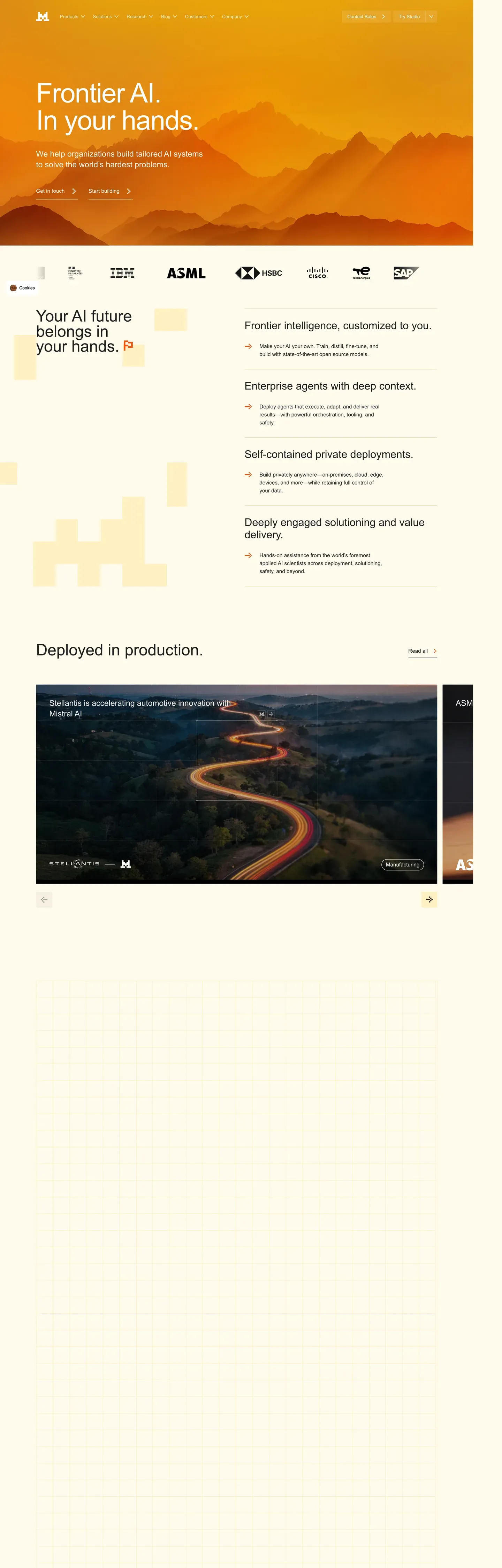
Mistral AI's brand reads like a magazine spread that happens to ship a frontier model. The homepage opens with "Frontier AI. In your hands." set in PP Editorial Old at 84px / 400 weight with -1.5px letter-spacing, layered over a photographic mountain landscape bathed in mustard-orange sunset light. Below the fold, every page closes with the same horizontal band — a sunset-stripe gradient running from "#fa520f" through "#ffa110" and "#ffd900" into "#fff8e0" cream, sitting just above the cream-tinted footer. The stripe is the brand's continuity element; it appears on the homepage, Le Studio, the Coding solutions page, news articles, the contact form, and the services tier page without exception.
This DESIGN.md file packages the entire system into 36 colors tokens, 19 typography styles, 12 spacing values, 7 corner radii, and 42 components — built against Google Labs' open DESIGN.md specification. Inside: the saturated "#fa520f" primary CTA, the "#fff8e0" cream surface that anchors form panels and feature cards, the deep-orange pressed state at "#cc3a05", the JetBrains Mono code blocks rendered on a "#1c1c1e" canvas, plus the pricing-card-featured variant with its 2px "#fa520f" border on cream. Every token quoted, every component traced to a real Mistral page.
Feed the file to Claude, Cursor, GitHub Copilot, or any AI tool that reads structured tokens. The agent will reproduce Mistral's editorial restraint — PP Editorial Old hero displays, 8px button radii, cream form panels, the sunset stripe at every page bottom — rather than a generic SaaS theme. The discipline worth studying here is the editorial/sans pairing: PP Editorial Old anchors a frontier-AI brand without resorting to the heavy geometric sans every other LLM company defaults to.
What makes it distinct
5 highlights
- Sunset stripe bandA multi-stop gradient from #fa520f through #ffa110 to #fff8e0 closes every single page above the footer
- Editorial display voicePP Editorial Old at 84px / 400 / -1.5px tracking carries the hero, Inter handles every other surface
- Sober radius scaleButtons at 8px and cards at 12px; pill shapes (9999px) are reserved for badges, never primary CTAs
- Cream-yellow form panels#fff8e0 surfaces with #e6d5a8 1px borders anchor the contact form, services tiers, and feature tiles
- Single-voltage orange#fa520f carries primary CTAs, active tab underlines, and footer links, with no second accent allowed
Live at mistral.ai
Mistral AI in production, as captured. Scroll the window to see the whole page.
36 colors
Mistral AI's system runs on #fa520f as its primary voltage, used in 6 of 42 components. Type is set in Inter across 19 tokens from 11px to 84px, weights 400–600. Shape language is mixed across 42 components, blending pills, soft rounds, and squarer corners.
Brand & Accent
Sparing, CTA-only voltage · 2
Surface
Page and card backgrounds · 5
Text
Headlines, body, captions · 8
Borders & Hairlines
Dividers, outlines, rules · 3
Other
Specialty colors · 18
19 type tokens
Set in Inter across 19 tokens, from 11px to 84px, weights 400–600. Shown in its own stack: where the font isn't installed, the fallback the file names stands in.
- hero-display84px · weight 400 · lh 1.05 · tracking -1.5pxThe quick brown fox jumps over the lazy dog
- display-lg64px · weight 400 · lh 1.1 · tracking -1pxThe quick brown fox jumps over the lazy dog
- heading-152px · weight 400 · lh 1.15 · tracking -0.5pxThe quick brown fox jumps over the lazy dog
- heading-236px · weight 500 · lh 1.2 · tracking -0.5pxThe quick brown fox jumps over the lazy dog
- heading-328px · weight 500 · lh 1.25The quick brown fox jumps over the lazy dog
- heading-422px · weight 500 · lh 1.3The quick brown fox jumps over the lazy dog
- heading-518px · weight 500 · lh 1.4The quick brown fox jumps over the lazy dog
- subtitle18px · weight 400 · lh 1.5The quick brown fox jumps over the lazy dog
- body-md16px · weight 400 · lh 1.55The quick brown fox jumps over the lazy dog
- body-md-medium16px · weight 500 · lh 1.55The quick brown fox jumps over the lazy dog
- body-sm14px · weight 400 · lh 1.5The quick brown fox jumps over the lazy dog
- body-sm-medium14px · weight 500 · lh 1.5The quick brown fox jumps over the lazy dog
- caption13px · weight 400 · lh 1.4The quick brown fox jumps over the lazy dog
- caption-bold13px · weight 600 · lh 1.4The quick brown fox jumps over the lazy dog
- micro12px · weight 500 · lh 1.4The quick brown fox jumps over the lazy dog
- micro-uppercase11px · weight 600 · lh 1.4 · tracking 1pxThe quick brown fox jumps over the lazy dog
- button-md14px · weight 500 · lh 1.3The quick brown fox jumps over the lazy dog
- stat-display56px · weight 400 · lh 1.1 · tracking -1pxThe quick brown fox jumps over the lazy dog
- code-md14px · weight 400 · lh 1.5The quick brown fox jumps over the lazy dog
Radii and spacing
7 corner radii and 12 spacing values. Shape language: mixed, on a 8px base radius.
Radii7
- xs4px
- sm6px
- md8px
- lg12px
- xl16px
- xxl20px
- full9999px
Spacing12
- xxs4px
- xs8px
- sm12px
- md16px
- lg20px
- xl24px
- xxl32px
- xxxl40px
- section-sm48px
- section64px
- section-lg96px
- hero120px
42 components
Each rendered from its tokens (color, type, radius, padding) on Mistral AI's own canvas.
- Button PrimaryButton Primarybutton-primary
- Button Primary PressedButton Primary Pressedbutton-primary-pressed
- Button Primary DisabledButton Primary Disabledbutton-primary-disabled
- Button CreamButton Creambutton-cream
- Button DarkButton Darkbutton-dark
- Button SecondaryButton Secondarybutton-secondary
- Button On CreamButton On Creambutton-on-cream
- Button LinkButton Linkbutton-link
- Card BaseCard Basecard-base
- Card FeatureCard Featurecard-feature
- Card CreamCard Creamcard-cream
- Card Cream SoftCard Cream Softcard-cream-soft
- Card Feature ProductCard Feature Productcard-feature-product
- Card PhotographicCard Photographiccard-photographic
- Pricing CardPricing Cardpricing-card
- Pricing Card FeaturedPricing Card Featuredpricing-card-featured
- Type here…Text Inputtext-input
- Type here…Text Input Focusedtext-input-focused
- Text AreaText Areatext-area
- Contact Form PanelContact Form Panelcontact-form-panel
- Pill TabPill Tabpill-tab
- Pill Tab ActivePill Tab Activepill-tab-active
- Segmented TabSegmented Tabsegmented-tab
- Segmented Tab ActiveSegmented Tab Activesegmented-tab-active
- Badge OrangeBadge Orangebadge-orange
- Badge CreamBadge Creambadge-cream
- Badge DarkBadge Darkbadge-dark
- Promo BannerPromo Bannerpromo-banner
- Hero Band SunsetHero Band Sunsethero-band-sunset
- Sunset Stripe BandSunset Stripe Bandsunset-stripe-band
- Cta Banner CreamCta Banner Creamcta-banner-cream
- Code BlockCode Blockcode-block
- Code Block HeaderCode Block Headercode-block-header
- Feature Icon TileFeature Icon Tilefeature-icon-tile
- Industry TileIndustry Tileindustry-tile
- Stat CellStat Cellstat-cell
- Customer Testimonial CardCustomer Testimonial Cardcustomer-testimonial-card
- Logo Wall ItemLogo Wall Itemlogo-wall-item
- Faq Accordion ItemFaq Accordion Itemfaq-accordion-item
- Footer RegionFooter Regionfooter-region
- Footer LinkFooter Linkfooter-link
- App Store BadgeApp Store Badgeapp-store-badge
The system, in use
Mistral AI's tokens on the kind of product it builds.
Think bigger with an AI at your side
Ask anything, write and analyze, and build with an assistant that understands your work.
Mistral AI design system FAQ
Mistral AI's tokens, its components and how to use this DESIGN.md in your project.
What are the color tokens in the Mistral AI DESIGN.md?
What is Mistral AI's primary color hex code?
How do I use Mistral AI's colors in Tailwind CSS?
What is Mistral AI's primary brand color?
Does Mistral AI have a dark mode?
What fonts does Mistral AI use?
What is Mistral AI's type scale?
What can I use if I don't have Mistral AI's font?
What typography does Mistral AI use?
Which components does the Mistral AI DESIGN.md define?
What corner radius and spacing does Mistral AI use?
Why doesn't Mistral use pill-shaped buttons in the Mistral AI design system?
How do I apply the Mistral AI design system to a shadcn/ui project?
How do I use the Mistral AI DESIGN.md with Claude Code or Cursor?
Is the Mistral AI DESIGN.md free to download?
How was the Mistral AI DESIGN.md made?
Is the Mistral AI DESIGN.md official?
What is the sunset stripe band in the Mistral AI design system?
How do I use this DESIGN.md in a React project in the Mistral AI design system?
Related reading
Specs, directories and component libraries that pair with this design system.
- Browse all design systemsThe full directory of DESIGN.md files on shadcn.io, with live mockups for each.shadcn.io
- Mistral AI homepageThe live brand surface — Frontier AI hero, Le Studio, sunset stripe band, all in production.mistral.ai (opens in a new tab)
- The DESIGN.md specificationGoogle Labs' open spec for machine-readable design system files — the format this page is built on.github.com (opens in a new tab)
Use Mistral AI in your project
One machine-readable file. Drop it into Claude Code, Cursor, VS Code or any AI tool that reads DESIGN.md.
Download the DESIGN.md
One machine-readable file: every color, type, radius, spacing, and component token of Mistral AI.
Feed it to your AI tool
Drop it into Claude, Cursor, or GitHub Copilot. The agent writes React components and Tailwind classes that match Mistral AI's visual language.
Reference the tokens directly
Or paste the values into your Tailwind config, CSS variables, or component library: every color, size and radius is a quoted, ready-to-copy value.
Read the full DESIGN.md overview, rationale, do’s and don’ts
Overview
Mistral AI carries itself with a singular, almost cinematographic visual signature — the homepage opens with "Frontier AI. In your hands." rendered in elegant near-serif display type over a photographic mountain landscape bathed in mustard-orange sunset light. Below the hero, every page closes with the same recognizable element: a horizontal "sunset stripe" gradient band running red→orange→yellow→cream that wraps the foot of the page just above the footer. This stripe is THE brand recognizer — it appears on the homepage, products/studio, solutions/coding, news articles, contact form, and services tier page without exception.
The system pairs PP Editorial Old (a near-serif elegant display face) for hero displays with Inter for everything else (body, headings, UI). Cream-yellow surfaces ({colors.cream}, {colors.surface-cream-soft}) anchor form panels and feature cards; saturated orange ({colors.primary}) carries primary CTAs; the deep mountain photography on the homepage and the dark code mockups inside Le Studio create photographic depth. Cards are rectangular with {rounded.lg} (12px) corners — distinctly less playful than Miro's or Mintlify's pill-buttons-everywhere approach. Buttons are also {rounded.md} (8px), not pills — Mistral's geometry is more sober and editorial than its peers.
Key Characteristics:
- Atmospheric mountain-sunset hero photography (orange-red-yellow gradient sky)
- Horizontal "sunset stripe" band ({colors.primary} → {colors.sunshine-700} → {colors.yellow-saturated} → {colors.cream}) at every page bottom
- Cream-yellow surfaces ({colors.cream}, {colors.cream-soft}) for form panels and feature cards
- PP Editorial Old (or similar near-serif) for hero displays; Inter for everything else
{rounded.md}(8px) buttons and{rounded.lg}(12px) cards — less playful, more editorial geometry- Saturated orange primary CTA ({colors.primary}) carries every action call
Known Gaps
- Specific dark-mode token values not surfaced; the brand has not shipped a published dark-mode palette
- Animation/transition timings not extracted; recommend 150–200ms ease for hover/focus state transitions
- Form validation success state not explicitly captured beyond defaults
- Sunset stripe band gradient stops are approximations — the actual values may vary slightly across pages but the visual rhythm is consistent
More systems like this
Algolia, Anthropic, Arc and 61 more in AI & LLM Platforms: each brand's colors, type and components in one file your AI agent builds from.
Build it with Pro
The DESIGN.md files are free. Pro adds 6,000+ blocks, premium templates and the MCP server, so your AI editor builds in your system for you.
4.9/5 out of 5 · 150+ reviewsfrom 150+ founders and developers.
- Secure checkout via Stripe
- Code lives in your repo
- Keep what you've shipped if you cancel
- License terms
4.9 out of 5 from 150+ developers


Your system, built for you
Every block, template and icon, installed by your AI agent in your design system. The DESIGN.md files stay free.
- Cancel anytime
- Keep what you've shipped