MongoDB Design System
MongoDB's brand green #00ed64 on deep teal #001e2b with Euclid Circular A, as a DESIGN.md with colors, type and components for React and AI tools.
- Primary color
- #00ed64
- Typeface
- Euclid Circular A
- Shape
- Mixed
- Base radius
- 8px
- Colors
- 34
- Type tokens
- 18
- Components
- 44
- Spacing values
- 12
About MongoDB DESIGN.md
Curated by Dov Azencot, updated May 12, 2026. Source mongodb.com (opens in a new tab).
MongoDB's design system runs on a tight two-mode contract. Deep teal "#001e2b" hero bands frame primary CTAs in bright MongoDB green "#00ed64", and the rest of the page drops to stark white "#ffffff" for documentation, pricing, and course catalogs. The brand has refined this contrast since the rebrand era, and today every surface — homepage, Atlas product page, Community Edition, MongoDB University, AI use cases, and the 3-tier pricing page — uses the same dark-band-plus-green-pill pattern. The pill button is the brand signature: 9999px radius applied universally to primary, secondary, on-dark, ghost, and badge CTAs. There is no rounded-rectangle button anywhere in the system. Euclid Circular A is the geometric sans-serif that holds the entire typographic scale, and Source Code Pro shows up only inside terminal-styled code mockup cards.
This page packages MongoDB's full specification into a single DESIGN.md file aligned with the Google Labs spec. Inside: 34 colors tokens (brand green ramp, deep teal palette, four category accents, surface and hairline neutrals, full text scale), 16 typography tokens at sizes from 11px micro-uppercase to 72px hero display, a 7-step rounded scale topping out at the universal 9999px pill, 13 spacing tokens running from 4px through a 120px hero band, and 44 components definitions covering buttons, cards, pricing tiers, course tiles, code mockups, inputs, tabs, badges, comparison tables, and the dark teal footer region.
Feed the file to Claude, Cursor, GitHub Copilot, or any AI coding tool that reads structured tokens. The agent will reproduce the deep-teal-and-green discipline rather than substitute a generic shadcn theme — green stays scoped to CTAs and inline links, dark hero bands frame primary actions, and category accents stay locked to course tags. The token names map cleanly onto Tailwind config keys or CSS variables. MongoDB is worth studying because the system proves a developer-tool brand can stay both stark and warm — the deep teal is serious, the bright green is human, and the discipline of holding only two saturated colors across six product surfaces is rare.
What makes it distinct
5 highlights
- Dual-mode identityDeep teal #001e2b hero bands paired with bright #00ed64 green pill CTAs, no third surface mode
- Universal pill buttonsEvery primary, secondary, on-dark, and badge CTA renders at 9999px radius across all six pages
- Category-coded course tagsPurple #7b3ff2, orange #fa6e39, pink #f06bb8, and blue #3d4f9f appear only on MongoDB University tiles
- Euclid Circular A across 18 type tokensFrom 72px hero display at weight 500 down to 11px uppercase eyebrows at weight 600
- Source Code Pro reserved for terminal-aesthetic code mockups on dark #001e2b canvas, never for prose
Live at mongodb.com
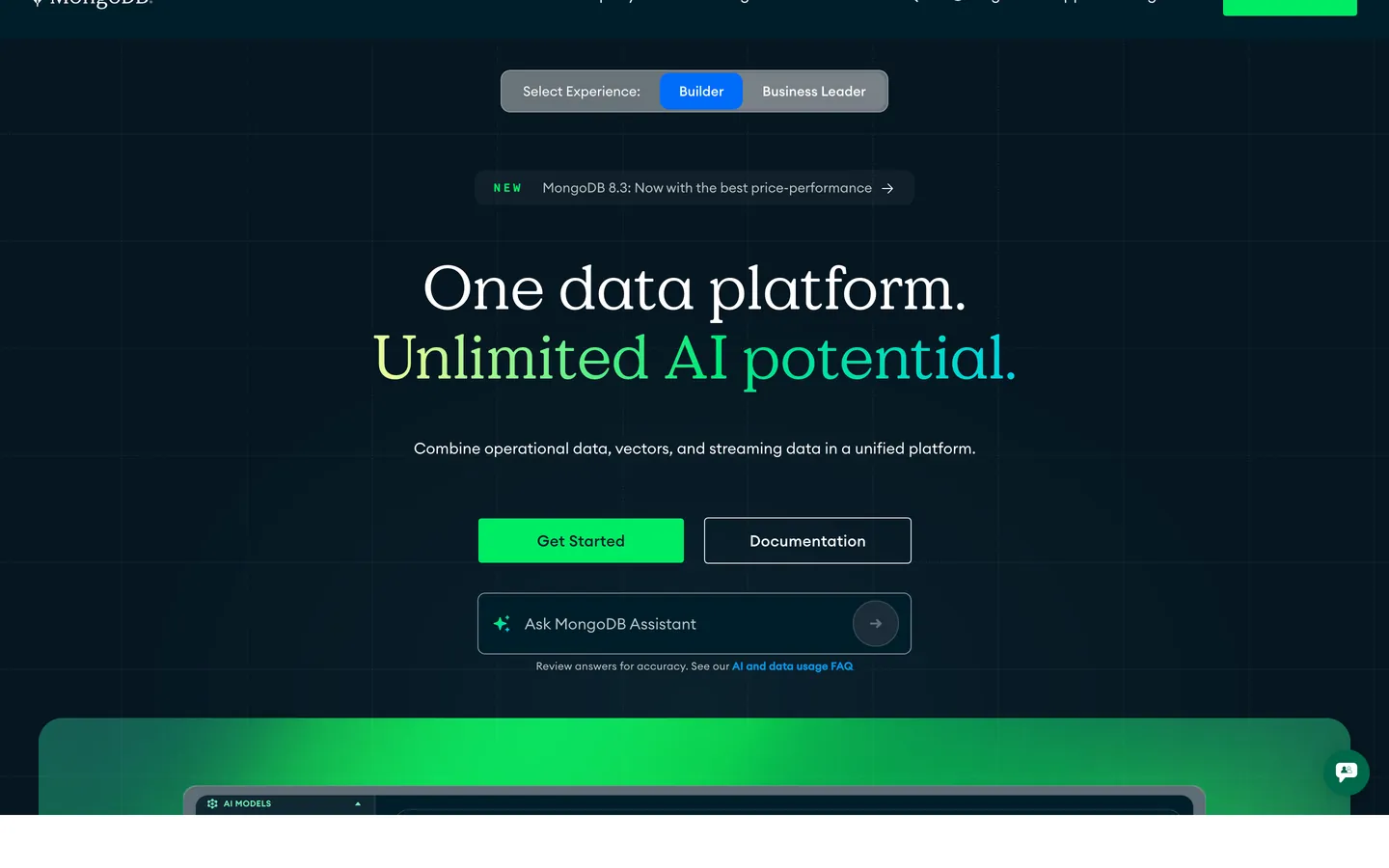
MongoDB in production, as captured. Scroll the window to see the whole page.
34 colors
MongoDB's system anchors on #00ed64 (primary) as its primary color. Type is set in Euclid Circular A across 18 tokens from 11px to 72px, weights 400–600. Shape language is mixed across 44 components, blending pills, soft rounds, and squarer corners.
Brand & Accent
Sparing, CTA-only voltage · 14
Surface
Page and card backgrounds · 5
Text
Headlines, body, captions · 6
Borders & Hairlines
Dividers, outlines, rules · 4
Semantic
Status, errors, success, links · 1
Other
Specialty colors · 4
18 type tokens
Set in Euclid Circular A across 18 tokens, from 11px to 72px, weights 400–600. Shown in its own stack: where the font isn't installed, the fallback the file names stands in.
- hero-display72px · weight 500 · lh 1.1 · tracking -1.5pxThe quick brown fox jumps over the lazy dog
- display-lg56px · weight 500 · lh 1.15 · tracking -1pxThe quick brown fox jumps over the lazy dog
- heading-148px · weight 500 · lh 1.2 · tracking -0.5pxThe quick brown fox jumps over the lazy dog
- heading-236px · weight 500 · lh 1.25 · tracking -0.5pxThe quick brown fox jumps over the lazy dog
- heading-328px · weight 500 · lh 1.3The quick brown fox jumps over the lazy dog
- heading-422px · weight 500 · lh 1.35The quick brown fox jumps over the lazy dog
- heading-518px · weight 600 · lh 1.4The quick brown fox jumps over the lazy dog
- subtitle18px · weight 400 · lh 1.5The quick brown fox jumps over the lazy dog
- body-md16px · weight 400 · lh 1.55The quick brown fox jumps over the lazy dog
- body-md-medium16px · weight 500 · lh 1.55The quick brown fox jumps over the lazy dog
- body-sm14px · weight 400 · lh 1.5The quick brown fox jumps over the lazy dog
- body-sm-medium14px · weight 500 · lh 1.5The quick brown fox jumps over the lazy dog
- caption13px · weight 400 · lh 1.4The quick brown fox jumps over the lazy dog
- caption-bold13px · weight 600 · lh 1.4The quick brown fox jumps over the lazy dog
- micro12px · weight 500 · lh 1.4The quick brown fox jumps over the lazy dog
- micro-uppercase11px · weight 600 · lh 1.4 · tracking 1pxThe quick brown fox jumps over the lazy dog
- button-md14px · weight 600 · lh 1.3The quick brown fox jumps over the lazy dog
- code-md14px · weight 400 · lh 1.55The quick brown fox jumps over the lazy dog
Radii and spacing
7 corner radii and 12 spacing values. Shape language: mixed, on a 8px base radius.
Radii7
- xs4px
- sm6px
- md8px
- lg12px
- xl16px
- xxl24px
- full9999px
Spacing12
- xxs4px
- xs8px
- sm12px
- md16px
- lg20px
- xl24px
- xxl32px
- xxxl40px
- section-sm48px
- section64px
- section-lg96px
- hero120px
44 components
Each rendered from its tokens (color, type, radius, padding) on MongoDB's own canvas.
- Button PrimaryButton Primarybutton-primary
- Button Primary PressedButton Primary Pressedbutton-primary-pressed
- Button Primary DisabledButton Primary Disabledbutton-primary-disabled
- Button SecondaryButton Secondarybutton-secondary
- Button On DarkButton On Darkbutton-on-dark
- Button Secondary On DarkButton Secondary On Darkbutton-secondary-on-dark
- Button GhostButton Ghostbutton-ghost
- Button LinkButton Linkbutton-link
- Card BaseCard Basecard-base
- Card FeatureCard Featurecard-feature
- Card Product DeployCard Product Deploycard-product-deploy
- Card Feature DarkCard Feature Darkcard-feature-dark
- Card CourseCard Coursecard-course
- Card CertCard Certcard-cert
- Pricing CardPricing Cardpricing-card
- Pricing Card FeaturedPricing Card Featuredpricing-card-featured
- Type here…Text Inputtext-input
- Type here…Text Input Focusedtext-input-focused
- Search PillSearch Pillsearch-pill
- Search Pill LargeSearch Pill Largesearch-pill-large
- Pill TabPill Tabpill-tab
- Pill Tab ActivePill Tab Activepill-tab-active
- Segmented TabSegmented Tabsegmented-tab
- Segmented Tab ActiveSegmented Tab Activesegmented-tab-active
- Badge GreenBadge Greenbadge-green
- Badge Green SoftBadge Green Softbadge-green-soft
- Badge PurpleBadge Purplebadge-purple
- Badge OrangeBadge Orangebadge-orange
- Badge PopularBadge Popularbadge-popular
- Promo BannerPromo Bannerpromo-banner
- Hero Band DarkHero Band Darkhero-band-dark
- Hero Platform CardHero Platform Cardhero-platform-card
- Cta Banner DarkCta Banner Darkcta-banner-dark
- Code BlockCode Blockcode-block
- Code Mockup CardCode Mockup Cardcode-mockup-card
- Comparison TableComparison Tablecomparison-table
- Comparison RowComparison Rowcomparison-row
- Service TileService Tileservice-tile
- Why CardWhy Cardwhy-card
- Customer Testimonial CardCustomer Testimonial Cardcustomer-testimonial-card
- Logo Wall ItemLogo Wall Itemlogo-wall-item
- Faq Accordion ItemFaq Accordion Itemfaq-accordion-item
- Footer RegionFooter Regionfooter-region
- Footer LinkFooter Linkfooter-link
The system, in use
MongoDB's tokens on the kind of product it builds.
The fastest way to build and ship software
Deploy from git in seconds, scale on demand and keep every environment in sync.
MongoDB design system FAQ
MongoDB's tokens, its components and how to use this DESIGN.md in your project.
Related reading
Specs, directories and component libraries that pair with this design system.
Use MongoDB in your project
One machine-readable file. Drop it into Claude Code, Cursor, VS Code or any AI tool that reads DESIGN.md.
Download the DESIGN.md
One machine-readable file: every color, type, radius, spacing, and component token of MongoDB.
Feed it to your AI tool
Drop it into Claude, Cursor, or GitHub Copilot. The agent writes React components and Tailwind classes that match MongoDB's visual language.
Reference the tokens directly
Or paste the values into your Tailwind config, CSS variables, or component library: every color, size and radius is a quoted, ready-to-copy value.
Read the full DESIGN.md overview, rationale, do’s and don’ts
Overview
MongoDB carries a strong dual-mode visual identity — dark deep-teal hero bands at "#001e2b" paired with bright MongoDB green "#00ed64" CTA pills, sitting alongside stark white "#ffffff" documentation and pricing surfaces. The homepage opens with "One data platform. Unlimited AI potential." headline over a deep navy hero, the green pill at the visual center as the primary CTA. Lower on the page, embedded code mockup cards with terminal aesthetic sit on the dark hero band, breaking out into white feature cards below. The pricing page renders a 3-tier comparison (Free / Flex / Dedicated) with a featured tier highlighted in soft mint "#e3fcef" background and a 2px "#00ed64" border. The MongoDB University page presents a course catalog grid where each tile carries a colored category tag — purple "#7b3ff2", orange "#fa6e39", pink "#f06bb8", and blue "#3d4f9f" — the only place outside the brand green where saturated color appears in the system.
The system uses Euclid Circular A as its display face. The face is contemporary geometric — confident but not overly playful — and pairs naturally with both the developer-tool aesthetic of the database product and the educational positioning of the learning surfaces. Cards use 12px corners; buttons use 9999px pills universally. The brand-teal palette at "#001e2b" anchors hero bands, footer, code mockups, and the dark CTA banners. Source Code Pro is scoped strictly to terminal-styled code mockup content — it never appears in prose, headers, or UI labels.
Key Characteristics:
- Deep navy/teal hero bands at "#001e2b" with bright MongoDB green "#00ed64" CTA pills
- Stark white "#ffffff" pricing and documentation surfaces with colored category tags for course tiles (purple, orange, pink, blue)
- Euclid Circular A across every UI surface from 11px micro-uppercase to 72px hero display
- Pill-shaped buttons (9999px) universal across primary, secondary, on-dark, ghost, and badge CTAs
- 3-tier pricing comparison (Free / Flex / Dedicated) with featured-mint highlight tier at "#e3fcef" + green border
- Code mockup cards with terminal-aesthetic dark canvas at "#001e2b"
Known Gaps
- Specific dark-mode token values for canvas and surface beyond hero bands not surfaced in the public spec
- Animation and transition timings not extracted; recommend 150–200ms ease as a working default
- Form validation success state not explicitly captured — only focus and error/disabled documented
- Course-tile category color mappings (purple for Database & Security, orange for Search, pink and blue variants) are observation-based rather than confirmed brand documentation
More systems like this
Biome, CircleCI, ClickHouse and 33 more in Backend, Database & DevOps: each brand's colors, type and components in one file your AI agent builds from.
Build it with Pro
The DESIGN.md files are free. Pro adds 6,000+ blocks, premium templates and the MCP server, so your AI editor builds in your system for you.
4.9/5 out of 5 · 150+ reviewsfrom 150+ founders and developers.
Billing
Billed once a year in USD. Cancel anytime.
- How many people can use the license.
- Client work, SaaS products and anything you charge for.
- Page sections in 56 categories, from heroes and pricing tables to dashboards and settings, on every framework and UI library, in your theme.
- Complete Next.js sites for startups, SaaS, agencies and portfolios, every page designed, ready to ship.
- Your AI agent searches, previews and installs any component, block, icon or DESIGN.md from a prompt: 22 tools in Claude Code, Cursor, VS Code and 35 more clients.
- Buttons with motion and states of their own, from an arrow that slides in to a burst of confetti.
- Typewriters, scrambles, counters and more, for headlines, labels and numbers.
- Animated backgrounds for heroes, sections and cards, from a soft aurora to a flock that flees the cursor. Most are pure CSS.
- WebGPU shaders, from a slow aurora to a black hole, each drawing only while it's on screen.
- One design and one theme on all four: the components, blocks and effects are built for each framework.
- React on Base UI, Radix UI, React Aria or Ark UI: install the version for the library your project already uses. Vue, Svelte and Solid run on Ark UI.
- From a button to a date picker, a color picker or a guided tour: accessible, typed in TypeScript, each with live demos.
- Real-world patterns built from the components, in 53 galleries: forms, tables, menus, dialogs and more.
- Area, bar, line, pie, radar and radial charts on TanStack Charts, on every framework. React also gets the Recharts originals.
- Debounce, local storage, media queries and more: each hook is one typed file you own.
- From 222 libraries, Lucide, Heroicons, Tabler and Material Symbols among them, as SVG or a React component in one command.
- Stripe, Linear, Apple and 497 more: a brand's colors, typography and components in one file your AI agent builds from.
- Restyle every component and block at once: 8 styles, 8 grays, 18 colors and 5 radii, shared as a shadcn preset code.
- Priority requests are answered first.
Individual
For personal projects & open source
$32instead of $49/mo
$389 billed yearly
- Seats: 1 seat
- Commercial use: Personal & open source only
- Blocks: All 6,181 blocks
- Templates: All 14 templates
- MCP server: 38 AI clients
- Animated buttons: All 35 buttons
- Text effects: All 97 effects
- Backgrounds: All 100 backgrounds
- Shaders: All 100 shaders
- Frameworks: React, Vue, Svelte, Solid
- UI libraries: Base UI, Radix, Aria, Ark
- Components: All 174 components
- Examples: All 1,103 examples
- Charts: All 70 charts
- React hooks: All 35 hooks
- Icons: 294k+ icons
- DESIGN.md files: All 500 brands
- Theme builder: 8 styles × 18 colors
- Support: Standard
Team
Most popularFor freelancers, agencies & startups
$66instead of $99/mo
$789 billed yearly · ≈ $13/dev/mo
- Seats: Up to 5 seats
- Commercial use: Included
- Blocks: All 6,181 blocks
- Templates: All 14 templates
- MCP server: 38 AI clients
- Animated buttons: All 35 buttons
- Text effects: All 97 effects
- Backgrounds: All 100 backgrounds
- Shaders: All 100 shaders
- Frameworks: React, Vue, Svelte, Solid
- UI libraries: Base UI, Radix, Aria, Ark
- Components: All 174 components
- Examples: All 1,103 examples
- Charts: All 70 charts
- React hooks: All 35 hooks
- Icons: 294k+ icons
- DESIGN.md files: All 500 brands
- Theme builder: 8 styles × 18 colors
- Support: Priority
Organization
For companies with larger teams
$132instead of $199/mo
$1,589 billed yearly
- Seats: Unlimited seats
- Commercial use: Included
- Blocks: All 6,181 blocks
- Templates: All 14 templates
- MCP server: 38 AI clients
- Animated buttons: All 35 buttons
- Text effects: All 97 effects
- Backgrounds: All 100 backgrounds
- Shaders: All 100 shaders
- Frameworks: React, Vue, Svelte, Solid
- UI libraries: Base UI, Radix, Aria, Ark
- Components: All 174 components
- Examples: All 1,103 examples
- Charts: All 70 charts
- React hooks: All 35 hooks
- Icons: 294k+ icons
- DESIGN.md files: All 500 brands
- Theme builder: 8 styles × 18 colors
- Support: Priority
Billed once a year in USD. Cancel anytime.
Individual
For personal projects & open source
$32instead of $49/mo
$389 billed yearly
- How many people can use the license.Seats: 1 seat
- Client work, SaaS products and anything you charge for.Commercial use: Personal & open source only
- Page sections in 56 categories, from heroes and pricing tables to dashboards and settings, on every framework and UI library, in your theme.Blocks: All 6,181 blocks
- Complete Next.js sites for startups, SaaS, agencies and portfolios, every page designed, ready to ship.Templates: All 14 templates
- Your AI agent searches, previews and installs any component, block, icon or DESIGN.md from a prompt: 22 tools in Claude Code, Cursor, VS Code and 35 more clients.MCP server: 38 AI clients
- Buttons with motion and states of their own, from an arrow that slides in to a burst of confetti.Animated buttons: All 35 buttons
- Typewriters, scrambles, counters and more, for headlines, labels and numbers.Text effects: All 97 effects
- Animated backgrounds for heroes, sections and cards, from a soft aurora to a flock that flees the cursor. Most are pure CSS.Backgrounds: All 100 backgrounds
- WebGPU shaders, from a slow aurora to a black hole, each drawing only while it's on screen.Shaders: All 100 shaders
- One design and one theme on all four: the components, blocks and effects are built for each framework.Frameworks: React, Vue, Svelte, Solid
- React on Base UI, Radix UI, React Aria or Ark UI: install the version for the library your project already uses. Vue, Svelte and Solid run on Ark UI.UI libraries: Base UI, Radix, Aria, Ark
- From a button to a date picker, a color picker or a guided tour: accessible, typed in TypeScript, each with live demos.Components: All 174 components
- Real-world patterns built from the components, in 53 galleries: forms, tables, menus, dialogs and more.Examples: All 1,103 examples
- Area, bar, line, pie, radar and radial charts on TanStack Charts, on every framework. React also gets the Recharts originals.Charts: All 70 charts
- Debounce, local storage, media queries and more: each hook is one typed file you own.React hooks: All 35 hooks
- From 222 libraries, Lucide, Heroicons, Tabler and Material Symbols among them, as SVG or a React component in one command.Icons: 294k+ icons
- Stripe, Linear, Apple and 497 more: a brand's colors, typography and components in one file your AI agent builds from.DESIGN.md files: All 500 brands
- Restyle every component and block at once: 8 styles, 8 grays, 18 colors and 5 radii, shared as a shadcn preset code.Theme builder: 8 styles × 18 colors
- Priority requests are answered first.Support: Standard
Team
Most popularFor freelancers, agencies & startups
$66instead of $99/mo
$789 billed yearly · ≈ $13/dev/mo
Everything in Individual, plus
- How many people can use the license.Seats: Up to 5 seats
- Client work, SaaS products and anything you charge for.Commercial use: Included
- Priority requests are answered first.Support: Priority
Organization
For companies with larger teams
$132instead of $199/mo
$1,589 billed yearly
Everything in Team, plus
- How many people can use the license.Seats: Unlimited seats
- Secure checkout via Stripe
- Code lives in your repo
- Keep what you've shipped if you cancel
- License terms
4.9 out of 5 from 150+ developers


Your system, built for you
Every block, template and icon, installed by your AI agent in your design system. The DESIGN.md files stay free.
- Cancel anytime
- Keep what you've shipped