NVIDIA Design System
NVIDIA's green #76b900 and the NVIDIA-EMEA typeface as a DESIGN.md file: colors, type and components for React, Next.js and AI tools like Claude.
- Primary color
- #76b900
- Typeface
- NVIDIA-EMEA
- Shape
- Sharp
- Base radius
- 2px
- Colors
- 28
- Type tokens
- 18
- Components
- 25
- Spacing values
- 8
About NVIDIA DESIGN.md
Curated by Dov Azencot, updated May 12, 2026. Source nvidia.com (opens in a new tab).
NVIDIA's marketing system reads like engineering documentation that learned graphic design. Every page is a structured cascade of dense, factual information arranged on a paper-white grid, framed top and bottom by deep black hero and footer chapters. One accent color does all the work: NVIDIA Green at "#76b900", used for every primary CTA, every active tab, every link affordance on dark surfaces, and the small decorative 12px corner squares that anchor each card. There are no gradients, no atmospheric mesh, no soft drop shadows — just black, white, gray, and green stacked into an editorial grid that scales from product cards to massive industry landing pages without bending its rules.
The file packages NVIDIA's chrome into a single Google Labs DESIGN.md spec: 28 colors tokens (one brand green plus a deep press variant, two surface modes, six text tiers, six semantic flags, four editorial accents), 18 typography roles in the proprietary NVIDIA-EMEA cut at weights 400 and 700, a tiny radius scale that tops out at 2px outside of avatars, an 8px-based spacing system stretching to a 64px section rhythm, and 25 components specs covering buttons, pill tabs, three card variants, inputs, the four-tier navigation stack, the six-column dark footer, and the signature corner-square ornament.
Feed the file to Claude, Cursor, or GitHub Copilot and the agent produces React components that respect NVIDIA's restraint — green reserved for CTAs and active states, 2px rounding everywhere, hierarchy built from weight contrast rather than color tinting. Or reference the tokens by name in Tailwind config or CSS variables. The system is worth studying precisely because it refuses to grow: ten years of expansion into AI, healthcare, robotics, and life sciences, and the chrome still resolves to one green, one black, one white, and a 2px corner.
What makes it distinct
5 highlights
- Single-accent voltageNVIDIA Green #76b900 carries every CTA, active tab, and 12px corner square; no second accent exists in chrome
- Hyper-angular geometry2px radius on every interactive element, 0px on hero/footer/nav; the only circles are avatars and social icons
- Two-mode surface architecturePure #000000 black hero/footer chapters alternate with #ffffff body canvas in a predictable rhythm
- Brand-locked NVIDIA-EMEA across 18 type tiers at only two weights (400 and 700)Hierarchy comes from weight and size, never from color
- Flat-by-policy cards1px #cccccc hairline borders replace drop shadows everywhere except a 5px ambient on sticky chrome
Live at nvidia.com
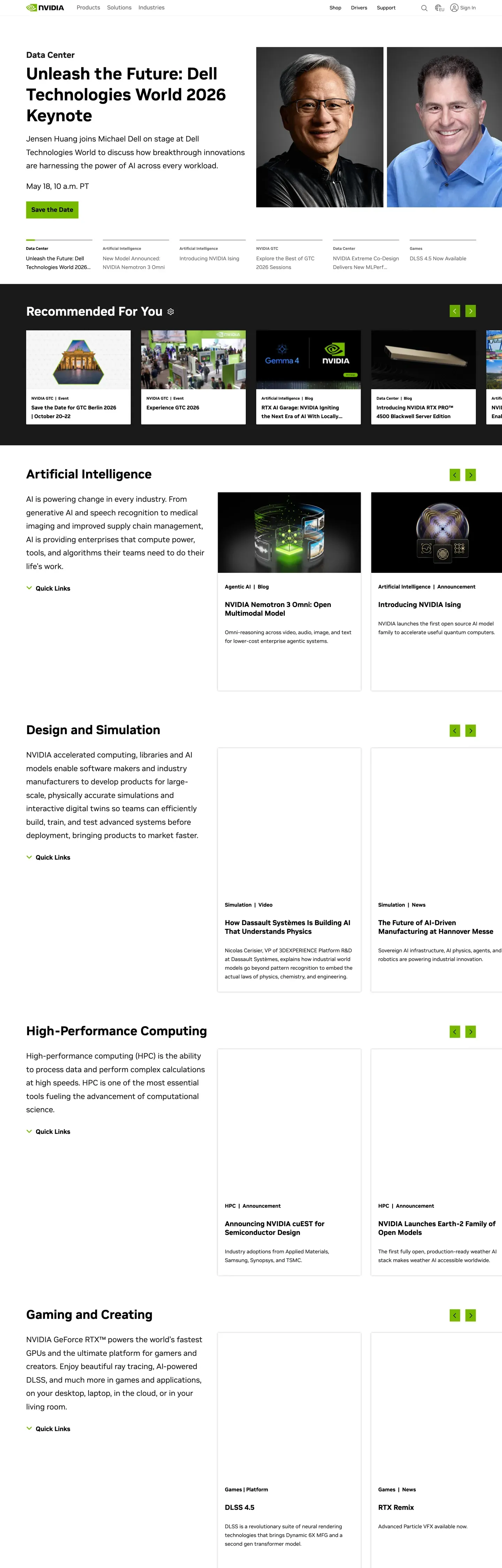
NVIDIA in production, as captured. Scroll the window to see the whole page.
28 colors
NVIDIA's system runs on #76b900 as its primary voltage, used in 3 of 25 components. Type is set in NVIDIA-EMEA across 18 tokens from 10px to 48px, weights 400–700. Shape language is sharp — components average 1px corner radius, favoring crisp rectangles.
Brand & Accent
Sparing, CTA-only voltage · 7
Surface
Page and card backgrounds · 4
Text
Headlines, body, captions · 6
Borders & Hairlines
Dividers, outlines, rules · 2
Semantic
Status, errors, success, links · 5
Other
Specialty colors · 4
18 type tokens
Set in NVIDIA-EMEA across 18 tokens, from 10px to 48px, weights 400–700. Shown in its own stack: where the font isn't installed, the fallback the file names stands in.
- display-xl48px · weight 700 · lh 1.25The quick brown fox jumps over the lazy dog
- display-lg36px · weight 700 · lh 1.25The quick brown fox jumps over the lazy dog
- heading-xl24px · weight 700 · lh 1.25The quick brown fox jumps over the lazy dog
- heading-lg22px · weight 400 · lh 1.75The quick brown fox jumps over the lazy dog
- heading-md20px · weight 700 · lh 1.25The quick brown fox jumps over the lazy dog
- heading-sm18px · weight 700 · lh 1.4The quick brown fox jumps over the lazy dog
- card-title17px · weight 700 · lh 1.47The quick brown fox jumps over the lazy dog
- body-md16px · weight 400 · lh 1.5The quick brown fox jumps over the lazy dog
- body-strong16px · weight 700 · lh 1.5The quick brown fox jumps over the lazy dog
- body-sm15px · weight 400 · lh 1.67The quick brown fox jumps over the lazy dog
- button-lg18px · weight 700 · lh 1.25The quick brown fox jumps over the lazy dog
- button-md16px · weight 700 · lh 1.25The quick brown fox jumps over the lazy dog
- button-sm14.4px · weight 700 · lh 1 · tracking 0.144pxThe quick brown fox jumps over the lazy dog
- link-md15px · weight 400 · lh 1.5The quick brown fox jumps over the lazy dog
- caption-md14px · weight 700 · lh 1.43The quick brown fox jumps over the lazy dog
- caption-sm12px · weight 400 · lh 1.25The quick brown fox jumps over the lazy dog
- caption-xs11px · weight 700 · lh 1The quick brown fox jumps over the lazy dog
- utility-xs10px · weight 700 · lh 1.5The quick brown fox jumps over the lazy dog
Radii and spacing
4 corner radii and 8 spacing values. Shape language: sharp, on a 2px base radius.
Radii4
- none0px
- xs1px
- sm2px
- full9999px
Spacing8
- xxs2px
- xs4px
- sm8px
- md12px
- lg16px
- xl24px
- xxl32px
- section64px
25 components
Each rendered from its tokens (color, type, radius, padding) on NVIDIA's own canvas.
- Button PrimaryButton Primarybutton-primary
- Button Primary ActiveButton Primary Activebutton-primary-active
- Button OutlineButton Outlinebutton-outline
- Button Outline On DarkButton Outline On Darkbutton-outline-on-dark
- Button Ghost LinkButton Ghost Linkbutton-ghost-link
- Button DisabledButton Disabledbutton-disabled
- Pill TabPill Tabpill-tab
- Pill Tab ActivePill Tab Activepill-tab-active
- Type here…Text Inputtext-input
- Type here…Text Input Focusedtext-input-focused
- Search InputSearch Inputsearch-input
- Product CardProduct Cardproduct-card
- Feature CardFeature Cardfeature-card
- Resource CardResource Cardresource-card
- Hero Card DarkHero Card Darkhero-card-dark
- Cta Strip DarkCta Strip Darkcta-strip-dark
- Callout StatCallout Statcallout-stat
- Corner SquareCorner Squarecorner-square
- Utility BarUtility Barutility-bar
- Primary NavPrimary Navprimary-nav
- Breadcrumb BarBreadcrumb Barbreadcrumb-bar
- Sub Nav StripSub Nav Stripsub-nav-strip
- Footer SectionFooter Sectionfooter-section
- Link InlineLink Inlinelink-inline
- Badge TagBadge Tagbadge-tag
The system, in use
NVIDIA's tokens on the kind of product it builds.
Powerful. Personal. Made to last.
Thoughtful design and all-day performance, with everything working together.
NVIDIA design system FAQ
NVIDIA's tokens, its components and how to use this DESIGN.md in your project.
What are the color tokens in the NVIDIA DESIGN.md?
What is NVIDIA's primary color hex code?
How do I use NVIDIA's colors in Tailwind CSS?
What is NVIDIA's primary brand color?
Does NVIDIA have a dark mode?
What fonts does NVIDIA use?
What is NVIDIA's type scale?
What can I use if I don't have NVIDIA's font?
What typography does NVIDIA use, and what should I substitute?
Which components does the NVIDIA DESIGN.md define?
What corner radius and spacing does NVIDIA use?
Why is the radius scale so tight in the NVIDIA design system?
How do I apply the NVIDIA design system to a shadcn/ui project?
How do I use the NVIDIA DESIGN.md with Claude Code or Cursor?
Is the NVIDIA DESIGN.md free to download?
How was the NVIDIA DESIGN.md made?
Is the NVIDIA DESIGN.md official?
Can I use this DESIGN.md to build NVIDIA-style React UI?
What's missing from this DESIGN.md spec in the NVIDIA design system?
Related reading
Specs, directories and component libraries that pair with this design system.
Use NVIDIA in your project
One machine-readable file. Drop it into Claude Code, Cursor, VS Code or any AI tool that reads DESIGN.md.
Download the DESIGN.md
One machine-readable file: every color, type, radius, spacing, and component token of NVIDIA.
Feed it to your AI tool
Drop it into Claude, Cursor, or GitHub Copilot. The agent writes React components and Tailwind classes that match NVIDIA's visual language.
Reference the tokens directly
Or paste the values into your Tailwind config, CSS variables, or component library: every color, size and radius is a quoted, ready-to-copy value.
Read the full DESIGN.md overview, rationale, do’s and don’ts
Overview
NVIDIA's marketing system is built like a piece of engineering documentation that learned graphic design — every page is a structured cascade of dense, factual information arranged on a paper-white grid, framed top and bottom by deep black hero/footer chapters. There is exactly one accent color in the entire system, and it is doing all the work: NVIDIA Green ({colors.primary} — #76b900), used for every primary CTA, every active tab, every link affordance on dark surfaces, and the small decorative corner squares that mark out card containers. Nothing else competes for attention.
The system's character comes from extreme typographic restraint and an almost punishingly angular geometry. Every container, button, and image uses {rounded.sm} (2px) — a token that's barely-there but never zero, giving the system the precise, technical feel of CAD output rather than warm consumer software. Cards sit on plain {colors.canvas} with a hairline {colors.hairline} border (no shadow, no elevation), separated by tight 8px-base spacing rhythm. Long-form pages stack 6–10 of these cards into multi-column technical grids without ever introducing decorative breaks.
The black-canvas hero and footer chapters are the system's "headline moments" — a single full-bleed photographic or 3D-rendered image with {typography.display-xl} headline copy laid in white, a single green CTA button, and a small green corner square as the only ornamentation. Everything else is subordinate.
Key Characteristics:
- Single-accent system:
{colors.primary}carries every CTA, active state, and decorative motif. The rest is monochrome black/white/gray. - Two-mode surface architecture:
{colors.surface-dark}for hero/footer chapters;{colors.canvas}for body — alternating in a predictable rhythm down the page - Hyper-angular geometry:
{rounded.sm}(2px) on every interactive element. There are no pill buttons, no rounded cards, no soft chrome. - NVIDIA-EMEA proprietary sans-serif at weights 400 and 700, scaled across a 12-tier hierarchy from
{typography.utility-xs}(10px) up to{typography.display-xl}(48px) - Card library leans on hairline
{colors.hairline}borders and{colors.surface-soft}backgrounds rather than shadows for separation - Signature decorative element: the small
{component.corner-square}(~12px green square) anchored to one corner of resource and feature cards - Dense multi-column footer with 4–6 link columns on
{colors.surface-dark}— every page closes with the same structured global navigation
Known Gaps
- Mobile screenshots not captured — responsive behavior synthesizes NVIDIA's known mobile pattern (hamburger drawer, accordion footer, 1-up card grid, hero downscale) from desktop evidence and the documented breakpoint stack.
- Hover states not documented by system policy.
- Dialog / modal styling beyond the locale-selector overlay not visible in the captured surfaces.
- Form field styling for full sign-up / contact forms is not present in the captured surfaces — only inline search and basic text inputs are documented.
- Login / authenticated chrome not in the captured pages.
More systems like this
DJI, Garmin, Groq and 1 more in Hardware & Robotics: each brand's colors, type and components in one file your AI agent builds from.
Build it with Pro
The DESIGN.md files are free. Pro adds 6,000+ blocks, premium templates and the MCP server, so your AI editor builds in your system for you.
4.9/5 out of 5 · 150+ reviewsfrom 150+ founders and developers.
Billing
Billed once a year in USD. Cancel anytime.
- How many people can use the license.
- Client work, SaaS products and anything you charge for.
- Page sections in 56 categories, from heroes and pricing tables to dashboards and settings, on every framework and UI library, in your theme.
- Complete Next.js sites for startups, SaaS, agencies and portfolios, every page designed, ready to ship.
- Your AI agent searches, previews and installs any component, block, icon or DESIGN.md from a prompt: 22 tools in Claude Code, Cursor, VS Code and 35 more clients.
- Buttons with motion and states of their own, from an arrow that slides in to a burst of confetti.
- Typewriters, scrambles, counters and more, for headlines, labels and numbers.
- Animated backgrounds for heroes, sections and cards, from a soft aurora to a flock that flees the cursor. Most are pure CSS.
- WebGPU shaders, from a slow aurora to a black hole, each drawing only while it's on screen.
- One design and one theme on all four: the components, blocks and effects are built for each framework.
- React on Base UI, Radix UI, React Aria or Ark UI: install the version for the library your project already uses. Vue, Svelte and Solid run on Ark UI.
- From a button to a date picker, a color picker or a guided tour: accessible, typed in TypeScript, each with live demos.
- Real-world patterns built from the components, in 53 galleries: forms, tables, menus, dialogs and more.
- Area, bar, line, pie, radar and radial charts on TanStack Charts, on every framework. React also gets the Recharts originals.
- Debounce, local storage, media queries and more: each hook is one typed file you own.
- From 222 libraries, Lucide, Heroicons, Tabler and Material Symbols among them, as SVG or a React component in one command.
- Stripe, Linear, Apple and 497 more: a brand's colors, typography and components in one file your AI agent builds from.
- Restyle every component and block at once: 8 styles, 7 grays, 18 colors and 5 radii, shared as a shadcn preset code.
- Priority requests are answered first.
Individual
For personal projects & open source
$32instead of $49/mo
$389 billed yearly
- Seats: 1 seat
- Commercial use: Personal & open source only
- Blocks: All 6,181 blocks
- Templates: All 14 templates
- MCP server: 38 AI clients
- Animated buttons: All 35 buttons
- Text effects: All 97 effects
- Backgrounds: All 100 backgrounds
- Shaders: All 100 shaders
- Frameworks: React, Vue, Svelte, Solid
- UI libraries: Base UI, Radix, Aria, Ark
- Components: All 174 components
- Examples: All 1,103 examples
- Charts: All 70 charts
- React hooks: All 35 hooks
- Icons: 294k+ icons
- DESIGN.md files: All 500 brands
- Theme builder: 8 styles × 18 colors
- Support: Standard
Team
Most popularFor freelancers, agencies & startups
$66instead of $99/mo
$789 billed yearly · ≈ $13/dev/mo
- Seats: Up to 5 seats
- Commercial use: Included
- Blocks: All 6,181 blocks
- Templates: All 14 templates
- MCP server: 38 AI clients
- Animated buttons: All 35 buttons
- Text effects: All 97 effects
- Backgrounds: All 100 backgrounds
- Shaders: All 100 shaders
- Frameworks: React, Vue, Svelte, Solid
- UI libraries: Base UI, Radix, Aria, Ark
- Components: All 174 components
- Examples: All 1,103 examples
- Charts: All 70 charts
- React hooks: All 35 hooks
- Icons: 294k+ icons
- DESIGN.md files: All 500 brands
- Theme builder: 8 styles × 18 colors
- Support: Priority
Organization
For companies with larger teams
$132instead of $199/mo
$1,589 billed yearly
- Seats: Unlimited seats
- Commercial use: Included
- Blocks: All 6,181 blocks
- Templates: All 14 templates
- MCP server: 38 AI clients
- Animated buttons: All 35 buttons
- Text effects: All 97 effects
- Backgrounds: All 100 backgrounds
- Shaders: All 100 shaders
- Frameworks: React, Vue, Svelte, Solid
- UI libraries: Base UI, Radix, Aria, Ark
- Components: All 174 components
- Examples: All 1,103 examples
- Charts: All 70 charts
- React hooks: All 35 hooks
- Icons: 294k+ icons
- DESIGN.md files: All 500 brands
- Theme builder: 8 styles × 18 colors
- Support: Priority
Billed once a year in USD. Cancel anytime.
Individual
For personal projects & open source
$32instead of $49/mo
$389 billed yearly
- How many people can use the license.Seats: 1 seat
- Client work, SaaS products and anything you charge for.Commercial use: Personal & open source only
- Page sections in 56 categories, from heroes and pricing tables to dashboards and settings, on every framework and UI library, in your theme.Blocks: All 6,181 blocks
- Complete Next.js sites for startups, SaaS, agencies and portfolios, every page designed, ready to ship.Templates: All 14 templates
- Your AI agent searches, previews and installs any component, block, icon or DESIGN.md from a prompt: 22 tools in Claude Code, Cursor, VS Code and 35 more clients.MCP server: 38 AI clients
- Buttons with motion and states of their own, from an arrow that slides in to a burst of confetti.Animated buttons: All 35 buttons
- Typewriters, scrambles, counters and more, for headlines, labels and numbers.Text effects: All 97 effects
- Animated backgrounds for heroes, sections and cards, from a soft aurora to a flock that flees the cursor. Most are pure CSS.Backgrounds: All 100 backgrounds
- WebGPU shaders, from a slow aurora to a black hole, each drawing only while it's on screen.Shaders: All 100 shaders
- One design and one theme on all four: the components, blocks and effects are built for each framework.Frameworks: React, Vue, Svelte, Solid
- React on Base UI, Radix UI, React Aria or Ark UI: install the version for the library your project already uses. Vue, Svelte and Solid run on Ark UI.UI libraries: Base UI, Radix, Aria, Ark
- From a button to a date picker, a color picker or a guided tour: accessible, typed in TypeScript, each with live demos.Components: All 174 components
- Real-world patterns built from the components, in 53 galleries: forms, tables, menus, dialogs and more.Examples: All 1,103 examples
- Area, bar, line, pie, radar and radial charts on TanStack Charts, on every framework. React also gets the Recharts originals.Charts: All 70 charts
- Debounce, local storage, media queries and more: each hook is one typed file you own.React hooks: All 35 hooks
- From 222 libraries, Lucide, Heroicons, Tabler and Material Symbols among them, as SVG or a React component in one command.Icons: 294k+ icons
- Stripe, Linear, Apple and 497 more: a brand's colors, typography and components in one file your AI agent builds from.DESIGN.md files: All 500 brands
- Restyle every component and block at once: 8 styles, 7 grays, 18 colors and 5 radii, shared as a shadcn preset code.Theme builder: 8 styles × 18 colors
- Priority requests are answered first.Support: Standard
Team
Most popularFor freelancers, agencies & startups
$66instead of $99/mo
$789 billed yearly · ≈ $13/dev/mo
Everything in Individual, plus
- How many people can use the license.Seats: Up to 5 seats
- Client work, SaaS products and anything you charge for.Commercial use: Included
- Priority requests are answered first.Support: Priority
Organization
For companies with larger teams
$132instead of $199/mo
$1,589 billed yearly
Everything in Team, plus
- How many people can use the license.Seats: Unlimited seats
- Secure checkout via Stripe
- Code lives in your repo
- Keep what you've shipped if you cancel
- License terms
4.9 out of 5 from 150+ developers


Your system, built for you
Every block, template and icon, installed by your AI agent in your design system. The DESIGN.md files stay free.
- Cancel anytime
- Keep what you've shipped