You.com Design System
Three bands of indigo, white and black, one indigo #5368ee pill CTA and Lumen Sans on every tier: You.com's colors, type and components for React.
- Primary color
- #5368ee
- Typeface
- Lumen Sans
- Shape
- Soft
- Base radius
- 12px
- Colors
- 17
- Type tokens
- 10
- Components
- 14
- Spacing values
- 8
About You.com DESIGN.md
Curated by Dov Azencot, updated May 19, 2026. Source you.com (opens in a new tab).
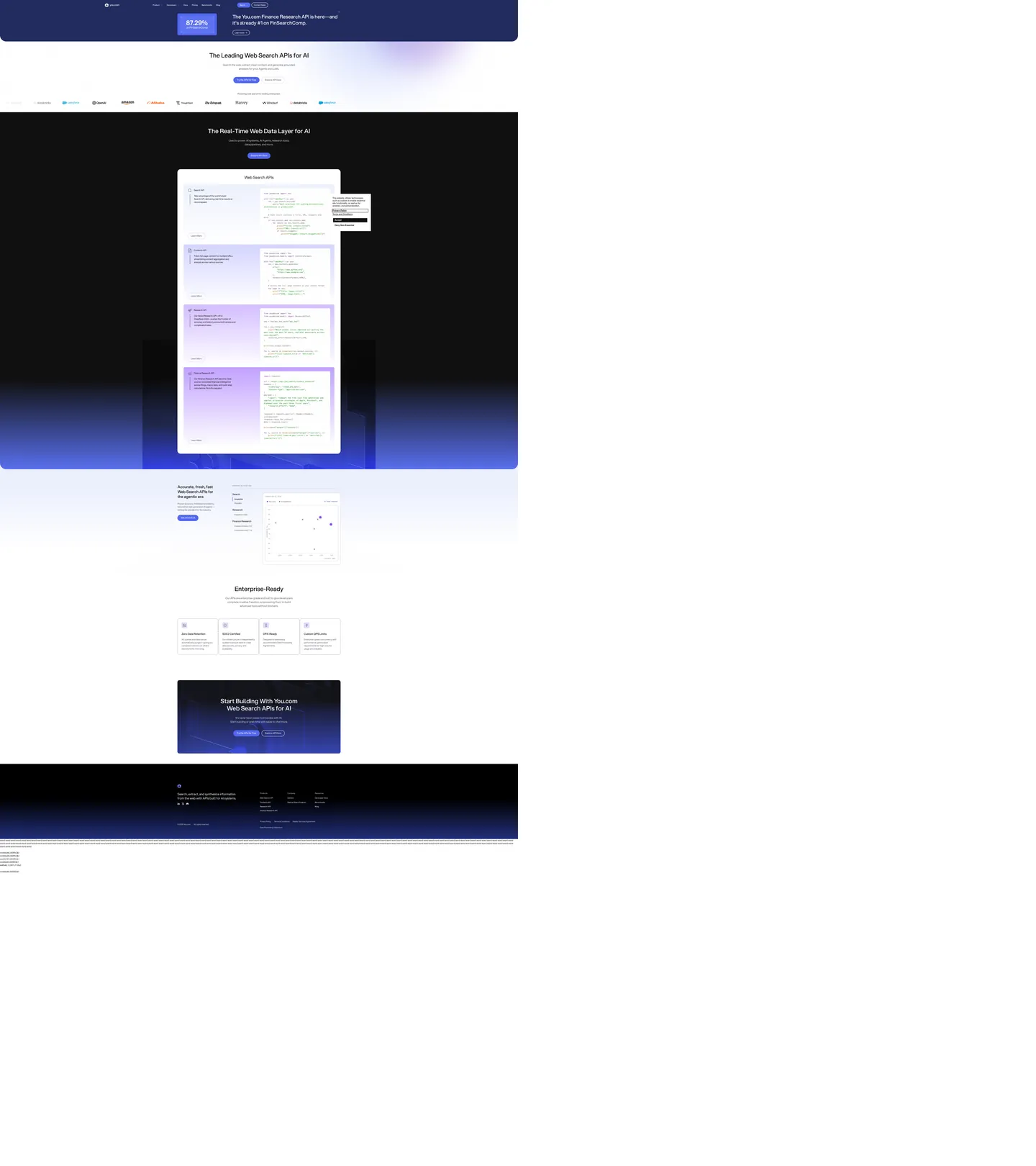
You.com's marketing page does something rare for an AI-search brand: it shows the indigo voltage on three different floors of the page without flinching. The top band is a deep navy-indigo hero with a featured 87.29% stat-card and a violet pill announcing the Finance Research API; the middle band switches to pure white with a 47px Lumen Sans headline in ink and the same indigo pill rendered as the only chromatic CTA; the bottom band goes pure black, with the indigo pill returning yet again above the footer. Most peer search brands (Perplexity, Brave) keep their accent locked to one surface — You inverts the canvas under it and asks the pill to do the work alone.
The DESIGN.md file packages the system into a machine-readable spec for React tooling. Inside: 17 colors tokens drawn from a single indigo brand voltage, an ink-near-black running-text color, a near-white body canvas, and a small set of structural grays; 9 typography tokens running Lumen Sans (You's proprietary geometric sans) at weights 400 and 500 across every tier from 47px display to 12px metadata; 5 radius tokens centered on a 16px default plus a full-pill option; 8 spacing values on a 4px base; and 14 components definitions covering the indigo pill, the ink-on-white display heading, the deep-indigo hero card, the dark scene panel, and the mono code-strip caption.
Feed this file to an AI coding tool and it reproduces You's specific moves: indigo as a single saturated pill voltage rather than as a UI accent, three-band canvas inversion (indigo hero / white body / black close), Lumen Sans at modest weights instead of bold display, 16px default rounding rather than tight 4px corners, and monospace as the only second voice. The move worth borrowing only if your product has a single confident brand color: trust one pill to do the entire CTA job across every surface — the inversion under it does more work than a second accent ever would.
What makes it distinct
5 highlights
- Three-band surface inversionDeep navy-indigo hero, ink-on-white middle, pure-black close; the brand pill survives every band
- Single indigo pill#5368ee carries the primary CTA at every position on the page, no second accent voltage
- Lumen Sans across every tierDisplay at 47px / 500, body at 16px / 400, no separate display family
- Mono caption strip14px monospace runs throughout the code snippets, the only secondary typographic voice
- Generous-soft 16px radiusCards round at 16px, pill CTAs go fully rounded, no 4px tight tier anywhere
Live at you.com
You.com in production, as captured. Scroll the window to see the whole page.
17 colors
You.com's system runs on #5368ee as its primary voltage, used in 1 of 14 components. Type is set in Lumen Sans across 10 tokens from 12px to 47px, weights 400–500. Shape language is soft — components average 15px corner radius, with no sharp interactive edges.
Brand & Accent
Sparing, CTA-only voltage · 5
Surface
Page and card backgrounds · 3
Text
Headlines, body, captions · 4
Borders & Hairlines
Dividers, outlines, rules · 2
Semantic
Status, errors, success, links · 2
Other
Specialty colors · 1
10 type tokens
Set in Lumen Sans across 10 tokens, from 12px to 47px, weights 400–500. Shown in its own stack: where the font isn't installed, the fallback the file names stands in.
- display-xl47px · weight 500 · lh 56pxThe quick brown fox jumps over the lazy dog
- display-md37px · weight 500 · lh 48pxThe quick brown fox jumps over the lazy dog
- heading-md29px · weight 500 · lh 38pxThe quick brown fox jumps over the lazy dog
- heading-sm20px · weight 500 · lh 30pxThe quick brown fox jumps over the lazy dog
- body-lg20px · weight 400 · lh 30pxThe quick brown fox jumps over the lazy dog
- body-md16px · weight 400 · lh 24pxThe quick brown fox jumps over the lazy dog
- body-sm14px · weight 400 · lh 21pxThe quick brown fox jumps over the lazy dog
- label-md16px · weight 500 · lh 16pxThe quick brown fox jumps over the lazy dog
- caption12px · weight 400 · lh 18px · tracking 0.3pxThe quick brown fox jumps over the lazy dog
- mono-sm14px · weight 400 · lh 21pxThe quick brown fox jumps over the lazy dog
Radii and spacing
6 corner radii and 8 spacing values. Shape language: soft, on a 12px base radius.
Radii6
- none0px
- sm8px
- md12px
- lg16px
- xl24px
- full9999px
Spacing8
- xs4px
- sm8px
- md12px
- base16px
- lg24px
- xl32px
- 2xl48px
- 3xl64px
14 components
Each rendered from its tokens (color, type, radius, padding) on You.com's own canvas.
- Button PrimaryButton Primarybutton-primary
- Button Primary HoverButton Primary Hoverbutton-primary-hover
- Button SecondaryButton Secondarybutton-secondary
- Top NavTop Navtop-nav
- Nav LinkNav Linknav-link
- Hero CardHero Cardhero-card
- Hero HeadingHero Headinghero-heading
- Section HeadingSection Headingsection-heading
- Body ParagraphBody Paragraphbody-paragraph
- Body Paragraph MutedBody Paragraph Mutedbody-paragraph-muted
- Card LightCard Lightcard-light
- Chip AnnouncementChip Announcementchip-announcement
- Code BlockCode Blockcode-block
- FooterFooterfooter
The system, in use
You.com's tokens on the kind of product it builds.
Think bigger with an AI at your side
Ask anything, write and analyze, and build with an assistant that understands your work.
You.com design system FAQ
You.com's tokens, its components and how to use this DESIGN.md in your project.
What are the color tokens in the You.com DESIGN.md?
What is You.com's primary color hex code?
How do I use You.com's colors in Tailwind CSS?
What is You.com's primary brand color?
What fonts does You.com use?
What is You.com's type scale?
What can I use if I don't have You.com's font?
What typeface does You.com use, and what should I use as a substitute?
Which components does the You.com DESIGN.md define?
What corner radius and spacing does You.com use?
What corner-radius scale does You.com use?
How do I apply the You.com design system to a shadcn/ui project?
How do I use the You.com DESIGN.md with Claude Code or Cursor?
Is the You.com DESIGN.md free to download?
How was the You.com DESIGN.md made?
Is the You.com DESIGN.md official?
Why does You.com invert its background three times on one page?
Can I use this DESIGN.md to build my own AI-search marketing site in the You.com design system?
Related reading
Specs, directories and component libraries that pair with this design system.
- Browse all design systemsThe full directory of DESIGN.md files on shadcn.io, with live mockups for each.shadcn.io
- You.com — official siteYou.com's public marketing site — the source of truth for the live tokens captured in this file.you.com (opens in a new tab)
- The DESIGN.md specificationGoogle Labs' open spec for machine-readable design system files — the format this page is built on.github.com (opens in a new tab)
Use You.com in your project
One machine-readable file. Drop it into Claude Code, Cursor, VS Code or any AI tool that reads DESIGN.md.
Download the DESIGN.md
One machine-readable file: every color, type, radius, spacing, and component token of You.com.
Feed it to your AI tool
Drop it into Claude, Cursor, or GitHub Copilot. The agent writes React components and Tailwind classes that match You.com's visual language.
Reference the tokens directly
Or paste the values into your Tailwind config, CSS variables, or component library: every color, size and radius is a quoted, ready-to-copy value.
Read the full DESIGN.md overview, rationale, do’s and don’ts
Overview
You.com's marketing page does something unusual for an AI-search brand: it inverts the canvas under its CTA three times in a single scroll. Voltage-across-bands. The top band is a deep navy-indigo hero carrying an announcement chip and a featured 87.29% stat card; the middle band switches to a near-white canvas with a 47px Lumen Sans headline in ink black; the bottom band goes pure {colors.surface-dark} (#000000), repeating the indigo pill once more above the footer. Where Perplexity locks its accent to a single dark canvas and Brave keeps the orange pinned to one CTA, You ships the same {colors.primary} (#5368ee) pill at every position on the page and lets the surface beneath it change.
The chromatic restraint is uncompromising. Indigo {colors.primary} is the only saturated brand voltage on the page — it carries the primary CTA, the secondary text-accent on inline links, and the selection-text color. A small set of supporting hues (the violet {colors.accent-violet} inside the announcement chip text, the amber {colors.accent-amber} on inline status pills, the green {colors.success} and red {colors.error} for system status) appears in fewer than two dozen captured occurrences combined. Every other tone on the page is structural — ink, muted gray, hairline, canvas — so the eye reads only one brand color.
Typography is Lumen Sans across every spoken tier. The display caps at 47px in weight 500 with normal letter-spacing, the body sits at 16px in weight 400, and the system uses no 700 weight at all. The supporting voice is a system monospace stack carrying the code captions inside the API panels — the only place a second typeface family appears. Monospace appears 118 times across the captured surface (mostly inside code blocks); Lumen Sans variants account for everything else.
Key Characteristics:
- Single indigo voltage (
{colors.primary}— #5368ee) carries the primary pill CTA across all three bands of the page — deep navy-indigo hero, white body, pure black close. - Three-band canvas inversion (
{colors.surface-dark}top hero variant /{colors.canvas}body /{colors.surface-dark}close) — the structural device that makes the single-voltage discipline visible. - Lumen Sans across every tier; display at 47px / 500 is the loudest moment, with no weight above 500 anywhere on the page.
- Monospace caption strip carries every code sample (118 captured occurrences) — the only second typographic voice in the system.
- Generous-soft radius scale anchored at
{rounded.lg}(16px), with full pill for the primary CTA and the announcement chip. - Customer logo wall renders all marks in original color rather than flattening to monochrome — a softer treatment than the Cloudflare or Vercel convention.
- Hairline-only cards on the white body band, with
{colors.hairline}(#d9d9de) as the dominant border tone; no shadow tier on the captured surface. - 4px base spacing with 8px as the dominant rhythm; section padding runs ~96px on the hero and tightens to ~64px between body sections.
Colors
Brand
- Indigo Primary (
{colors.primary}— #5368ee): frequency 11. Used as background (5), border (5), gradient (1). The single brand voltage — fills the primary CTA pill, the announcement chip background on the hero, the inline text-accent links, and the selection background. Wired in CSS as--swatch--brand-500,--_theme---button-primary--background,--_theme---text--text-accent, and--_theme---selection--text. - Indigo Hover (
{colors.primary-hover}— #4757c9): declared as--_theme---button-primary--background-hoverand--swatch--brand-700. The press / hover state — one step darker than the primary, unused in the captured static render but reserved for the interactive state. - Indigo Soft (
{colors.primary-soft}— #5061d5): declared as--swatch--brand-600. A mid-tone between primary and hover; reserved for product-side accent layers. - Accent Violet (
{colors.accent-violet}— #7928a1): frequency 56 — text and border only. Used on the announcement-chip text ("The You.com Finance Research API is here") and on inline category tags inside code-snippet cards. Not part of the brand voltage; reads as a sibling color reserved for product-domain emphasis. - Accent Amber (
{colors.accent-amber}— #aa5d00): frequency 24. Used on inline status pills and badges that need to read as warm-priority without competing with the brand indigo.
Status
- Success (
{colors.success}— #008000): frequency 102 — text and border. Used on positive system-state indicators inside the API documentation panels and on the customer-logo strip captions. - Error (
{colors.error}— #f04438): declared as--swatch--error. Reserved for form validation; not rendered in the captured static surface.
Surface
- Canvas (
{colors.canvas}— #ffffff): frequency 319 — the dominant body floor below the hero. Carries the editorial middle band, the customer-logo wall, the feature cells, and the inside of every hairline-bordered card. - Surface-1 (
{colors.surface-1}— #f2f2f2): frequency 23 — a soft gray used for inset surfaces inside cards and as the hover background on secondary buttons. Wired as--swatch--light-2and--_theme---button-secondary--background. - Surface Dark (
{colors.surface-dark}— #000000): frequency 5 — used as the page-close band beneath the white middle, the dark scene-panel surface, and the footer floor. The black surfaces frame the white body band on both ends of the scroll.
Text
- Ink (
{colors.ink}— #121212): frequency 356 — the dominant text color on the white body band. Wired as--swatch--zinc-900,--swatch--brand-950,--_theme---text--text-primary. Never pure black — slightly off so the display headline reads warm rather than industrial. - Ink Soft (
{colors.ink-soft}— #242426): a secondary ink tone used inside dropdown surfaces and small UI labels — wired as--swatch--zinc-700and--swatch--grey-950. - Ink Muted (
{colors.ink-muted}— #5e5f6b): frequency 73 — used for secondary running-text and caption rows. Wired as--swatch--grey-600and--_theme---text--text-secondary. - Muted (
{colors.muted}— #545454): frequency 270 — the dominant secondary text color, sitting between ink and ink-muted in tone. Wired as--swatch--grey-700.
Hairline
- Hairline (
{colors.hairline}— #d9d9de): frequency 5 — used as the default 1px border on cards, dropdowns, and input fields. Wired as--swatch--grey-200,--swatch--zinc-200,--_theme---menu--stroke. - Hairline Soft (
{colors.hairline-soft}— #cdced6): frequency 34 — a slightly cooler hairline used on the secondary-button hover state and on dropdown internal dividers.
Decorative
- Chip Violet (
{colors.chip-violet}— #e0dbf9): frequency 4 — the soft violet fill behind the announcement chip on the hero. Wired as--swatch--brand-300and--swatch--cherry-200.
Typography
Font Family
The system runs Lumen Sans — You's proprietary geometric sans — for every spoken surface. Fallbacks walk Arial, sans-serif. The supporting voice is a system monospace stack (ui-monospace, SFMono-Regular, Consolas) reserved for the code captions inside API-documentation panels. There is no serif tier and no display-specific family — one variable-weight sans does display, heading, body, button, and label work alike.
Hierarchy
| Token | Size | Weight | Line Height | Use |
|---|---|---|---|---|
{typography.display-xl} | 47px | 500 | 56px | Hero h1 ("The Leading Web Search APIs for AI"), section h2 below the fold |
{typography.display-md} | 37px | 500 | 48px | Smaller display, secondary section titles |
{typography.heading-md} | 29px | 500 | 38px | h2 / h3 sub-section headings |
{typography.heading-sm} | 20px | 500 | 30px | h3 / card titles |
{typography.body-lg} | 20px | 400 | 30px | Hero sub-paragraph, lead-paragraph blocks |
{typography.body-md} | 16px | 400 | 24px | Default running text, nav links |
{typography.body-sm} | 14px | 400 | 21px | Caption rows, footnote text |
{typography.label-md} | 16px | 500 | 16px | Button label, chip label, primary tab label |
{typography.caption} | 12px | 400 | 18px | Metadata, tracked labels (0.3px letter-spacing) |
{typography.mono-sm} | 14px | 400 | 21px | Code captions inside API documentation panels |
Principles
Display weight stays at 500 across every size, from the 47px hero h1 down to 20px card titles. There is no 700 weight on the captured page — body and labels share 400, and 500 is the system's emphasis tier across both display and small-label surfaces. The 47px hero size is the loudest typographic moment; bumping to 700 would tip the editorial dek into a generic SaaS hero. Captions at 12px / 400 carry a slight 0.3px letter-spacing — the only tracked text in the system.
Note on Font Substitutes
Lumen Sans is proprietary. Inter at the same weights is the closest open-source substitute; the geometric proportions transfer cleanly. Geist (Vercel's open-source sans) at weight 500 is a slightly tighter alternative for the 47px display tier. For the mono caption strip, JetBrains Mono or the system stack already declared in fallbacks both transfer at the same 14px size.
Layout
Spacing System
- Base unit: 4px, with 8px and 16px as the dominant gap rhythms.
- Tokens:
{spacing.xs}4px ·{spacing.sm}8px ·{spacing.md}12px ·{spacing.base}16px ·{spacing.lg}24px ·{spacing.xl}32px ·{spacing.2xl}48px ·{spacing.3xl}64px. - Section padding (vertical): ~96px on the hero band; below the fold the rhythm tightens to ~64px between sections.
- Card internal padding:
{spacing.lg}(24px) on the API-panel cards,{spacing.base}(16px) on the smaller customer-logo chips.
Grid & Container
- Max content width: ~1080px on the editorial body sections, ~1280px on the customer-logo wall and the dark scene panel.
- Hero band: dark navy-indigo full-bleed surface, content centered at ~720px max-width with the announcement chip and 87.29% stat card stacked beside the headline.
- Middle band: white canvas, centered ~1080px column; the headline / sub-paragraph / CTA stack runs single-column, with customer logos flowing in a single uniform-height row beneath.
- Code-panel section: 2-column 50/50 grid pairing an API-description column with a syntax-highlighted code block on the right.
- Bottom band: pure black scene panel, content centered at ~720px with the same indigo pill repeated above the footer.
Rhythm
The page alternates between three structural bands — dark hero / light body / dark close — rather than holding a single tempo. The hero is dense (chip + stat + headline + CTA). The body is generous (single-column editorial, ample whitespace between sections). The close is dense again (paired scene panel + CTA pill). The inversion is the page's structural device — every section is unambiguously assigned to one of the three bands.
Elevation
The system has essentially no shadow tier on the captured surfaces. Cards on the white body band use 1px {colors.hairline} (#d9d9de) outlines and zero shadow; the dark scene panel on the bottom band reads as elevated purely by tonal contrast against the pure-black floor. Dropdown menus carry a subtle rgba(0,0,0,0.04) halo but the value is faint enough to read as a hairline at most viewing sizes.
- Flat (no shadow): hero, body bands, feature cells, footer — 99% of surfaces.
- Tonal lift: the indigo CTA pill sits with a barely-perceptible 1-pixel shadow on the white body band; the dark scene panel on the close band lifts off
{colors.surface-dark}by ~10 points of lightness. - Hairline outlines:
{colors.hairline}carries the elevation work that shadows would carry on a typical dashboard product.
Shapes
The radius scale is generous-soft with a full-pill option:
{rounded.none}0px — only on code-block annotations.{rounded.sm}8px — small UI surfaces (dropdown items, input field corners).{rounded.md}12px — secondary chips and internal card sub-surfaces.{rounded.lg}16px — default card rounding, the dark scene panel, the API-documentation panels.{rounded.xl}24px — larger feature surfaces.{rounded.full}9999px — the primary CTA pill ({component.button-primary}), the announcement chip ({component.chip-announcement}), and circular icon buttons.
There is no 4px tier. Even the smallest interactive surfaces start at 8px. The pill treatment is reserved for two surfaces — the primary CTA and the announcement chip — both of which carry the brand voltage at one stop or another on the page.
Components
button-primary — The signature CTA. Indigo {colors.primary} fill, white text, fully-rounded {rounded.full} pill, 8x16px padding, 36px height, weight 500. "Try the APIs for free" is the canonical instance, repeated three times on the page — once per band.
button-primary-hover — Background flips to {colors.primary-hover} (#4757c9) — one step darker — on press. White text remains.
button-secondary — White {colors.canvas} fill, ink text, 1px hairline border, fully-rounded {rounded.full} pill, 8x16px padding, 36px height. Used for "Contact Sales" and "Explore API Docs" tertiary actions across the page.
top-nav — Transparent surface that sits over the dark hero band — Lumen Sans white text, 16x24px padding, 64px height. Houses the You.com wordmark flush left, the product-nav links (Product / Customers / You / Pricing / Benchmarks / Blog) center, and the Sign In / Contact Sales cluster flush right.
nav-link — Transparent background, white text at {typography.body-md} (16px / 400), 8x12px padding. No visible hover background in the captured static render.
hero-card — Dark {colors.surface-dark} fill, white text, {rounded.lg} 16px radius, 24px padding. The 87.29% featured stat card on the dark hero band sits inside this treatment.
hero-heading — Ink {colors.ink} text on the white middle band, Lumen Sans 47px / 500. The h1 inverts to white when it appears on the dark hero band but keeps the same size and weight token.
section-heading — White text on the dark sections, same {typography.display-xl} token. The bottom-band h2 ("Start Building With You.com Web Search APIs for AI") uses this treatment.
body-paragraph — Default ink running-text at {typography.body-md} — the workhorse paragraph style on the white body band.
body-paragraph-muted — {colors.muted} (#545454) variant for secondary copy and caption rows.
card-light — White {colors.canvas} surface, 1px {colors.hairline} border, {rounded.lg} 16px radius, 24px internal padding. The default content card on the white body band — holds feature explanations and customer quotes.
chip-announcement — Soft violet {colors.chip-violet} (#e0dbf9) fill on the hero band, ink text, fully-rounded {rounded.full} pill, 4x12px padding, 28px height. Carries the "Finance Research API" announcement copy in the upper-left of the hero.
code-block — Black {colors.surface-dark} fill, white text, {rounded.md} 12px radius, 16px padding. Uses {typography.mono-sm} (14px / 400) for the embedded API code samples.
footer — Black {colors.surface-dark} floor, muted-gray text at {typography.body-sm}, 48x24px padding. Continues the bottom-band canvas without a surface break.
Do's and Don'ts
Do carry the indigo {colors.primary} pill across all three bands of the page — dark hero, white body, dark close. The system's single chromatic discipline is that one pill anchors every band; collapsing it onto a single band would lose the surface-inversion structural device.
Do use {colors.canvas} (#ffffff) for the middle band and {colors.surface-dark} (#000000) for the top and bottom bands. A neutral gray for either floor would mute the band inversion that frames the editorial body.
Do keep Lumen Sans display weight at 500 across every size from 47px down to 20px. Bumping to 700 turns the editorial dek into a generic SaaS hero and undercuts the magazine-style restraint.
Do reserve the mono-caption stack for code samples inside API-documentation panels. Using mono for headings, body, or nav would break the only meaningful typographic split in the system.
Don't introduce a second saturated brand color alongside indigo {colors.primary}. The violet, amber, green, and red tones in the swatch palette are scoped to status indicators, announcement chips, and code-snippet category tags — putting any of them on a primary CTA would create two competing brand voltages.
Don't flatten the customer-logo wall to monochrome. You renders customer marks in their original brand colors at uniform height — the multi-color treatment is intentional and signals openness rather than the single-voltage discipline of a Cloudflare-style logo wall.
Don't introduce a 4px corner-radius tier. The system is deliberately generous-soft starting at 8px; adding tight corners would feel borrowed from a dev-tools system (Vercel, Linear) rather than from a consumer-search product.
Don't drop the indigo pill on the white middle band in favor of an ink-on-white button. The pill must keep its brand voltage on every band, and inverting it on the white surface would lose the cross-band anchor that the entire layout depends on.
Known Gaps
- Dark / light mode pairing: the page captures a single fixed sequence of dark-hero / light-body / dark-close bands rather than a toggleable theme. The product itself (the chat interface) carries a full dark-mode token set not represented here.
- Hover and focus states: documented for
{component.button-primary-hover}only; the full state matrix (focus rings, disabled tints, error tokens) is declared in the CSS swatch palette but not rendered on the captured surface. - Form input states: the captured page has no surface-rendered text input — the search bar and sign-in fields live behind interaction and are not visible in the static capture.
- Motion: the dark scene panel above the footer carries a subtle particle / line-art animation in the live page, but the spec captures end-state values only. Easing curves and motion timing live in the runtime.
- Product surfaces: this DESIGN.md captures the public marketing page only. The You.com chat interface (
you.com/?q=) and the agentic search interface carry a much richer dark-mode token set — chat bubbles, citation tags, source thumbnails, model picker — that is not represented here. - Subscription tier accents: the
{colors.accent-violet}and{colors.accent-amber}carry rare badge / chip rendering on the marketing page but their primary use is product-side (subscription tier labels, status flags) and is not exposed in the captured marketing chrome.
More systems like this
Algolia, Anthropic, Arc and 61 more in AI & LLM Platforms: each brand's colors, type and components in one file your AI agent builds from.
Build it with Pro
The DESIGN.md files are free. Pro adds 6,000+ blocks, premium templates and the MCP server, so your AI editor builds in your system for you.
4.9/5 out of 5 · 150+ reviewsfrom 150+ founders and developers.
- Secure checkout via Stripe
- Code lives in your repo
- Keep what you've shipped if you cancel
- License terms
4.9 out of 5 from 150+ developers


Your system, built for you
Every block, template and icon, installed by your AI agent in your design system. The DESIGN.md files stay free.
- Cancel anytime
- Keep what you've shipped