shadcn.io is an independent project built on shadcn/ui
A people icon, the title No team members yet, and a line about inviting people. Invite Team Member and Import from CSV are full-width buttons, one above the other.
Use it in a narrow panel so the two actions do not sit in a cramped row. The invite form itself can open in a Dialog. In React, Ark UI does not send the invite.
Installation
Anatomy
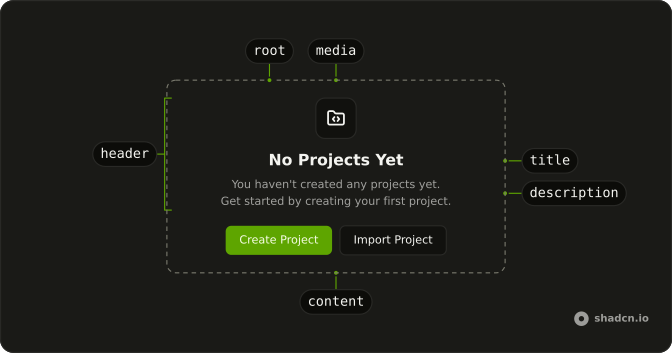
Usage
<Empty>
  <EmptyHeader>
    <EmptyMedia variant="icon">
      <UsersIcon aria-hidden="true" />
    </EmptyMedia>
    <EmptyTitle>No team members yet</EmptyTitle>
    <EmptyDescription>
      Invite team members to collaborate on your projects.
    </EmptyDescription>
  </EmptyHeader>
  <EmptyContent>
    <Button className="w-full">
      <UserPlusIcon aria-hidden="true" data-icon="inline-start" />
      Invite Team Member
    </Button>
    <Button className="w-full" variant="outline">
      <UploadIcon aria-hidden="true" data-icon="inline-start" />
      Import from CSV
    </Button>
  </EmptyContent>
</Empty>
FAQ
How do the buttons stack?
They are direct children of EmptyContent, which is a column. Each Button has className="w-full", so both stretch to the content width.
Which button is filled?
Invite Team Member has no variant and includes UserPlusIcon. Import from CSV sets variant="outline" and includes UploadIcon. Invite is first.
What separates the two buttons?
EmptyContent is a column with a gap, so the buttons separate without a margin class of their own. The header icon is UsersIcon in EmptyMedia with variant="icon".
What does the empty team say?
EmptyTitle is "No team members yet". EmptyDescription says to invite team members to collaborate on projects.
API Reference
Empty
Sets variant="icon". The rest is on the Empty page.
Button
Sets variant="outline". The rest is on the Button page.