shadcn.io is an independent project built on shadcn/ui
A message icon, the title No messages yet, and a line about sending the first message. New Message, with a plus, sits under the text.
Use it in chat or a support inbox before the first message. If the thread failed to load, say that in an Alert. In React, Ark UI does not know the inbox is empty.
Installation
Anatomy
Usage
<Empty>
  <EmptyHeader>
    <EmptyMedia variant="icon">
      <MessageSquareIcon aria-hidden="true" />
    </EmptyMedia>
    <EmptyTitle>No messages yet</EmptyTitle>
    <EmptyDescription>
      Start a conversation by sending your first message.
    </EmptyDescription>
  </EmptyHeader>
  <EmptyContent>
    <Button>
      <PlusIcon aria-hidden="true" data-icon="inline-start" />
      New Message
    </Button>
  </EmptyContent>
</Empty>
FAQ
What icon is above the title?
MessageSquareIcon in EmptyMedia with variant="icon". The plus on the button is a second icon.
What does the empty inbox say?
EmptyTitle is "No messages yet". EmptyDescription says to start a conversation by sending the first message.
Which parts make up the header?
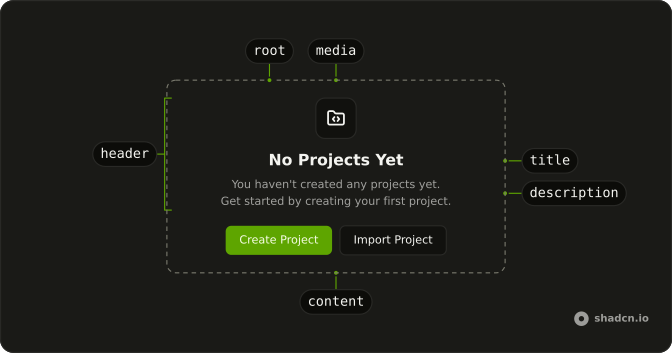
EmptyHeader holds EmptyMedia, then EmptyTitle, then EmptyDescription. EmptyContent is the next sibling and holds the button.
API Reference
Empty
Sets variant="icon". The rest is on the Empty page.
Button
No extra props in this demo. The rest is on the Button page.